
Our Short List of 3
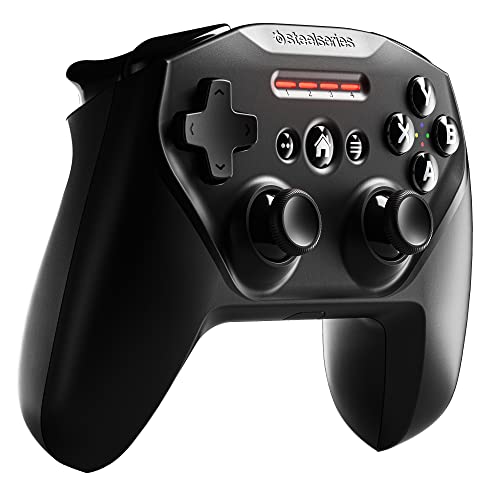
- Best for: Households where the controller will serve iPad, iPhone, and Apple TV and nothing else.
- Bluetooth mobile gaming controller, per the title
- iPhone mount included, per the title
- Long battery life rated in hours in the title
- Apple licensed, per the title
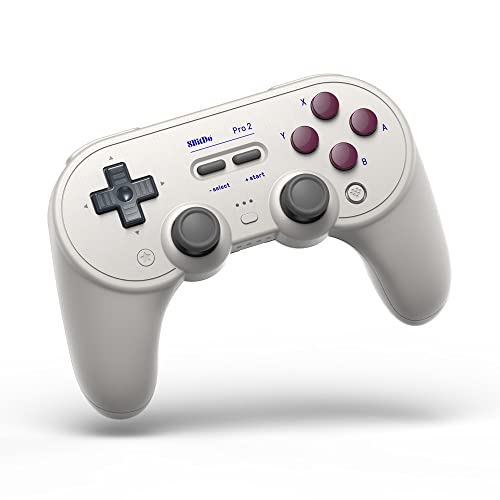
- Best for: Apple-heavy desks where one pad must cover iPad, Mac, and Apple TV in rotation.
- Bluetooth controller, per the title
- For iPhone, iPad, macOS, and Apple TV, per the title
- Also names Switch, PC, and Android in the title
- G Classic Edition finish

- Best for: iPad players who also use Windows or Xbox and want one pad switching between all three.
- Wireless and Bluetooth connectivity named in the title
- Hybrid D-pad
- Share button
- Textured grip
All 4 Picks at a Glance
| Product | Specs | Action |
|---|---|---|
| SteelSeries Nimbus+ Bluetooth Mobile Gaming Controller |
| Check price on Amazon |
| 8BitDo Pro 2 Bluetooth Controller G Classic Edition |
| Check price on Amazon |
| Xbox Wireless Controller Carbon Black |
| Check price on Amazon |
 8BitDo Ultimate 2.4G Wireless Controller |
| Check price on Amazon |
Key takeaways
- Choose an iPad gaming controller with confidence: Bluetooth pairing, button layout, battery and Apple compatibility explained in five clear picks.
What's inside
As an Amazon Associate I earn from qualifying purchases. This post may contain affiliate links at no extra cost to you.
An iPad is not a big phone, and controller shopping goes wrong when people treat it like one. Telescopic phone pads cannot stretch to a tablet, so the iPad decision is about Bluetooth gamepads whose listings genuinely include Apple devices, paired with a stand, a sensible viewing distance, and buttons that your games will actually recognize.
This guide is for iPad players using Apple Arcade, native controller-ready games, and streaming apps on a tablet at home or on the road. Each pick below was chosen from an Amazon listing that names Apple, iPad, iOS, or Apple-ecosystem support in its own wording, and the specs quoted stay inside what those listings state rather than assuming broader compatibility. Screen size also shapes the shortlist, because a pad that feels balanced in front of a phone can feel lost beside a large tablet on a stand across the room.
Quick Picks
As an Amazon Associate we earn from qualifying purchases
| Product | Best for | Key spec from title |
|---|---|---|
| SteelSeries Nimbus+ Bluetooth Mobile Gaming Controller | Apple-only households | Made for iOS, iPadOS and tvOS, Apple licensed |
| 8BitDo Pro 2 Bluetooth Controller G Classic Edition | iPad plus Mac and Apple TV rotation | For iPhone, iPad, macOS and Apple TV, per title |
| PlayStation DualSense Wireless Controller White | iPad players who also own a PlayStation | Wireless controller with haptic feedback and adaptive triggers |
| Xbox Wireless Controller Carbon Black | iPad and almost everything else | Easily pair and switch between devices |
| 8BitDo Ultimate 2.4G Wireless Controller | iPad desk setup with a charging dock | For Apple in title, with charging dock |
How to Choose
Trust Only the Compatibility the Listing States
Apple support is not a vibe; it is a line of text. The Nimbus+ title says made for iOS, iPadOS, and tvOS and calls itself Apple licensed, while the 8BitDo Pro 2 title names iPhone, iPad, macOS, and Apple TV directly. Other pads list iOS among several platforms. Prefer listings that name your exact device family, and be wary of assuming a controller works with an iPad simply because it pairs with a phone from the same maker.
Bluetooth Is the iPad Connection That Matters
Every pick here reaches the iPad wirelessly, which keeps the tablet’s port free and lets you set the screen on a stand at a comfortable distance. That freedom shapes the whole experience: the iPad becomes a small television and the pad becomes a true gamepad. Check that the listing describes Bluetooth or wireless connection in its title, and think about where the iPad will sit, because a controller cannot fix a tablet lying flat and reflecting the ceiling lights.
Battery Life Versus Charging Routine
A tablet controller can hide in a drawer for weeks, so its power story matters. The Nimbus+ title advertises a long rated battery life in hours, which suits occasional players who hate finding a dead pad. Dock-based ownership, as with the 8BitDo Ultimate here, suits a fixed desk where the pad always returns home. Console pads recharge by cable and reward players who plug in after sessions. Match the routine to your real habits, not your intentions.
Layout, Prompts, and the Games on Your iPad
Button legends differ between Xbox-style and PlayStation-style pads, and games vary in which prompts they show on screen. If your iPad library leans on Apple Arcade titles built around Apple-friendly controllers, the Nimbus+ and Pro 2 speak that language natively in their listings. If you also play the same pad on a console, matching the console’s layout reduces mental translation. Consider adding a simple stand to the purchase, because screen angle decides comfort as much as grip shape does.
The 5 Best Options
SteelSeries Nimbus+ Bluetooth Mobile Gaming Controller
- Best for: Households where the controller will serve iPad, iPhone, and Apple TV and nothing else.
- Bluetooth mobile gaming controller, per the title
- iPhone mount included, per the title
- Long battery life rated in hours in the title
- Apple licensed, per the title
Households where the controller will serve iPad, iPhone, and Apple TV and nothing else.
The included mount is sized for a phone, so plan on a separate stand for comfortable iPad play.
Apple-focused players get the clearest promise in this entire group from the Nimbus+ title: a Bluetooth mobile gaming controller with an iPhone mount, a long rated battery life, Apple licensed status, and made for iOS, iPadOS, and tvOS. That wording names the iPad’s own system directly, which is exactly the reassurance a tablet buyer needs. The included mount serves a phone, yet on an iPad the pad works as a clean wireless gamepad while the tablet rests on a stand nearby, ready for Arcade sessions.
8BitDo Pro 2 Bluetooth Controller G Classic Edition
- Best for: Apple-heavy desks where one pad must cover iPad, Mac, and Apple TV in rotation.
- Bluetooth controller, per the title
- For iPhone, iPad, macOS, and Apple TV, per the title
- Also names Switch, PC, and Android in the title
- G Classic Edition finish
Apple-heavy desks where one pad must cover iPad, Mac, and Apple TV in rotation.
Check the exact listing’s availability and edition, because Pro 2 versions differ in features and stock status.
This Pro 2 listing is unusually explicit for Apple shoppers, naming Switch, PC, and Android alongside a controller for iPhone, iPad, macOS, and Apple TV in its G Classic Edition wording. That breadth suits a person whose iPad shares a desk with a Mac and an Apple TV, because one pad can rotate through the whole setup. The symmetrical Pro 2 layout flatters platformers and retro libraries common on tablets. One caution from the listing itself: this version’s availability status should be checked carefully at ordering time.
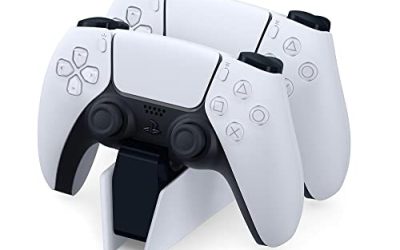
PlayStation DualSense Wireless Controller White
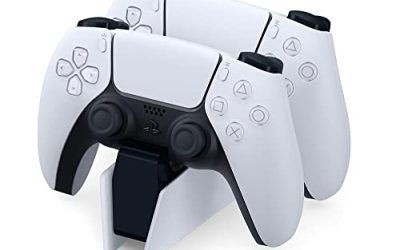
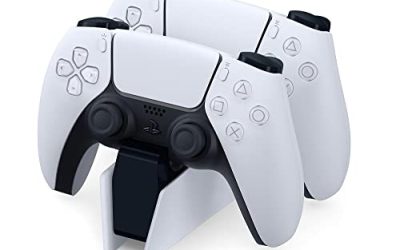
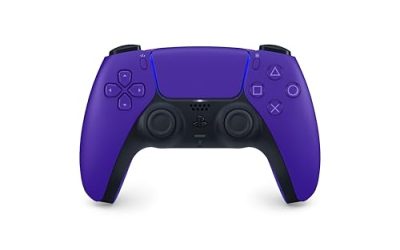
If a PlayStation already lives in your home, its controller is a natural iPad companion for streaming and compatible native games, and the DualSense listing presents the pad as a wireless controller with haptic feedback, adaptive triggers, and a built-in microphone in its product identity. On the iPad it serves as a comfortable, familiar Bluetooth gamepad, while its special feedback features belong to supported PlayStation and PC experiences. Buy it for the console first, then let the tablet inherit a genuinely premium second screen controller.
Specs
- Wireless controller in White finish
- Haptic feedback as part of the DualSense design
- Adaptive triggers as part of the DualSense design
- Built-in microphone named in DualSense product materials
- USB-C charging connection
- PlayStation console controller
Best for: PlayStation owners who want their main console pad to double for iPad sessions.
Watch out for: Its signature feedback and trigger features depend on the game and platform, so expect standard gamepad behavior in many iPad titles.
ASIN: B0CQKLS4RP
Xbox Wireless Controller Carbon Black
- Best for: iPad players who also use Windows or Xbox and want one pad switching between all three.
- Wireless and Bluetooth connectivity named in the title
- Hybrid D-pad
- Share button
- Textured grip
iPad players who also use Windows or Xbox and want one pad switching between all three.
Remember which device it was last paired with, because easy switching still requires you to manage the rotation.
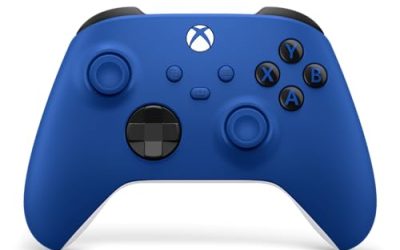
Versatility is the argument here, because the Xbox listing promises wireless and Bluetooth connectivity, a hybrid D-pad, a share button, textured grip, and the ability to easily pair and switch between devices. For an iPad owner who also games on Windows or an Xbox, that switching habit means the tablet is one more stop on the pad’s daily route rather than a separate accessory ecosystem. The layout is also the one many streamed and cross-platform games assume when they draw button prompts on screen.
8BitDo Ultimate 2.4G Wireless Controller
- Best for: A permanent iPad desk setup where the controller charges in its dock between sessions.
- Wireless controller naming Apple among its platforms, per the title
- Also for PC, Android, and Steam Deck, per the title
- Charging dock included, per the title
- Hall Effect joystick update in related listings
A permanent iPad desk setup where the controller charges in its dock between sessions.
Confirm the Apple wording on the exact variant you order, since 8BitDo sells near-identical models for different platforms.
A fixed iPad gaming corner, perhaps a desk with a stand and a tablet that rarely travels, suits this 8BitDo well. Its title lists PC, Android, Steam Deck, and Apple among its platforms and includes a charging dock, so the controller lives beside the tablet and is always ready when a session starts. The Hall Effect joystick update named in related listings adds a modern stick story, and the full-size shape supports longer games better than compact mobile pads. It is the most desk-bound option here, proudly.
Which One Fits Your Situation
Your Whole Setup Is Apple
Take the Nimbus+ and stop translating compatibility charts, because its title was written for your drawer: iOS, iPadOS, and tvOS, Apple licensed, with a battery rated for long stretches between charges. It will not serve a Windows PC the way others here might, yet within an Apple-only home that narrowness is clarity, and every device you own is named on the box in spirit.
The iPad Shares a Desk With a Mac
The Pro 2 G Classic Edition fits this rotation best, since its listing names iPad, macOS, and Apple TV in one breath alongside other platforms. One pad on the desk, three screens within reach, and a layout that suits the platformers and adventures that dominate tablet libraries. Just verify the edition and availability on the listing before you build the whole setup around it.
You Stream Console Games to the iPad
Match the pad to the console you stream from: DualSense for a PlayStation household, the Xbox controller for an Xbox and Windows home. Familiar prompts and a familiar grip make streamed sessions feel native, and the Xbox model’s device switching is genuinely handy when the same pad returns to the console afterward. Either way, a sturdy tablet stand completes the illusion.
The iPad Lives on a Stand in One Room
Choose the 8BitDo Ultimate with its dock, because a stationary setup rewards a controller that charges where it rests. The iPad stays propped, the pad stays full, and starting a game becomes a two-second decision instead of a cable hunt. For a study, a bedroom desk, or a family gaming corner, that small ritual is the feature you will feel most often.
Common Mistakes
- Trying to stretch a telescopic phone controller around an iPad, when tablet play calls for a separate Bluetooth gamepad.
- Assuming Apple support from a brand name instead of reading whether iPad or iPadOS is actually named in the listing.
- Playing with the iPad flat on a table and blaming the controller for neck strain a simple stand would prevent.
- Expecting console-specific feedback features to appear in every iPad game, when support varies title by title.
- Forgetting the pad in a drawer for months, then being surprised that an undocked battery needs attention before play.
Frequently Asked Questions
Do iPad games show the right button prompts?
It depends on the title. Some games adapt their prompts to the connected controller family, while others show generic icons or the layout they were designed around. If prompts matter to you, matching the pad to the ecosystem you play most, Apple-focused, PlayStation, or Xbox, reduces surprises. The controller will still function in most cases; only the on-screen labels change.
Can I use a phone mount controller with an iPad?
Not in the way the mount suggests. The Nimbus+ above includes an iPhone mount, and that mount is phone-sized; the iPad instead sits on a stand while the same pad connects wirelessly. Treat any included mount as a phone bonus. For the tablet itself, budget a simple stand alongside the controller and the setup becomes more comfortable than any clamp could make it.
Is one controller enough for iPad and Apple TV?
Yes, when the listing names both, as the Nimbus+ does with iPadOS and tvOS, and the Pro 2 does by naming iPad and Apple TV directly. You will re-pair or switch the pad between the two as you move rooms, which is a small ritual. Households that game in both places daily sometimes prefer a second pad, but one well-chosen controller covers both screens.
What should I check before ordering for a newer iPad?
Read the compatibility wording on the exact listing, confirm it names iPad, iPadOS, iOS, or Apple support as these listings do, and confirm the connection is Bluetooth or wireless rather than a phone-sized wired mount. Also check the edition and availability notes, because several models here have sibling versions with different platform lists that look identical in photos.
Related guides
More from Amazon
Programs that pair well with the guide above. Offers and eligibility are set by Amazon and may change.
Free shipping on eligible items, Prime Video and more. Eligible new members can start with a free trial.
Start a Prime free trialAudiobooks and podcasts to listen to on the go. Eligible new members can start with a free trial.
Try Audible freeAd-free music streaming. Eligible new subscribers can start with a free trial.
Try Music Unlimited freeA free business account with business pricing and bulk-buying tools for work, shop or home office.
Create a business accountAs an Amazon Associate we earn from qualifying purchases.
Write Your Review
No reviews yet. Be the first to share your experience!