
Our Short List of 3
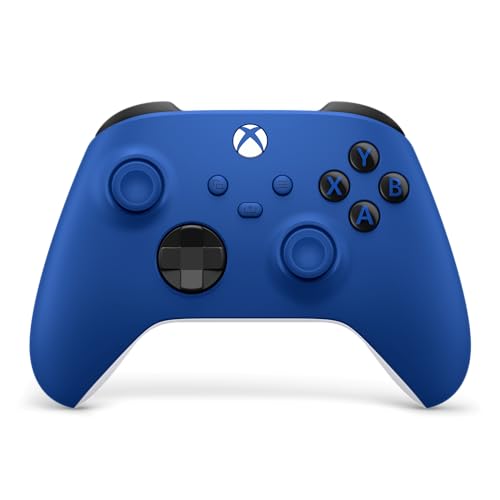
- Best for: PC players who want default compatibility and matching prompts in most games.
- Brand: Xbox
- Model: Xbox Wireless Controller, Shock Blue
- Listed platforms: Xbox, Windows, Android, iOS, Fire TV sticks, smart TVs, VR headsets
- Connectivity in related listings: Wireless, Bluetooth, and USB-C

- Best for: PC gamers who also play Switch and want switchable trigger behaviour.
- Brand: 8BitDo
- Model: Ultimate 2, black
- Listed platforms: Switch, Switch 2, and Windows PC
- Joysticks: TMR joysticks
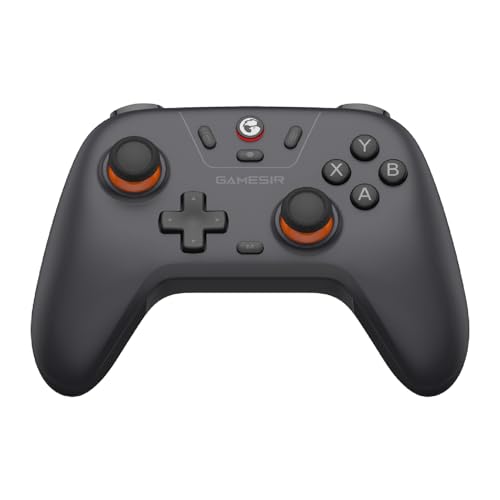
- Best for: A flexible first PC controller that also pairs with handhelds and phones.
- Brand: GameSir
- Model: Nova Lite, black listing
- Connectivity in descriptions: Bluetooth, 2.4GHz dongle, and USB-C wired
- Joysticks: Hall Effect joysticks
All 3 Picks at a Glance
| Product | Specs | Action |
|---|---|---|
| Xbox Wireless Gaming Controller Shock Blue |
| Check price on Amazon |
| 8BitDo Ultimate 2 Bluetooth Controller |
| Check price on Amazon |
| GameSir Nova Lite Wireless Controller |
| Check price on Amazon |
Key takeaways
- Compare the best gaming controller for PC gaming, covering XInput support, remapping software, wired polling rates, TMR sticks and tri-mode connections.
What's inside
As an Amazon Associate I earn from qualifying purchases. This post may contain affiliate links at no extra cost to you.
On PC a controller is never just a controller. One game expects XInput and shows Xbox prompts, another leans on Steam Input remapping, a third cares about polling rate more than comfort, and the same pad may connect by cable at your desk and by Bluetooth from the sofa. Picking on shape alone ignores the software and connection layer where PC play actually succeeds or fails.
These five picks address desktop and laptop Windows players, from plug-and-play beginners to competitive players tuning dead zones. Each was chosen from the platforms, connection modes, polling rates, and customisation features stated on its Amazon listing, so the differences below reflect published specifications rather than assumed performance across every possible game in a typical Steam library.
Quick Picks
As an Amazon Associate we earn from qualifying purchases
| Product | Best for | Key spec from title |
|---|---|---|
| Xbox Wireless Gaming Controller Shock Blue | Default XInput play across Steam and Windows | Play on Xbox, Windows, Android, iOS and more |
| 8BitDo Ultimate 2 Bluetooth Controller | Windows PC play with TMR joysticks | TMR joysticks and switchable triggers |
| GameSir Nova Lite Wireless Controller | Tri-mode play across PC and handhelds | Tri-mode gamepad with Hall Effect joysticks |
| 8BitDo Pro 2 Bluetooth Controller | Symmetrical sticks and back buttons | Bluetooth controller with Hall Effect update |
| GameSir Tarantula Pro Wireless Controller | Deep remapping with a charging dock | 9 mappable buttons with charging dock |
How to Choose
XInput, Steam Input, and What Games Expect
Most Windows games were built expecting an Xbox-style XInput pad, which is why the Xbox Wireless Controller remains the path of least resistance: prompts match buttons and setup is usually automatic. Steam adds its own input layer that can translate other pads, including PlayStation-style and 8BitDo models, into something games accept. That flexibility helps, yet it also means a setting buried in Steam can override a controller elsewhere. Decide whether you want native behaviour everywhere or are comfortable managing profiles inside Steam before choosing a less standard layout.
Wired Latency, Polling Rates, and Wireless Modes
Listings in this category quote polling figures such as 1000Hz, and connection choice influences how that figure applies. A wired link is the consistent option for competitive PC play, removing battery and interference from the equation entirely. A 2.4G dongle usually offers a middle path for desk setups, while Bluetooth prioritises convenience and multi-device use. Several controllers here offer multiple modes in one body, so read which mode carries which stated rate instead of assuming the headline number covers Bluetooth as well.
Remapping Software and Extra Buttons
Back buttons and mappable controls separate a basic PC pad from a configurable one. The GameSir Tarantula Pro lists 9 mappable buttons, and GameSir descriptions of its range mention app-based adjustment of dead zones, vibration, and firmware. 8BitDo markets its own configuration approach across the Ultimate and Pro lines. Ask what you will genuinely remap: a jump or reload moved to the back is transformative in shooters, whereas menu-heavy strategy games gain little. Software only earns its place if your genres use it weekly.
Stick Sensors for Heavy PC Libraries
A PC library can mean hundreds of hours a year across shooters, racers, and platformers, so stick sensing deserves scrutiny. Listings here name TMR joysticks on the 8BitDo Ultimate 2, Hall Effect joysticks on the Nova Lite and the Pro 2 update, and TMR sticks on the Tarantula Pro. These magnetic approaches headline modern PC controllers precisely because stick wear is a known long-term concern. Players with lighter habits can reasonably prioritise price or layout instead, but heavy users should filter by stick type early.
The 5 Best Options
Xbox Wireless Gaming Controller Shock Blue
- Best for: PC players who want default compatibility and matching prompts in most games.
- Brand: Xbox
- Model: Xbox Wireless Controller, Shock Blue
- Listed platforms: Xbox, Windows, Android, iOS, Fire TV sticks, smart TVs, VR headsets
- Connectivity in related listings: Wireless, Bluetooth, and USB-C
PC players who want default compatibility and matching prompts in most games.
Check whether your PC has Bluetooth or whether you will play wired or need a separate wireless adapter for your setup.
For a PC player who wants games to simply recognise the controller, this Shock Blue Xbox pad is the benchmark the ecosystem was built around. Its full listing title names Xbox, Windows, Android, iOS, Fire TV sticks, smart TVs, and VR headsets, underlining how widely it travels beyond the desktop. On Windows that breadth translates into default XInput behaviour in most titles and matching on-screen prompts. Textured grip and the hybrid D-pad from the current Xbox design carry over, making it a safe first controller for a mixed Steam library.
8BitDo Ultimate 2 Bluetooth Controller
- Best for: PC gamers who also play Switch and want switchable trigger behaviour.
- Brand: 8BitDo
- Model: Ultimate 2, black
- Listed platforms: Switch, Switch 2, and Windows PC
- Joysticks: TMR joysticks
PC gamers who also play Switch and want switchable trigger behaviour.
Confirm Bluetooth is the connection you want for competitive PC titles, since this listing leads with Bluetooth rather than a dongle.
Windows players who also keep a Switch nearby will find the Ultimate 2 unusually well aimed. The listing calls it a Bluetooth controller for Switch, Switch 2, and Windows PC, with TMR joysticks, switchable Hall Effect and tactile triggers, vibration, and motion control in this black version. Switchable trigger behaviour suits a library split between racers needing analogue travel and shooters wanting a short pull. On PC it presents as a modern, configurable pad rather than a retro accessory, which distinguishes it from 8BitDo models built around classic layouts.
GameSir Nova Lite Wireless Controller
- Best for: A flexible first PC controller that also pairs with handhelds and phones.
- Brand: GameSir
- Model: Nova Lite, black listing
- Connectivity in descriptions: Bluetooth, 2.4GHz dongle, and USB-C wired
- Joysticks: Hall Effect joysticks
A flexible first PC controller that also pairs with handhelds and phones.
Verify which colour and bundle the listing shows, because Nova Lite variants differ, and confirm the dongle is included for 2.4G play.
Budget-conscious PC players still get modern stick hardware from the Nova Lite, whose listing promises a tri-mode gamepad with Hall Effect joysticks, turbo function, and rumble vibration. Retailer descriptions name Windows PC, Switch, Android, iOS, and Steam Deck, connected by Bluetooth, 2.4GHz dongle, or USB-C, which covers desk, sofa, and handheld play with one purchase. That flexibility makes it a strong household second controller as well as a starter pad. Expect utility first: the appeal is connection choice and stick type at the accessible end of the range.
8BitDo Pro 2 Bluetooth Controller
Symmetrical sticks still have loyal PC fans, particularly for platformers, fighting games, and retro libraries, and the Pro 2 serves them directly. This Hall Effect update listing covers Switch and Switch 2, PC, Windows, Android, macOS, Steam, and Raspberry Pi, an unusually broad platform list that suits emulation corners and multi-machine desks. Two back buttons, noted in retailer coverage of the model, add modest remapping without a full pro-controller layout. Its classic silhouette hides modern internals, which is precisely the combination its audience is shopping for.
Specs
- Brand: 8BitDo
- Model: Pro 2 Bluetooth Controller, Hall Effect joystick update
- Listed platforms: Switch, Switch 2, PC, Windows, Android, macOS, Steam, Raspberry Pi
- Connectivity: Bluetooth controller
- Layout: Symmetrical sticks in a classic-style body
Best for: PC players who prefer symmetrical sticks for platformers and retro games.
Watch out for: Check the exact edition on the listing, because Pro 2 versions exist with and without the Hall Effect joystick update.
ASIN: B0CSPHXJYM
GameSir Tarantula Pro Wireless Controller
Customisation is the entire argument for the Tarantula Pro. Its listing names Switch, PC, iOS, and Android with a charging dock, Bluetooth, 2.4GHz, and wired connection, TMR sticks, 9 mappable buttons, a 1200mAh battery figure, and ABXY layout switching. That last feature is rare and genuinely useful when one pad moves between PC prompts and Switch layouts. For players who maintain per-game profiles and dislike reaching for face buttons mid-fight, no other controller in this list offers as many stated remapping options to work with.
Specs
- Brand: GameSir
- Model: Tarantula Pro
- Connectivity: Bluetooth, 2.4GHz, and wired, with charging dock
- Buttons: 9 mappable buttons and ABXY layout switching
- Sticks and battery in listing: TMR sticks, 1200mAh
Best for: PC tinkerers who remap heavily and switch between PC and Switch layouts.
Watch out for: Plan time to configure the extra buttons in the app, and confirm the dock and receiver contents listed for this bundle.
ASIN: B0DFM8L3YH
Which One Fits Your Situation
You Want Zero Setup Across a Big Steam Library
Choose the Xbox Wireless Gaming Controller in Shock Blue and stop thinking about input layers. Its Windows billing and Xbox layout mean most games display the right prompts immediately, whether you connect by Bluetooth, cable, or wireless. That reliability is worth more to a varied library than exotic features you may configure once and forget about entirely.
You Play Competitive Shooters at a Desk
A wired or dongle-based routine with modern sticks should guide you here. The Tarantula Pro offers wired, 2.4GHz, and Bluetooth modes with TMR sticks and extensive remapping, while the Nova Lite covers the same three connection styles at a simpler level. Settle on one mode for ranked play instead of switching connections between sessions.
Your PC Sits Beside a Switch or Steam Deck
Shared households and multi-device desks point to the 8BitDo Ultimate 2 for Switch and Windows, or the Nova Lite where Steam Deck and phones join the rotation. Both listings name those platforms explicitly. Keeping one controller across machines also keeps your muscle memory consistent, which matters more than small specification differences once a library spans three devices.
You Prefer Classic Layouts and Retro Games
The 8BitDo Pro 2 is built for you, with symmetrical sticks, a classic body, and a platform list running from Windows and macOS to Raspberry Pi. Its back buttons modernise the layout without changing its character. Players raised on offset Xbox sticks may need an adjustment period, so decide based on the games you replay most.
Common Mistakes
- Assuming a headline polling rate applies to every connection mode, when it may describe wired or dongle play only.
- Buying a Bluetooth-only controller for competitive desktop play without considering a wired or 2.4G alternative.
- Ignoring Steam Input settings that remap or mask a controller, then blaming the hardware for odd behaviour.
- Paying for extensive remapping buttons that your main genres will never use.
- Mixing up controller variants with similar names, where one edition has Hall Effect or TMR sticks and another does not.
Frequently Asked Questions
Do PC games work with any controller in this list?
Most modern Windows games expect XInput, so the Xbox controller works with the least effort. Steam Input can translate the 8BitDo and GameSir models here for Steam titles, and their listings name PC or Windows directly. Older or non-Steam games vary, so check support for the specific titles you play most.
What polling rate should a PC controller have?
Listings quote figures such as 1000Hz on some wired or wireless modes, but the number only applies to the mode stated. Casual and story-driven play rarely hinges on it. Competitive players should compare the rate for the exact connection they will use, wired, dongle, or Bluetooth, rather than the largest number on the page.
Can I remap buttons on a PC controller?
Often, yes, through Steam Input or the maker software named for the model. The Tarantula Pro lists 9 mappable buttons, and GameSir descriptions mention dead zone and vibration adjustment in its apps. Remapping depth differs sharply between models, so confirm the software supports the profiles and back buttons you plan to use.
Are Hall Effect and TMR sticks worth it on PC?
For heavy PC use they are a reasonable priority, because both appear in listings as magnetic stick technologies on controllers such as the Ultimate 2, Nova Lite, and Tarantula Pro. Light users may never notice a difference in practice. Match the decision to your weekly hours and the genres that punish imprecise sticks hardest.
Related guides
More from Amazon
Programs that pair well with the guide above. Offers and eligibility are set by Amazon and may change.
Free shipping on eligible items, Prime Video and more. Eligible new members can start with a free trial.
Start a Prime free trialAudiobooks and podcasts to listen to on the go. Eligible new members can start with a free trial.
Try Audible freeAd-free music streaming. Eligible new subscribers can start with a free trial.
Try Music Unlimited freeA free business account with business pricing and bulk-buying tools for work, shop or home office.
Create a business accountAs an Amazon Associate we earn from qualifying purchases.
Write Your Review
No reviews yet. Be the first to share your experience!