
Key takeaways
- New to Switch? Start with a case, glass, storage, controller and charger that cover daily play without buying extras you will never use at home.
What's inside
As an Amazon Associate I earn from qualifying purchases. This post may contain affiliate links at no extra cost to you.
Unboxing a Switch leaves one awkward question: what else does this console actually need before it leaves the house, fills up with downloads, or gets handed to a second player? Buying everything at once wastes money, yet skipping protection and storage creates problems within the first week of ownership.
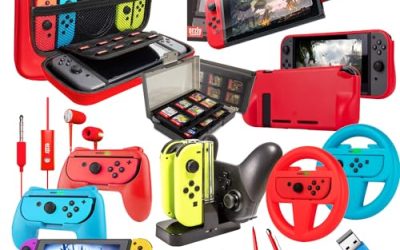
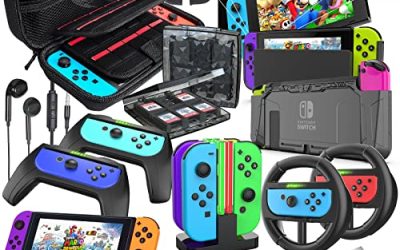
This starter set is for brand-new owners of the standard Switch who want coverage by category rather than a pile of novelties. Each pick below was chosen from its Amazon listing name and stated specifications, covering carrying, screen care, storage, control, and charging in that order. Buying in that order also protects a new owner from the common trap of spending the whole accessories budget on novelty extras during the first week, while the console itself still travels unprotected and its storage fills up.
Quick Picks
As an Amazon Associate we earn from qualifying purchases
| Product | Best for | Key spec from title |
|---|---|---|
| Orzly Carrying Case for Nintendo Switch | First trip away from home in a backpack | Protective hard portable travel case |
| daydayup 3 Pack Tempered Glass Screen Protector | Fitting glass on day one without a spare worry | Transparent HD clear anti-scratch, 3 pack |
| SanDisk 128GB microSD Card Licensed for Nintendo Switch | Downloading several large games immediately | 128GB, licensed for Nintendo Switch |
| Nintendo Switch Pro Controller | Couch play that feels like a full-size pad | Official Pro Controller for Nintendo Switch |
| KDD Switch Controller Charging Dock Station | Keeping two pairs of Joy-Con ready together | Joy-Con charger with 8 game storage |
How to Choose
Start With Protection Before Anything Decorative
A new console is most vulnerable during its first journeys, when owners are still learning how it slides into bags and docks. Prioritise a hard carrying case that holds the console itself, then add tempered glass before fingerprints and dock contact mark the display. For example, a slim hard case suits a daily commute, while a larger case suits family travel with cables. Decorative shells, stickers, and themed extras can wait until the basics are covered, because none of them prevent a cracked corner or a scratched screen during ordinary handling at home or away.
Match Storage Size to How You Buy Games
Internal storage disappears quickly once a few download-only titles, updates, and captured clips accumulate, so think about buying habits rather than headline capacity alone. Someone who mainly buys game cards needs a modest card for updates and a handful of digital titles. Someone who shops download sales needs noticeably more room from the start. As an example, a 128GB card comfortably holds a starter library of mixed sizes, whereas a household sharing one console should consider stepping up sooner. Check that any card is microSDXC and licensed or clearly specified for Switch use before ordering.
Decide How the Second Player Will Play
Multiplayer is where many new owners get caught out, because the included Joy-Con pair splits for some games but feels cramped for longer sessions. Work out whether your second player needs a full pad, another Joy-Con pair, or only an occasional sideways controller. A Pro Controller, for instance, gives one player a conventional layout for docked play while the Joy-Con stay attached for handheld use. Households planning regular two-player evenings should budget for that extra controller early, instead of discovering on game night that sharing a single tiny Joy-Con spoils the titles everyone wanted to play together.
Plan Charging Around Where Controllers Rest
Joy-Con charge while attached to a docked console, which works until spare controllers, guests, or handheld-heavy routines enter the picture. A separate charging dock earns its keep when controllers live away from the console or when more than one pair circulates. Look at how many Joy-Con a dock holds at once, whether indicators show charge status per controller, and whether game storage is built in if loose cards are already multiplying. Place the dock beside the television rather than in a bedroom drawer, so returning controllers to charge becomes part of the normal tidy-up routine after playing.
The 5 Best Options
Orzly Carrying Case for Nintendo Switch

New owners who expect the console to travel in a school bag, work backpack, or car footwell should start here. The listing describes a protective hard portable travel case for the first-generation Switch console, gift boxed and shaped around the handheld itself. That focus matters for beginners because it solves the single most common early accident, an unprotected console knocking against keys, chargers, and hard objects. It also gives game cards and small extras a defined home from the outset, which stops loose items drifting around the house during those first weeks.
Specs
- Brand: Orzly
- Compatibility: Nintendo Switch console, 1st Gen consoles, per listing
- Form: Protective hard portable travel case
- Colour in listing: Midnight Blue
- Packaging: Gift boxed, per listing
Best for: Beginners carrying the console daily without a separate gadget bag.
Watch out for: Confirm you own the standard Switch rather than the Lite or OLED, since case fit differs by model.
ASIN: B06Y6CPZYV
daydayup 3 Pack Tempered Glass Screen Protector

Anyone fitting glass for the first time benefits from a multi-pack, because one dusty attempt does not end the job. The Amazon title specifies a three-pack of tempered glass protectors described as transparent, HD clear, and anti-scratch for Nintendo Switch. Beginners should apply the first sheet in a steamy bathroom after cleaning the display carefully, keeping the remaining sheets for a future replacement or a second console in the household. Having spares also removes the temptation to leave a poorly aligned sheet in place simply because no backup exists in the drawer.
Specs
- Brand: daydayup
- Count: 3 pack, per listing title
- Material: Tempered glass
- Properties in title: Transparent HD clear, anti-scratch
- Compatibility: Nintendo Switch, per listing title
Best for: First-time fitting at the kitchen table with room for one mistake.
Watch out for: Clean the screen thoroughly and align before pressing down, because trapped dust shows permanently under glass.
ASIN: B07SQZ3GJG
SanDisk 128GB microSD Card Licensed for Nintendo Switch
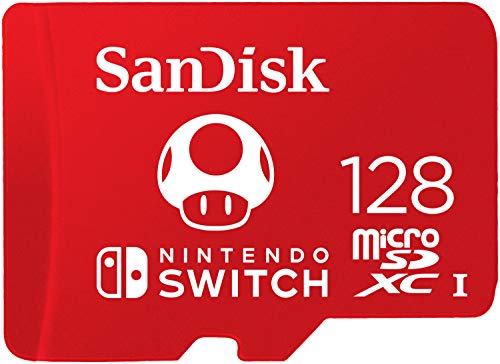
Download-focused beginners run out of room sooner than expected, and this card addresses that before the first large title fails to install. Its listing identifies it as a microSD card officially licensed for Nintendo Switch in Super Mario Super Mushroom Edition form, with read speeds up to 100MB/s stated by the maker. That capacity suits a starter mix of download games, updates, screenshots, and video captures without forcing deletions every month. Insert it before building a library, so downloads land in one place from the beginning rather than being split awkwardly across internal storage.
Specs
- Brand: SanDisk
- Capacity: 128GB
- Model: SDSQXAO-128G-GNCZN
- Read speed: Up to 100MB/s, per listing
- Licensing: Officially licensed for Nintendo Switch
Best for: New owners buying games digitally from the first week onward.
Watch out for: Note the listing states compatibility with Nintendo Switch and not Nintendo Switch 2, so keep it for the original system.
ASIN: B07KXQX3S3
Nintendo Switch Pro Controller

Beginners who play on a television quickly notice that a full-size pad changes comfort during longer story sessions and precision titles. Nintendo lists this as the Switch Pro Controller, the official alternative to playing with Joy-Con in a grip. It suits the player who takes the main seat for platformers, racers, and action games, while the included Joy-Con remain available for a guest or for handheld play. Adding it early also teaches a useful habit: keep the Pro Controller by the sofa and leave the Joy-Con attached to the console, so handheld pick-up-and-play never requires hunting for parts.
Specs
- Brand: Nintendo
- Product: Nintendo Switch Pro Controller
- Platform: Nintendo Switch
- Use: Full-size controller for docked and tabletop play
- Listing form: Official Nintendo controller
Best for: The main player at home who prefers a conventional controller layout.
Watch out for: Pair it with your console on arrival and confirm every input registers before a multiplayer session is planned.
ASIN: B01NAWKYZ0
KDD Switch Controller Charging Dock Station

Households where Joy-Con end the evening scattered across a coffee table will appreciate a single charging home. KDD describes this station as a controller charger dock compatible with Nintendo Switch and OLED model Joy-Con, with upgraded storage for eight games built into the listing title. That combination suits beginners because it tackles two early messes at once: flat controllers and loose game cards. Position it next to the television dock, return each Joy-Con after play, and the next session starts without swapping controllers onto the console purely to recover charge before anyone can join in.
Specs
- Brand: KDD
- Compatibility: Nintendo Switch and OLED Model Joy-Con, per listing
- Function: Controller charging dock station
- Storage: Upgraded 8 game storage, per listing title
- Model number: kdd-001
Best for: Families keeping spare Joy-Con charged beside the television.
Watch out for: Check your Joy-Con model matches the stated Switch and OLED compatibility before relying on it for Switch 2 controllers.
ASIN: B08FX5QKGD
Which One Fits Your Situation
Your Switch Leaves the House Every Day
Pair the Orzly carrying case with the daydayup glass and treat them as one purchase, because travel exposes both the body and the display at the same time. The hard case handles knocks inside a crowded bag, while the glass takes the small abrasions that happen during docking and quick clean-ups. Together they cover the risks a commuter or student faces before any other accessory becomes relevant to daily ownership.
You Mostly Download Games
Begin with the SanDisk 128GB card and install it during setup, even if the internal storage still looks empty on day one. Early installation keeps your library organised and avoids moving files later. If two people share the console and both buy digitally, treat this capacity as a sensible floor rather than a generous ceiling, and monitor free space after each large release you add to the collection together.
Friends Play at Your Place Regularly
Add the Pro Controller and the KDD charging dock as a pair, since extra players create both a control problem and a charging problem. One guest gets a proper pad while Joy-Con stay charged in their station between visits. That arrangement means impromptu sessions start immediately, instead of beginning with a flat controller, a search for cables, and a long wait beside the television while everyone loses interest in playing.
You Want the Smallest Sensible Starter Kit
Choose the case, the glass, and the microSD card first, then live with the console for a fortnight before buying anything else. Those three items protect the hardware and remove the storage ceiling without assuming how you will play. If docked multiplayer never happens, you have avoided an unnecessary controller. If it becomes a weekly habit, the Pro Controller can follow later with a clearer sense of exactly who needs it and how often it will genuinely be used.
Common Mistakes
- Buying a case shaped for the wrong Switch model, then forcing a fit that stresses the Joy-Con rails.
- Fitting screen glass in a dusty room and wasting every sheet in the pack on trapped particles.
- Ignoring storage until a download fails, then deleting games that household members still play.
- Assuming one Joy-Con pair covers every multiplayer game comfortably for long evening sessions.
- Leaving spare controllers uncharged in drawers instead of giving them one regular charging spot.
Frequently Asked Questions
Which accessory should a new Switch owner buy first?
Start with a hard carrying case if the console will travel at all, because impact damage is harder to reverse than any other early problem. Add tempered glass in the same week. Storage and extra controllers solve convenience issues that develop over time, whereas protection addresses risks present from the very first journey out of the house.
Is 128GB of extra storage enough for a beginner?
For a starter library mixing game cards and downloads, 128GB is a reasonable first step that holds several large titles plus updates and captures. Heavy download buyers or households sharing one console may fill it faster. Watch the free-space figure in system settings and step up in size before deletions become a regular chore.
Do beginners really need a Pro Controller straight away?
Only if docked play or regular multiplayer is planned from the start. Solo handheld players can wait and learn their habits first. However, anyone hosting friends or playing long television sessions will feel the benefit immediately, because a full-size pad is easier to hold for hours and frees the Joy-Con to stay attached to the console for portable play.
Can these starter picks also work for the Switch OLED?
Some can, but fit-specific items need checking model by model. The KDD dock listing states OLED Joy-Con compatibility, while the Orzly case listing targets first-generation consoles. Always match the exact model named in a listing to your console before ordering, especially for cases and glass, where small dimensional differences decide whether an accessory fits properly at all.
Related guides
More from Amazon
Programs that pair well with the guide above. Offers and eligibility are set by Amazon and may change.
Free shipping on eligible items, Prime Video and more. Eligible new members can start with a free trial.
Start a Prime free trialAudiobooks and podcasts to listen to on the go. Eligible new members can start with a free trial.
Try Audible freeAd-free music streaming. Eligible new subscribers can start with a free trial.
Try Music Unlimited freeA free business account with business pricing and bulk-buying tools for work, shop or home office.
Create a business accountAs an Amazon Associate we earn from qualifying purchases.

Write Your Review
No reviews yet. Be the first to share your experience!