
Our Short List of 3

- Best for: A single shared pad that must serve console, PC, and mobile without fuss.
- Wireless and Bluetooth connectivity named in the title
- Hybrid D-pad
- Share button
- Textured grip

- Best for: Television-based Switch gaming where comfort over hours is the priority.
- Pro Controller for Nintendo Switch, per the title
- Full-size traditional gamepad layout
- Wireless connection to the console
- Rechargeable internal battery

- Best for: Competitive Xbox and PC players who customize controls for each game.
- Elite Wireless Controller Series 2 model
- Adjustable-tension thumbsticks in the Elite product design
- Wraparound rubberized grip in the Elite product design
- Wireless connection for Xbox and Windows devices
All 4 Picks at a Glance
| Product | Specs | Action |
|---|---|---|
| Xbox Wireless Controller Carbon Black |
| Check price on Amazon |
| Nintendo Switch Pro Controller |
| Check price on Amazon |
| Xbox Elite Wireless Controller Series 2 |
| Check price on Amazon |
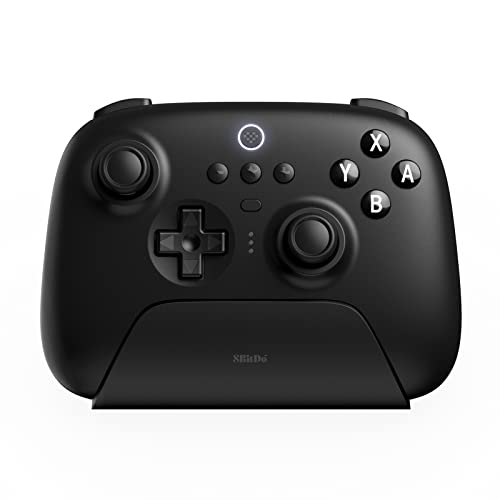 8BitDo Ultimate Bluetooth Controller with Charging Dock |
| Check price on Amazon |
Key takeaways
- Compare cross-platform gaming controllers by connection, sticks, triggers and grip, with five all-rounder picks for console, PC and mobile play.
What's inside
As an Amazon Associate I earn from qualifying purchases. This post may contain affiliate links at no extra cost to you.
Most players do not own a single screen anymore, so the real decision is which one controller can travel between a console, a PC, and maybe a phone without feeling like a compromise everywhere. Layout familiarity, pairing behavior, and battery habits matter more than any single headline feature when the same pad has to serve every room in the house.
This roundup is for generalists: families sharing one good pad, PC players who also own a console, and anyone replacing a worn controller with something versatile. Each pick below was chosen from its Amazon listing, where platform support, connection types, and control features are spelled out in the product name and details. That listing-first approach keeps the comparison honest, because a controller that looks universal in a photograph may still leave one of your devices unsupported.
Quick Picks
As an Amazon Associate we earn from qualifying purchases
| Product | Best for | Key spec from title |
|---|---|---|
| Xbox Wireless Controller Carbon Black | One pad for console, PC, and phone | Wireless and Bluetooth with hybrid D-pad |
| PlayStation DualSense Wireless Controller White | PlayStation owners who also play on PC | Wireless controller for PS5 with built-in microphone |
| Nintendo Switch Pro Controller | Docked Switch sessions lasting all evening | Pro controller for Nintendo Switch |
| Xbox Elite Wireless Controller Series 2 | Competitive players who remap constantly | Elite Series 2 with adjustable-tension thumbsticks |
| 8BitDo Ultimate Bluetooth Controller with Charging Dock | Switch and PC households wanting a dock | Bluetooth controller with charging dock and Hall Effect joystick |
How to Choose
Platform Coverage Before Anything Else
Write down every device you actually use, then match that list against the compatibility line in each listing, word for word. A pad that pairs happily with your console may only work wired on PC, or may not be recognized by your phone at all. The Xbox controller below lists several device families in its title, while the Switch Pro Controller is deliberately narrower. Neither approach is wrong, but buying the narrower tool for a wider job guarantees frustration, so let your device list lead.
Wired, Bluetooth, and Dongle Connections
Connection style shapes daily friction. Bluetooth is convenient and widely supported, yet a dedicated wireless connection or a cable can feel steadier for fast games on PC. Some controllers offer several routes in one body, which helps when a laptop port is occupied or a console sits far from the sofa. Check what the listing actually promises: pairing and switching between devices is a named feature on the Xbox pad, while dock-based models recharge in place so the pad is always ready.
Stick and Trigger Feel
Analog sticks and triggers decide how a game feels minute to minute. Look for concrete listing language: hybrid D-pad designs, adjustable-tension thumbsticks on the Elite model, and Hall Effect joysticks on the 8BitDo, which is a specific sensor technology named by the maker. Vague comfort claims tell you little. If you play racers, trigger travel matters; if you play fighters, the D-pad shape matters; and if you play shooters, stick tension and any remapping options deserve the closest reading.
Power Habits and Everyday Handling
A controller that is always flat is a controller you will stop using. Some models run on replaceable batteries, others recharge internally, and the 8BitDo here ships with a charging dock that gives the pad a home. Grip texture, share or capture buttons, and headset jacks sound minor until a long session makes them central. Match the power routine to your habits: dock people love docks, while travelers often prefer whatever charges from the same cable as their phone.
The 5 Best Options
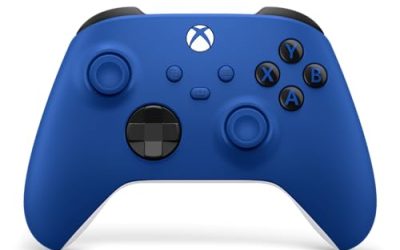
Xbox Wireless Controller Carbon Black
- Best for: A single shared pad that must serve console, PC, and mobile without fuss.
- Wireless and Bluetooth connectivity named in the title
- Hybrid D-pad
- Share button
- Textured grip
A single shared pad that must serve console, PC, and mobile without fuss.
Confirm the power source you prefer, since this design uses replaceable batteries rather than a dock.
For most mixed households this is the safest shape of answer, because the listing promises wireless and Bluetooth connectivity, easy pairing and switching between devices, and a hybrid D-pad with textured grip. It feels familiar to anyone who has held an Xbox-style pad, which lowers the learning curve for guests and younger players. The share button named in the listing suits players who capture clips often. If your gaming spreads across console, Windows, and a phone, this controller was clearly designed for exactly that sprawl.
PlayStation DualSense Wireless Controller White
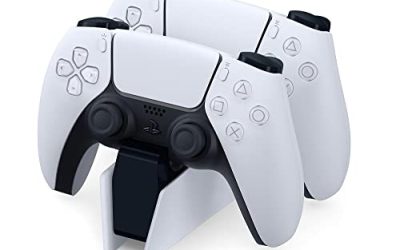
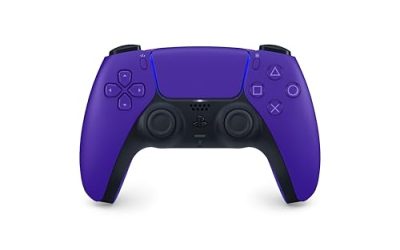
PlayStation owners who want their console pad to double up elsewhere will recognize the appeal here. The DualSense listing presents it as the wireless controller for its console generation, and its distinctive features, including haptic feedback, adaptive triggers, and a built-in microphone, are part of its official product identity. On supported PC games those trigger and feedback features can carry over, while on other platforms it behaves as a capable standard pad. Buy it primarily for PlayStation play, then enjoy the bonus flexibility.
Specs
- Wireless controller in White finish
- Haptic feedback as part of the DualSense design
- Adaptive triggers as part of the DualSense design
- Built-in microphone named in DualSense product materials
- USB-C charging connection
- Created for PlayStation console play
Best for: PlayStation-first players who occasionally move to PC with the same pad.
Watch out for: Check each PC game’s controller support, because its special trigger features only appear in supported titles.
ASIN: B0CQKLS4RP
Nintendo Switch Pro Controller
- Best for: Television-based Switch gaming where comfort over hours is the priority.
- Pro Controller for Nintendo Switch, per the title
- Full-size traditional gamepad layout
- Wireless connection to the console
- Rechargeable internal battery
Television-based Switch gaming where comfort over hours is the priority.
Do not buy it expecting phone or PC flexibility to match the Xbox pad; its focus is the Switch.
Docked Switch players who find small detachable controllers tiring over long sessions are the audience for this one. The Pro Controller listing keeps its promise simple: a full-size traditional pad for the Switch, with the standard buttons, motion-friendly design, and amiibo functionality that the platform’s official controller carries. It suits long adventure games, family multiplayer where one person claims the good pad, and anyone whose hands cramp during handheld-style play at the television. It does one job, and it does that job with no setup drama.
Xbox Elite Wireless Controller Series 2
- Best for: Competitive Xbox and PC players who customize controls for each game.
- Elite Wireless Controller Series 2 model
- Adjustable-tension thumbsticks in the Elite product design
- Wraparound rubberized grip in the Elite product design
- Wireless connection for Xbox and Windows devices
Competitive Xbox and PC players who customize controls for each game.
Decide whether you need the full accessory set or the Core version before ordering, since the bundles differ.
Serious competitive players who tweak everything will feel at home here. The Elite Series 2 listing family centers on customization: adjustable-tension thumbsticks, wraparound rubberized grip, and saved profiles are the themes of this product line, with the Core and full versions differing in bundled accessories. It is the pick for someone who remaps buttons per game and notices small differences in stick resistance. Casual players may never open its settings, but for a dedicated main pad on Xbox or PC, the tailoring is the entire point.
8BitDo Ultimate Bluetooth Controller with Charging Dock
- Best for: Switch and PC homes that want a docked, always-charged shared controller.
- Bluetooth controller with charging dock, per the title
- Hall Effect joystick named in product materials
- Multifunction charging dock
- Motion controls named in product materials
Switch and PC homes that want a docked, always-charged shared controller.
Verify the exact version in the listing, because 8BitDo sells similar models with different connection types.
Households split between Switch and PC should look closely at this 8BitDo, whose listing highlights a multifunction charging dock, a Hall Effect joystick, motion controls, and a custom profile switch button. The dock solves the dead-battery problem by giving the controller a permanent parking spot near the television or desk. Its shape will feel natural to players raised on modern twin-stick layouts, and the profile button suits families where two players prefer different mappings. It is a thoughtful alternative to the official pads.
Which One Fits Your Situation
One Controller for the Whole House
Take the standard Xbox Wireless Controller, because its listing explicitly talks about pairing and switching between devices, and its layout is the one most PC games assume by default. Guests will already know where everything is. Keep spare batteries or a rechargeable solution nearby and it will quietly become the pad everyone reaches for first.
You Play Mostly on One Console
Match the pad to the console: DualSense for PlayStation, the Pro Controller for Switch, and either Xbox model for Xbox. Native pads unlock the small conveniences, from system wake behavior to platform-specific buttons, that cross-platform pads sometimes handle awkwardly. You give up some travel flexibility, yet every session at home, where most play happens, feels completely native and unforced.
You Compete and Notice Small Differences
The Elite Series 2 earns its place when you actively remap buttons, save profiles, and adjust stick tension between games. If that sentence describes your habits, the customization is not decoration. If it does not, the standard Xbox pad will feel just as accurate in your hands, and the simpler routine may suit you better over years of casual play.
Two Players, Two Favorite Settings
Choose the 8BitDo Ultimate Bluetooth model, park it in its dock, and use its profile switching so each player can keep a preferred setup. The dock also ends the argument about who left the controller uncharged. For a couple or siblings sharing one premium-feeling pad across Switch and PC, that combination of charging habit and personal profiles solves the real daily problems.
Common Mistakes
- Buying a console-specific pad and only later checking whether it works with your PC or phone.
- Confusing similar model names within one brand, especially where Bluetooth and dongle versions sit side by side.
- Ignoring how the controller charges, then resenting the battery routine within a month.
- Paying for deep customization features that you will never open, instead of a comfortable standard pad.
- Forgetting the headset jack and capture button placement until a regular online session makes them matter.
Frequently Asked Questions
Can one controller really cover console, PC, and phone?
Sometimes, yes, but only where the listing says so. The Xbox pad in this group explicitly lists several device families and device switching, which makes it the natural traveler. Console-first pads can still work elsewhere in narrower ways. Always match your exact devices against the compatibility wording on the product page before relying on a single pad.
What does a Hall Effect joystick actually change?
It changes how stick movement is sensed, using magnets rather than physical contact inside the sensor. Makers name it in listings because it is a concrete hardware choice, not a styling claim. For buyers, the practical takeaway is to treat it as a durability-minded design decision and to compare it alongside grip, layout, and connection rather than buying on that term alone.
Is a charging dock worth choosing a controller for?
For a pad that lives in one room, a dock removes the most common failure: picking up a dead controller. The 8BitDo above builds its routine around that habit. If you travel with your pad or play in several rooms, a simple cable routine may be easier. Think about where the controller sleeps at night before deciding.
Should beginners buy a pro-style controller?
Only if the customization genuinely appeals to you. Beginners usually benefit more from a familiar layout, easy pairing, and a pad that every game supports without configuration. The standard models here cover that ground well. A pro-style pad becomes worthwhile when you already know which buttons you want to remap and which stick feel you prefer.
Related guides
More from Amazon
Programs that pair well with the guide above. Offers and eligibility are set by Amazon and may change.
Free shipping on eligible items, Prime Video and more. Eligible new members can start with a free trial.
Start a Prime free trialAudiobooks and podcasts to listen to on the go. Eligible new members can start with a free trial.
Try Audible freeAd-free music streaming. Eligible new subscribers can start with a free trial.
Try Music Unlimited freeA free business account with business pricing and bulk-buying tools for work, shop or home office.
Create a business accountAs an Amazon Associate we earn from qualifying purchases.
Write Your Review
No reviews yet. Be the first to share your experience!