
Our Short List of 3

- Best for: Homes rotating two controllers through daily play
- Brand: PlayStation
- Product: DualSense Charging Station
- Capacity listed: charges two DualSense controllers
- Power: AC adapter included as listed

- Best for: PS5 players who want wireless audio made for the console
- Brand: PlayStation
- Product: PULSE 3D Wireless Headset
- Audio listed: fine-tuned for 3D Audio on PS5 consoles
- Microphones listed: dual noise-cancelling microphones

- Best for: Competitive players who adjust controls for different games
- Brand: PlayStation
- Product: DualSense Edge Wireless Controller
- Features listed: changeable stick caps and replaceable stick modules
- Controls listed: back buttons and adjustable trigger lengths
All 4 Picks at a Glance
| Product | Specs | Action |
|---|---|---|
| PlayStation DualSense Charging Station |
| Check price on Amazon |
| PlayStation PULSE 3D Wireless Headset – White |
| Check price on Amazon |
| PlayStation DualSense Edge Wireless Controller |
| Check price on Amazon |
 WD_BLACK SN850X 1TB NVMe SSD with Heatsink |
| Check price on Amazon |
Key takeaways
- Temu shoppers hunting PS5 gear can use this guide to judge cases, stands, grips and covers, then compare five Amazon-listed accessories by fit and specs.
What's inside
As an Amazon Associate I earn from qualifying purchases. This post may contain affiliate links at no extra cost to you.
Shoppers who browse Temu for PS5 gear usually face a simpler question than brand loyalty: which accessory type actually solves the problem in front of them, a protective case, a charging stand, better grips or a cover that fits their console version? Listings on any marketplace can look alike in photos, so size, model fit and included parts deserve attention first. That detail matters most when the headset or accessory has to earn a permanent place in an everyday setup rather than sit unused in a drawer after the first week of play at home.
This guide is for PS5 owners using Temu as a starting point for ideas, then comparing the same accessory types against established Amazon listings. The five products below are Amazon-listed items chosen from the names and specifications on their Amazon pages, and none of them is presented as a Temu listing.
Quick Picks
As an Amazon Associate we earn from qualifying purchases
| Product | Best for | Key spec from title |
|---|---|---|
| PlayStation DualSense Wireless Controller – White | A second pad for co-op nights | Haptic feedback and adaptive triggers |
| PlayStation DualSense Charging Station | Two controllers charged off the console | Charges two DualSense controllers at once |
| PlayStation PULSE 3D Wireless Headset – White | Console-tuned wireless audio and chat | Fine-tuned for 3D Audio on PS5 consoles |
| PlayStation DualSense Edge Wireless Controller | Customisable controls for competitive play | Replaceable stick modules as listed |
| WD_BLACK SN850X 1TB NVMe SSD with Heatsink | More internal room for PS5 games | Works with PlayStation 5, M.2 2280 with heatsink |
How to Choose
Check the Console Version Before Anything Else
PS5 accessories split by console revision, so a cover, stand or shell cut for the original model may not sit correctly on a slimmer revision. Read the listing for the exact model wording, measure the space where a vertical or horizontal stand will sit, and confirm whether disc and digital editions are both named. A case that fits the console but blocks a disc slot, vent or port creates a new problem instead of solving one. That detail matters most when the headset or accessory has to earn a permanent place in an everyday setup rather than sit unused in a drawer after the first week of play at home.
Judge Cases, Covers and Grips by Material
Hard shells protect against knocks during travel, while silicone covers trade some rigidity for grip and easier removal at home. Thumb grips and controller skins should state the controller model they suit, because a loose cap spins during play. Look for cutouts named in the listing, check whether adhesive is involved, and prefer designs that can be removed without leaving residue on the controller shell or console panels during normal use. Checking the listing title against your own console, controller or computer ports before ordering prevents the most common mismatch and saves a return later on for most buyers.
Separate Charging Convenience From Storage
A charging dock, a display stand and a storage tower do different jobs, even when product photos make them look similar at a glance. Decide whether you need two controllers topped up overnight, a single pad kept upright, or a place for games and headsets as well. Then check how the dock is powered, whether an adapter is included, and whether charging contacts or a cable do the work, since that affects where the dock can sit. Comfort also compounds over time, because a fit that feels fine for twenty minutes can become distracting once a session stretches across an entire evening with friends online.
Treat Storage and Audio as Their Own Decisions
Running out of room for new games calls for internal storage that the listing names as working with PlayStation 5, not a generic drive in a similar box. Audio is separate again: a headset built for the console handles chat and game sound together. Keeping these categories apart stops a cheap-looking bundle of unrelated parts from beating a single accessory that does its one job properly and fits the setup you already own today. A clear specification list is more useful than a bold claim, since it lets you compare driver size, connection type and included parts side by side without guessing at anything important.
The 5 Best Options
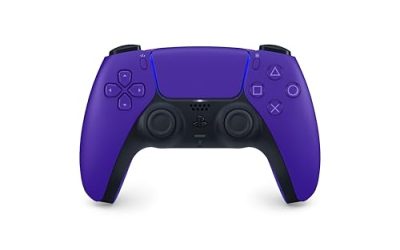
PlayStation DualSense Wireless Controller – White
Households sharing one console know the real gap is a second controller, not another novelty. This standard DualSense suits players who want the same haptics, adaptive triggers and layout as the pad in the box, which keeps co-op fair and avoids a learning curve when controllers swap hands mid-evening. Checking the listing title against your own console, controller or computer ports before ordering prevents the most common mismatch and saves a return later on for most buyers. Comfort also compounds over time, because a fit that feels fine for twenty minutes can become distracting once a session stretches across an entire evening with friends online.
Specs
- Brand: PlayStation
- Model: DualSense Wireless Controller, model CFI-ZCT1W as listed
- Features listed: haptic feedback and adaptive triggers
- Built-in microphone and headset jack as listed
- Connection: wireless with USB-C charging as listed
- Platform: PlayStation 5
Best for: Players who want a matching second controller for local multiplayer
Watch out for: Confirm the colour and model code on the listing, since limited editions share the DualSense name
ASIN: B0CQKLS4RP
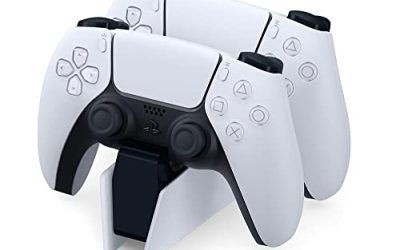
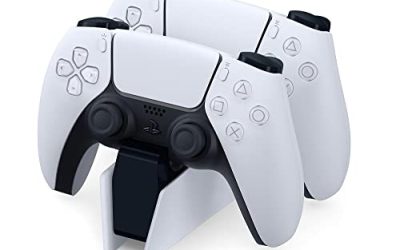
PlayStation DualSense Charging Station
- Best for: Homes rotating two controllers through daily play
- Brand: PlayStation
- Product: DualSense Charging Station
- Capacity listed: charges two DualSense controllers
- Power: AC adapter included as listed
Homes rotating two controllers through daily play
Check that your controllers are DualSense models, because older PlayStation pads use different contacts
Loose cables across the TV unit are the problem this dock answers. It suits homes where two controllers rotate through long sessions and need a fixed home that tops both up without tying up console ports. Because it is a stand and charger in one, it also answers the stand category many Temu browsers start with, only with official fit for the DualSense shape and contacts. Comfort also compounds over time, because a fit that feels fine for twenty minutes can become distracting once a session stretches across an entire evening with friends online.
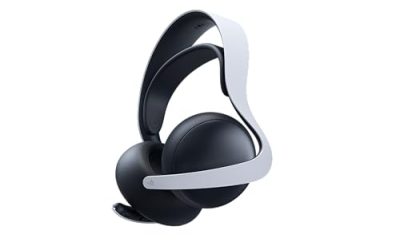
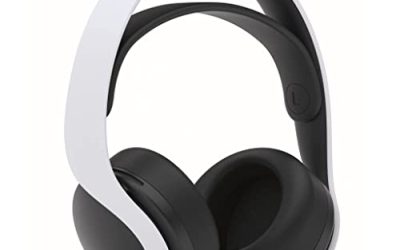
PlayStation PULSE 3D Wireless Headset – White
- Best for: PS5 players who want wireless audio made for the console
- Brand: PlayStation
- Product: PULSE 3D Wireless Headset
- Audio listed: fine-tuned for 3D Audio on PS5 consoles
- Microphones listed: dual noise-cancelling microphones
PS5 players who want wireless audio made for the console
Confirm how it connects to each device you own, because wireless and cable use differ by platform
Accessory hunting often ends at audio, because a cover cannot fix quiet dialogue or muffled chat. This headset fits PS5 owners who want a wireless option designed around the console and its 3D Audio, with built-in microphones rather than a separate boom to store. It also suits players moving between console and computer, since both appear in the listed compatibility for this model. A clear specification list is more useful than a bold claim, since it lets you compare driver size, connection type and included parts side by side without guessing at anything important.
PlayStation DualSense Edge Wireless Controller
- Best for: Competitive players who adjust controls for different games
- Brand: PlayStation
- Product: DualSense Edge Wireless Controller
- Features listed: changeable stick caps and replaceable stick modules
- Controls listed: back buttons and adjustable trigger lengths
Competitive players who adjust controls for different games
Read which stick modules and caps are included, because replacement parts are specific to this model
Some shoppers browsing grips and add-ons really want control over the pad itself. The DualSense Edge suits competitive players who would rather adjust trigger length, swap stick modules and map back buttons than clip accessories onto a standard controller. It is the premium route in this list, aimed at one main player who uses the same pad daily and values adjustment over a second basic controller for guests. Think about where the item will live between sessions too, because storage, cable routing and charging habits shape whether a purchase stays convenient month after month of regular use.
WD_BLACK SN850X 1TB NVMe SSD with Heatsink
- Best for: Owners who keep reinstalling games to free up space
- Brand: WD_BLACK
- Capacity listed: 1TB
- Form factor listed: M.2 2280
- Heatsink: included as listed in the product name
Owners who keep reinstalling games to free up space
Verify the heatsink version is selected, because this family is also sold without one fitted
Deleting a game before every install is a storage problem, and no case or stand fixes it. This drive fits owners whose library has outgrown the console and who are comfortable opening the expansion bay to fit an M.2 drive with a heatsink. The listing names PlayStation 5 compatibility directly, which is the first check any shopper comparing drives on any marketplace should insist on before looking at capacity. The strongest choice is usually the one whose listed features line up with the games you actually play, the platform you use most and the people you talk with every single week.
Which One Fits Your Situation
You Share the Console With Family
A second standard DualSense removes the nightly argument over the single charged pad, and the charging station keeps both ready. Start with those two before decorative extras, because they change every shared session rather than only how the console looks on a shelf. A clear specification list is more useful than a bold claim, since it lets you compare driver size, connection type and included parts side by side without guessing at anything important.
Your Setup Looks Messy in Photos
The charging station gives controllers a single upright home, which tidies the TV unit more than a loose cover ever will. Pair that tidiness with honest cable routing behind the console, and check stand dimensions against your shelf before ordering anything decorative. Think about where the item will live between sessions too, because storage, cable routing and charging habits shape whether a purchase stays convenient month after month of regular use.
You Play Competitive Shooters Late
The DualSense Edge brings adjustable triggers and back buttons for faster inputs, while the PULSE 3D handles chat without waking the house through TV speakers. Together they cover the two upgrades competitive players notice most during ranked evenings at home. The strongest choice is usually the one whose listed features line up with the games you actually play, the platform you use most and the people you talk with every single week.
Your Library No Longer Fits
Choose the SN850X with heatsink when installs, not inputs, are the bottleneck. Moving large games onto internal expansion storage ends the delete-and-redownload cycle, provided you confirm the heatsink variant and follow the console expansion instructions carefully before fitting it. That detail matters most when the headset or accessory has to earn a permanent place in an everyday setup rather than sit unused in a drawer after the first week of play at home.
Common Mistakes
- Buying a cover or stand before confirming which PS5 revision you own.
- Assuming a marketplace photo proves fit, without reading the model wording in the listing.
- Ordering thumb grips or skins that do not name the DualSense controller.
- Choosing a drive that never states PlayStation 5 compatibility or heatsink fit.
- Treating every accessory type as equal, instead of fixing the charging, storage or audio problem first.
Frequently Asked Questions
Are the products in this guide sold on Temu?
No. This guide uses Temu only as the shopping idea that starts the search, covering the accessory types people look for there. Every product listed here is an Amazon-listed item with an ASIN, chosen from its Amazon page, so check that page for the exact model, included parts and current availability before ordering anything.
Which PS5 accessory should a new owner buy first?
A second controller or a charging dock usually changes daily play more than a decorative cover. Shared households feel the benefit immediately, while solo players may prefer storage or a headset. Match the first purchase to the annoyance you meet most often, whether that is a flat battery, a full drive or quiet game audio at night.
How do I check whether a stand or cover will fit?
Find the console revision named in the listing and compare it with the model wording on your own console box or settings. Then measure the shelf space and check port and vent cutouts in the product description. If a listing avoids naming a revision at all, treat that silence as a reason to keep looking elsewhere.
Does the SN850X need a heatsink inside a PS5?
The version listed here includes a heatsink in its product name, and that is the variant to select for console use. Confirm the heatsink wording is present on the exact listing before ordering, because the same drive family is also sold in versions without one, and fitting differs between a desktop computer and the console expansion bay.
Related guides
More from Amazon
Programs that pair well with the guide above. Offers and eligibility are set by Amazon and may change.
Free shipping on eligible items, Prime Video and more. Eligible new members can start with a free trial.
Start a Prime free trialAudiobooks and podcasts to listen to on the go. Eligible new members can start with a free trial.
Try Audible freeAd-free music streaming. Eligible new subscribers can start with a free trial.
Try Music Unlimited freeA free business account with business pricing and bulk-buying tools for work, shop or home office.
Create a business accountAs an Amazon Associate we earn from qualifying purchases.
Write Your Review
No reviews yet. Be the first to share your experience!