
Our Short List of 3

- Best for: Laptop gamers who also play on Xbox Series X|S or Xbox One at home.
- Brand: Microsoft Xbox
- Connectivity: Wireless and Bluetooth, with USB-C connection
- Controls: Hybrid D-pad and Share button
- Grip: Textured grip, designed to pair and switch between devices

- Best for: A fixed laptop desk where a dock keeps the controller charged and ready.
- Brand: 8BitDo
- Connectivity: 2.4G wireless with charging dock
- Joysticks: Hall Effect joystick update
- Listed platforms: PC, Android, Steam Deck, and Apple devices

- Best for: Players whose laptop sessions alternate with PS5 sessions on the same pad.
- Brand: PlayStation
- Model: DualSense Wireless Controller
- Colour: Galactic Purple
- Feedback features in DualSense listings: Haptic feedback and adaptive triggers
All 4 Picks at a Glance
| Product | Specs | Action |
|---|---|---|
| Xbox Wireless Controller Carbon Black |
| Check price on Amazon |
| 8BitDo Ultimate 2.4G Wireless Controller |
| Check price on Amazon |
| PlayStation DualSense Wireless Controller Galactic Purple |
| Check price on Amazon |
 Logitech G F310 Wired Gamepad |
| Check price on Amazon |
Key takeaways
- Compare the best gaming controller for laptop use, from wired USB pads to Bluetooth models with charging docks, hall sticks and multi-device pairing.
What's inside
As an Amazon Associate I earn from qualifying purchases. This post may contain affiliate links at no extra cost to you.
A laptop rarely sits in one place, so its controller has to earn space in a bag, pair again without fuss after sleep, and still feel precise when you finally sit down to play. Choosing badly usually means living with a dongle you keep losing, a cable that is too short for a hotel desk, or Bluetooth that drops at the wrong moment.
This shortlist suits students, commuters, and anyone who games on a Windows or Mac laptop at home and away. Every pick was selected from the connection types, platform lists, and stick technology named on its Amazon page, covering simple wired pads, dock-charged wireless models, and one PlayStation pad that also lists PC and Mac support for cross-device households.
Quick Picks
As an Amazon Associate we earn from qualifying purchases
| Product | Best for | Key spec from title |
|---|---|---|
| Xbox Wireless Controller Carbon Black | Moving between laptop and console at home | Wireless and Bluetooth connectivity |
| 8BitDo Ultimate 2.4G Wireless Controller | A desk setup with a charging dock | Hall Effect joystick update with charging dock |
| PlayStation DualSense Wireless Controller Galactic Purple | Laptop players who also own a PS5 | DualSense wireless controller in Galactic Purple |
| Logitech G F310 Wired Gamepad | A spare pad that lives in a laptop bag | Wired gamepad with console-like layout |
| GameSir Cyclone 2 Wireless Controller | Switching between laptop and phone | 1000Hz report rate with charging dock |
How to Choose
Wired Simplicity or Wireless Freedom
A wired pad removes charging from your routine entirely, which matters when a laptop bag already carries a charger, mouse, and cables. The Logitech G F310, for instance, connects over its built-in cord and needs no battery or pairing step. Wireless models trade that certainty for a cleaner desk and easier sofa play. Bluetooth suits short sessions and travel, while a 2.4G receiver, such as the one supplied with the 8BitDo Ultimate 2.4G, usually gives a steadier link at a fixed desk. Decide where you play most often before deciding how the pad should connect.
Port and Dongle Management
Laptops keep shedding ports, so count yours before ordering anything. A controller that needs a full-size USB receiver can become awkward on a machine with only USB-C sockets unless an adapter is already in your bag. Bluetooth pads avoid that problem completely, and the Xbox Wireless Controller pairs that way as well as through its own wireless protocol on supported devices. Wired buyers should check cable length against their usual seating distance, because a short cord that works at a desk may not reach from a media laptop across a living room.
Stick Technology and Longevity
Stick drift ruins a travel controller faster than almost any other fault, because a pad knocked around in a bag takes more knocks than one that never leaves a desk. Listings that name Hall Effect joysticks, like the 8BitDo Ultimate 2.4G update, or the TMR sticks on the GameSir Cyclone 2, describe magnetic sensing rather than contact-based sensing. That distinction is worth weighing if you play daily. Traditional sticks still serve occasional players well, especially on an inexpensive wired spare, but frequent laptop gamers should treat stick type as a primary filter, not a footnote.
Battery Routine and Charging Docks
How a wireless controller recharges shapes whether it is ready when you are. Models supplied with a charging dock, including the Ultimate 2.4G and the Cyclone 2, give the pad a permanent home and a predictable routine: lift it off, play, drop it back. Controllers powered by replaceable batteries, such as the standard Xbox pad format, let you swap cells mid-session instead of waiting. USB-C charging sits between those approaches. Match the routine to your habits, because the best specification sheet loses to a flat battery on a train.
The 5 Best Options
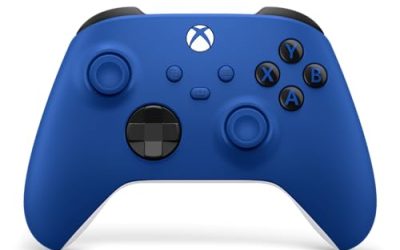
Xbox Wireless Controller Carbon Black
- Best for: Laptop gamers who also play on Xbox Series X|S or Xbox One at home.
- Brand: Microsoft Xbox
- Connectivity: Wireless and Bluetooth, with USB-C connection
- Controls: Hybrid D-pad and Share button
- Grip: Textured grip, designed to pair and switch between devices
Laptop gamers who also play on Xbox Series X|S or Xbox One at home.
Confirm how your laptop will connect, Bluetooth or cable, and check what batteries or rechargeable pack your routine will require.
Anyone who splits time between a laptop and an Xbox console at home gets the smoothest routine from this pad, since one controller covers both machines. Its hybrid D-pad suits platformers and menu navigation, while the Share button and textured grip come straight from the current Xbox design language. For laptop-only players it remains a sensible default because Bluetooth pairing avoids carrying a receiver, and the layout is the one most PC games assume when they draw on-screen button prompts.
8BitDo Ultimate 2.4G Wireless Controller
- Best for: A fixed laptop desk where a dock keeps the controller charged and ready.
- Brand: 8BitDo
- Connectivity: 2.4G wireless with charging dock
- Joysticks: Hall Effect joystick update
- Listed platforms: PC, Android, Steam Deck, and Apple devices
A fixed laptop desk where a dock keeps the controller charged and ready.
Check that your laptop has a suitable port for the receiver or dock, and confirm the colour variant on the listing before ordering.
Desk-based laptop players who dislike loose cables will appreciate a controller that returns to its own charging dock after every session. This Hall Effect update of the Ultimate 2.4G is listed for PC, Android, Steam Deck, and Apple devices, so the same pad can follow you from a Windows laptop to a tablet without buying twice. The included receiver lives in the dock, reducing the chance of losing it between trips, and the familiar Xbox-style layout keeps default prompts in most laptop games easy to follow.
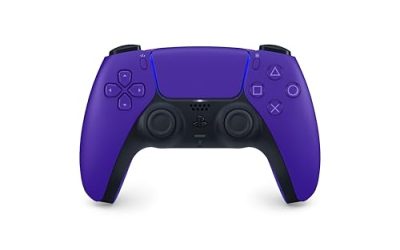
PlayStation DualSense Wireless Controller Galactic Purple
- Best for: Players whose laptop sessions alternate with PS5 sessions on the same pad.
- Brand: PlayStation
- Model: DualSense Wireless Controller
- Colour: Galactic Purple
- Feedback features in DualSense listings: Haptic feedback and adaptive triggers
Players whose laptop sessions alternate with PS5 sessions on the same pad.
Check each laptop game for DualSense support, because some titles show Xbox prompts or need extra configuration for PlayStation pads.
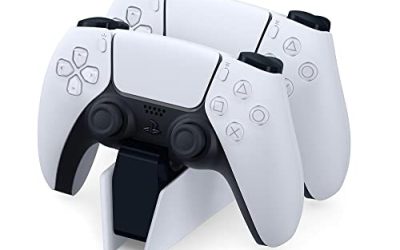
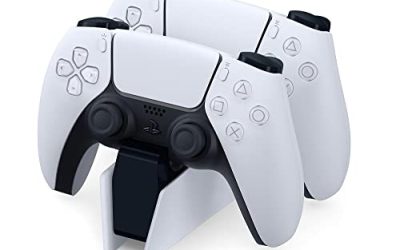
Laptop owners who already play on PS5, or who simply prefer symmetrical sticks, should look closely at the DualSense in Galactic Purple. Its listing identifies it as a PlayStation DualSense wireless controller, and the wider DualSense family is sold for PS5, PC, Mac, and mobile use, giving a laptop player a second life for the same hardware. Haptic feedback and adaptive triggers are DualSense features named across its listings, although laptop games vary in whether they use them, so treat those as a bonus rather than a promise.
Logitech G F310 Wired Gamepad
- Best for: A dependable spare controller that stays permanently in a laptop bag.
- Brand: Logitech G
- Model: F310 Gamepad, model number 940-000110
- Connectivity: Wired USB connection
- Layout: Console-like layout with 4-switch D-pad
A dependable spare controller that stays permanently in a laptop bag.
Measure whether the wired cord suits your seating distance, and remember this model has no wireless option if you later want one.
Travellers who want a controller they can forget about until it is needed will find the F310 easy to justify. It is a wired gamepad with a console-like layout and a 4-switch D-pad, listed for PC, Steam, Windows, and Android TV, so a laptop is squarely inside its stated territory. There is no battery to charge before a trip and no pairing menu to fight in an airport lounge. Its XInput and DirectInput support, named in retailer descriptions of the model, helps older and newer laptop games alike recognise it.
GameSir Cyclone 2 Wireless Controller
Players who hop between a laptop, a phone, and a handheld will value the Cyclone 2 and its multi-platform billing. The listing names PC, Switch, iOS, and Android, a 1000Hz report rate, Mag-Res TMR sticks, and Hall and micro 2-in-1 triggers, plus RGB lighting and a charging dock in this white version. That combination targets frequent players who notice stick feel and trigger response, while the dock keeps a shared desk tidy. It is the most feature-dense option here for people who genuinely use several screens.
Specs
- Brand: GameSir
- Model: Cyclone 2
- Report rate: 1000Hz as stated in the listing
- Sticks and triggers: Mag-Res TMR sticks, Hall and micro 2-in-1 triggers
- Listed platforms: PC, Switch, iOS, and Android, with charging dock
Best for: Laptop gamers who also play on phone or Switch and want one docked pad.
Watch out for: Confirm which connection mode you will use on your laptop, and check the dock and receiver requirements on the listing.
ASIN: B0DBLN822T
Which One Fits Your Situation
You Game in Dorms, Cafes, and Trains
Portability should drive this choice, and the Logitech G F310 fits it best because the wired connection never needs charging or pairing before a short session. Pack it, plug it into the laptop, and play. If cables annoy you in tight seating, the Xbox Wireless Controller over Bluetooth is the alternative, provided you keep spare power sorted in the same bag.
Your Laptop Never Leaves Its Desk
A permanent setup rewards the 8BitDo Ultimate 2.4G, since its dock turns charging into a habit you stop thinking about and its receiver stays in one place. The GameSir Cyclone 2 makes sense at the same desk if you also pair a phone or Switch there, because its listing covers those platforms alongside PC and includes its own dock.
You Own a Console as Well as a Laptop
Console owners should buy the pad their console already expects. The DualSense in Galactic Purple serves PS5 owners who want haptics carried across to supported laptop titles, while the Xbox Wireless Controller serves Xbox owners with the layout most laptop games assume. Either route avoids learning two different button layouts for the same library of games.
You Play Competitive Titles on the Move
Frequent, fast-paced play puts stick technology and report rate at the top of the list. The Cyclone 2, with TMR sticks and a stated 1000Hz report rate, is the pick aimed at that player. Pair it with its dock at home, then carry it knowing the same hardware covers the laptop sessions that matter most to your ranking.
Common Mistakes
- Buying a receiver-based controller for a laptop with no suitable free port, then relying on an adapter that stays at home.
- Assuming every laptop game supports PlayStation pads equally, when many default to Xbox layouts and prompts.
- Leaving a wireless controller uncharged in a travel bag because it has no dock or fixed charging routine.
- Ignoring stick technology on a pad that will be carried daily, where knocks and heavy use arrive quickly.
- Choosing by colour variant without rechecking the listing, since connection bundles and included docks can differ between variants.
Frequently Asked Questions
Does a laptop controller need a USB receiver?
Not necessarily. Bluetooth models such as the Xbox Wireless Controller pair directly with many laptops, and wired models such as the Logitech G F310 simply plug in. A 2.4G receiver can still suit a fixed desk, provided your laptop has a compatible port or an adapter you actually keep with the machine.
Will a PS5 controller work properly on a laptop?
The DualSense is listed for PS5, PC, Mac, and mobile contexts, so basic laptop play is within its stated use. Individual games differ, though. Some show Xbox button prompts, and haptic or adaptive trigger features depend on the title. Check the store page of each important game before relying on those extras.
Is wired or wireless better for laptop gaming?
Wired play removes charging and pairing entirely, which suits travel and spare controllers. Wireless play keeps a desk or sofa setup cleaner and lets you sit further from a small laptop screen. Neither is universally better; the right answer follows where you sit, how often you move, and whether you will maintain a charging routine.
What does Hall Effect mean in these listings?
Listings use the term for joysticks that sense movement magnetically rather than through physical contact inside the stick. The 8BitDo Ultimate 2.4G update names Hall Effect joysticks, and the GameSir Cyclone 2 names TMR sticks. Buyers who play daily often prioritise these designs when comparing otherwise similar laptop controllers.
Related guides
More from Amazon
Programs that pair well with the guide above. Offers and eligibility are set by Amazon and may change.
Free shipping on eligible items, Prime Video and more. Eligible new members can start with a free trial.
Start a Prime free trialAudiobooks and podcasts to listen to on the go. Eligible new members can start with a free trial.
Try Audible freeAd-free music streaming. Eligible new subscribers can start with a free trial.
Try Music Unlimited freeA free business account with business pricing and bulk-buying tools for work, shop or home office.
Create a business accountAs an Amazon Associate we earn from qualifying purchases.
Write Your Review
No reviews yet. Be the first to share your experience!