
Key takeaways
- Find the best puppy cameras to watch, talk to and reward your dog from anywhere, with rotating views, treat tossing and barking alerts at home and away.
What's inside
As an Amazon Associate I earn from qualifying purchases. This post may contain affiliate links at no extra cost to you.
The best puppy cameras let an owner see what a dog is doing, talk to it, and even reward it, all from a phone miles away. A puppy left alone can get bored, anxious or destructive, and a camera that only records does not help much. A pet camera adds two-way audio, a wide or rotating view, barking alerts and, on the best models, a treat tosser that turns a check-in into a game.
A puppy camera has different priorities from a security camera. The picture must follow a moving animal around a room, so a rotating lens or a wide view matters more than a fixed view of a doorway. The audio must work both ways, because the owner needs to hear the puppy and the puppy needs to hear the owner. Night vision matters because puppies are often left alone in a dim room, and alerts matter because the owner cannot watch the live feed all day. A camera that sends a barking alert is far more useful than one that waits to be opened.
This guide compares three verified pet cameras listed on Amazon US, all of the same type: cameras made for watching pets, with two-way audio and night vision. The Furbo 360 and the Petcube Cam 360 are dedicated pet cameras with rotating views, while the Blink Mini is a compact indoor camera that Amazon also lists as a pet security camera, included here as the simple, low-cost option for several rooms at once.
What to Look For
Rotating or wide view. A puppy moves around a room, so the camera must follow. A 360-degree rotating lens or a wide-angle lens keeps the puppy in view, while a fixed narrow lens stares at an empty bed.
Two-way audio. Two-way audio lets the owner speak to the puppy and hear the room. The speaker should be loud enough for the puppy to hear across a room, and the microphone should pick up barking clearly.
Barking alerts. A barking alert tells the owner that something is happening, rather than waiting for the owner to open the app. Check whether barking alerts are included or need a subscription.
Treat tossing. A treat tosser throws a treat from the camera, which rewards the puppy and gives it a reason to come to the camera. It is the feature that turns a camera into an interactive toy.
Night vision. Puppies are often left in a dim room, so night vision matters. Colour night vision shows more detail, while infrared night vision works in total darkness.
Zoom. A digital zoom lets the owner pull in close to check whether the puppy is eating, drinking or resting. A 360-degree camera with zoom covers a whole room and still shows detail.
Power. Plug-in cameras record continuously without battery worries, but they need an outlet nearby. A battery camera can sit anywhere, but it needs charging and wakes only on motion.
Subscription. Cloud recording, video history and smart alerts often need a subscription after a trial. Check what is included without one, because the ongoing cost changes the value of the camera.
Top Picks
Furbo 360-Degree Dog Camera, Rotating Pet Camera with Treat Tossing, Colour Night Vision, Two-Way Audio, Barking Alerts

The Furbo 360 is a dog camera built around a rotating lens that turns through 360 degrees, with treat tossing, colour night vision, two-way audio and barking alerts. The 360-degree rotation is the feature that matters most for a pet camera: a dog rarely stays in one spot, and the rotating lens follows the animal around the room instead of staring at an empty bed. Treat tossing lets the owner throw a treat from the app, which turns a check-in into a small game and gives the dog a reason to come to the camera. Two-way audio lets the owner talk to the dog, and barking alerts send a notification when the dog barks, so the owner knows something is happening rather than finding out hours later. Colour night vision keeps the picture in colour after dark with the help of the built-in light, which makes it easier to see what the dog is doing at night. The camera records in 1080p and connects over home Wi-Fi, and it needs a power outlet nearby. Some smart features, including cloud recording and detailed barking alerts, need a Furbo subscription after the trial period. For a dog owner who wants to watch, talk to and reward a pet from anywhere, the Furbo 360 is the most pet-focused camera in this group.
For an interactive puppy camera, the Furbo 360 is the leading pick here: a 360-degree rotating lens, treat tossing, barking alerts and colour night vision in one pet-focused camera.
Petcube Cam 360 Interactive Wi-Fi Pet Camera, 1080p HD Video, 360-Degree Pan, Two-Way Audio, Night Vision, 8x Digital Zoom

The Petcube Cam 360 is an interactive Wi-Fi pet camera with 1080p HD video, a 360-degree pan, two-way audio, night vision and 8x digital zoom. The 360-degree pan lets the camera sweep a whole room, so a pet that moves from a bed to a window to a food bowl stays in view without the owner having to reposition anything. The 8x digital zoom pulls in close on the pet for a better look, which helps when checking whether a pet is eating, drinking or resting comfortably. Two-way audio lets the owner speak to the pet and hear the room, and night vision keeps the picture usable after dark. The 1080p video is sharp enough to recognise the pet and to see its behaviour clearly across a room, and the camera connects over home Wi-Fi with a plug-in power supply, so there is no battery to charge. The compact cube design sits on a shelf or a table without dominating a room, and the Petcube app brings the live view, alerts and two-way talk together in one place. Some features, including cloud video history and smart alerts, need a Petcube subscription after the trial. For a pet owner who wants a wide, panning view of a whole room with the ability to zoom in and talk to the animal, the Petcube Cam 360 is a flexible, pet-focused choice.
For a wide, panning view, the Petcube Cam 360 is the flexible choice: a 360-degree pan, 8x digital zoom, two-way audio and night vision for watching a whole room.
Blink Mini, Compact Indoor Plug-In Smart Security Camera, 1080p HD Video, Night Vision, Motion Detection, Two-Way Audio, Works with Alexa, 3 Cameras (White)
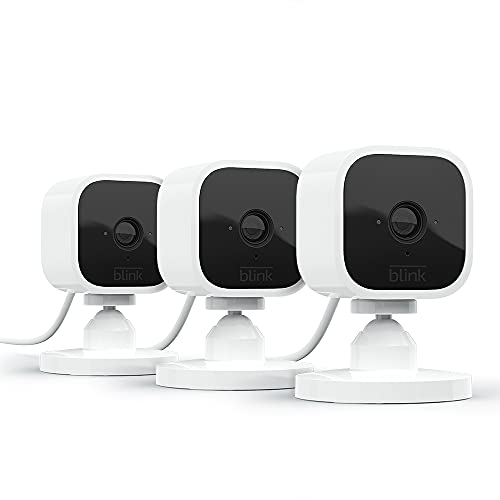
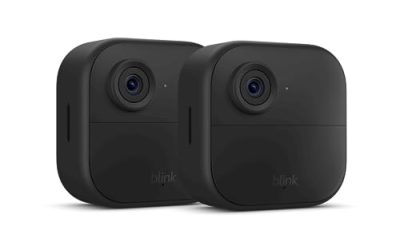
The Blink Mini is a compact indoor plug-in camera that records 1080p HD video with infrared night vision, motion detection and two-way audio, and this listing covers three cameras in white. At two inches by 1.9 inches and 1.7 ounces, the Mini is small enough to sit on a shelf, a desk or a windowsill without drawing attention, which is why it works well as a discreet indoor camera and as a pet camera. The 1080p video is sharp enough to recognise people and pets across a room, and the infrared night vision keeps the picture usable in a dark room. Motion detection sends an alert to the Blink app, and two-way audio lets the owner speak through the camera from anywhere. The 110-degree field of view covers a whole room corner from a single spot, and the camera works with Alexa for voice control and live view on a compatible screen. Because the Mini plugs into an outlet, it records without battery worries, but it needs an outlet nearby and a 2.4 gigahertz Wi-Fi network. Local storage needs a Blink Sync Module with a USB drive, and some smart features need a Blink subscription plan after the included trial. For a small, cheap, always-on indoor camera that can be placed in several rooms at once, this three-camera listing is the simplest way to start.
For a simple, low-cost option, the Blink Mini is the practical pick: a tiny plug-in camera with 1080p video, infrared night vision and two-way audio, in a three-camera listing for several rooms.
Comparison at a Glance
| Product | Video | View | Pet features |
|—|—|—|—||
| Furbo 360 | 1080p, colour night vision | 360-degree rotation | Treat tossing, barking alerts |
| Petcube Cam 360 | 1080p, night vision | 360-degree pan, 8x zoom | Two-way audio |
| Blink Mini, 3-pack | 1080p, infrared night vision | 110-degree fixed view | Two-way audio, motion alerts |
Helping a Puppy Settle While Home Alone
A camera helps, but it works best alongside a routine. A puppy should be exercised and fed before being left alone, because a tired puppy with a full stomach settles far more easily than a restless one. A familiar bed, a chew toy and a piece of clothing that smells of the owner all help the puppy feel safe in the room, and the camera should be placed where it can see the bed and the water bowl, which are the two places the puppy will spend most of its time. Leaving should be calm and uneventful: a long, emotional goodbye teaches the puppy that leaving is a big event, while a quiet exit with a treat from the camera teaches the opposite. The two-way audio should be used gently, because a sudden loud voice from a speaker can startle a puppy that cannot see where the voice comes from. Short absences should come first, building up gradually, and the barking alerts should be checked to learn when the puppy barks and why, rather than simply silencing them.
The camera placement also matters. It should sit at the puppy eye level or slightly above, with a clear view of the room and no furniture blocking the lens. A camera placed too high sees only the top of the puppy, while a camera placed on the floor can be knocked over or chewed. The power cable should be kept out of reach, because a teething puppy will chew anything within reach, including a cable. If the puppy is crated, the camera should be aimed at the crate door, so the owner can see whether the puppy is resting or distressed.
Frequently Asked Questions
What is the best puppy camera?
For an interactive camera, the Furbo 360 in this guide is the leading pick: a 360-degree rotating lens, treat tossing, barking alerts and colour night vision, all built for dogs.
Can I talk to my puppy through a pet camera?
Yes. All three cameras in this guide have two-way audio, so the owner can speak to the puppy and hear the room. The voice should be used gently, because a sudden loud voice can startle a puppy.
Do puppy cameras need a subscription?
Some features do. Cloud recording, video history and detailed barking alerts often need a subscription after a trial, while live viewing and basic alerts usually work without one. Check the listing for what is included.
Where should I place a puppy camera?
At the puppy eye level or slightly above, with a clear view of the bed and the water bowl, and with the power cable out of reach. The camera should see the places where the puppy spends most of its time.
Can a puppy camera help with separation anxiety?
It can help the owner understand when and why the puppy becomes distressed, and a treat tosser or a calm voice can reassure the animal. A camera is not a substitute for training or for advice from a vet or a behaviourist.
Conclusion
The best puppy cameras watch, listen and interact, not just record. The Furbo 360 leads with treat tossing and a rotating lens, the Petcube Cam 360 covers a whole room with a pan and zoom, and the Blink Mini gives a simple, low-cost camera for several rooms at once. Place the camera where it can see the bed and the water bowl, keep the cable out of reach, and use the two-way audio gently.
Disclosure: As an Amazon Associate, stanthonyscalgary.com earns from qualifying purchases.
Related guides
More from Amazon
Programs that pair well with the guide above. Offers and eligibility are set by Amazon and may change.
Free shipping on eligible items, Prime Video and more. Eligible new members can start with a free trial.
Start a Prime free trialAudiobooks and podcasts to listen to on the go. Eligible new members can start with a free trial.
Try Audible freeAd-free music streaming. Eligible new subscribers can start with a free trial.
Try Music Unlimited freeA free business account with business pricing and bulk-buying tools for work, shop or home office.
Create a business accountAs an Amazon Associate we earn from qualifying purchases.
Write Your Review
No reviews yet. Be the first to share your experience!