
Key takeaways
- Find the best indoor cameras for elderly loved ones with clear night vision, two-way audio and simple setup. Compare 4 indoor cameras and pick the right one.
What's inside
As an Amazon Associate I earn from qualifying purchases. This post may contain affiliate links at no extra cost to you.
When an older parent or grandparent lives alone, a small indoor camera can bring real calm to the whole family. The best indoor cameras for elderly loved ones do more than show a room: they let a son or daughter check in during the day, speak through the camera when a parent needs a hand, and get a motion alert if something looks out of place at night. This guide compares four indoor cameras that fit that job well. Each one plugs into a wall outlet, connects to home Wi-Fi, and shows live video on a phone, so the person being looked after does not need to learn new controls. We look at night vision, two-way audio, room coverage, motion alerts, privacy controls, and storage, and we note where each camera fits best, from a single living-room camera to a pan-and-tilt model that watches a whole room. Read on to find the match for your parent’s home and your family’s routine.
At a Glance
Here is the short list. Each camera below is an indoor model with two-way audio and night vision.
| Product | ASIN | Best for |
|---|---|---|
| Ring Indoor Cam (2nd Gen) | B0B6GJBKRK | Simple living-room check-ins with a privacy cover |
| Ring Pan-Tilt Indoor Cam | B0CG2WNRHF | Watching a whole room from one corner |
| TP-Link Tapo C210 | B09Y8TLP25 | Pan-and-tilt coverage with local microSD storage |
| Google Nest Cam Indoor (Wired, 3rd Gen) | B0FN7DLWGF | Google Home households wanting 2K HDR video |
How to Choose the Best Indoor Cameras for Elderly
A camera for an older adult is not the same as a camera for a front porch. The person in front of the lens may move slowly, may not hear a phone ring, and may feel uneasy about being watched. Use the seven points below to judge every camera in this guide.
1. Night vision that shows detail
Many worries about an older adult happen after dark: a trip to the bathroom at 2 a.m., a light left off, a fall in a dim hallway. A camera with color night vision keeps faces and clothing clear enough to tell what is happening, while basic infrared video turns everything grey. Look for a model that names color night vision in its listing, and place the camera where a lamp or hallway light can help it.
2. Two-way audio
A camera that only shows video leaves you watching in silence. Two-way audio lets you speak calmly through the camera, for example “Mom, stay where you are, I am on my way”, and lets your parent answer without reaching for a phone. Noise cancellation helps when a television is on in the same room. All four cameras in this guide include two-way audio.
3. Room coverage
One camera should cover the room where your parent spends most of the day, usually the living room, plus the path to the kitchen or bathroom. A wide-angle fixed camera, such as the Ring Indoor Cam with its 143-degree diagonal view, covers a whole sitting area from a shelf. A pan-and-tilt camera, such as the Ring Pan-Tilt or the Tapo C210, can turn to follow movement and look into corners, so one camera can watch a larger open room.
4. Motion and person alerts
You cannot watch a live feed all day, so alerts matter. Motion alerts tell your phone when something moves in view. Person detection goes a step further and flags a human shape, cutting down on alerts from a curtain moving or a pet crossing the room. Activity zones, where a camera supports them, let you watch a doorway or a bedside and ignore the rest of the room.
5. Privacy controls and consent
A camera in a parent’s home only works with trust. Talk with your parent before you install anything, agree on which rooms the camera watches, and keep cameras out of bedrooms and bathrooms unless your parent asks for one there. A manual privacy cover, such as the one on the Ring Indoor Cam, lets your parent block the lens and microphone with a slide. An LED that glows while the camera streams, such as the green light on the Nest Cam, shows at a glance that the camera is on.
6. Plug-in power
Batteries run down at the worst moment, and climbing a ladder to change them is a poor job for anyone. All four cameras here run on wall power, so they stay on around the clock as long as the outlet has power. Put the camera near an outlet with a short cable run, out of the way of a walking path, so the cord never becomes a trip hazard.
7. Storage and video history
Live viewing answers what is happening now, but stored clips answer what happened an hour ago. The Tapo C210 stores video on a microSD card of up to 512 GB, so clips stay in the home. Ring and Nest cameras keep video history through a plan from the maker, so check what each plan holds before you buy. Decide who in the family can open stored clips, and keep that list short.
One honest limit: none of these cameras detects a fall by itself. They show video and send motion alerts, and a person still needs to respond. A camera works best beside a phone, a personal alarm, and a neighbor or family member who can visit quickly.
Ring Indoor Cam (2nd Gen)
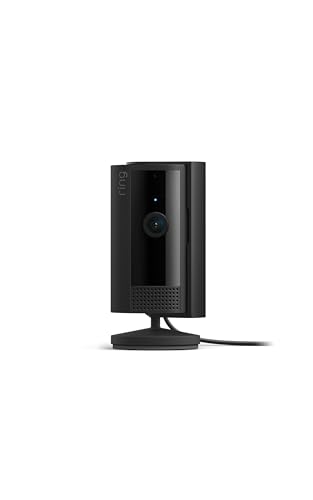
The Ring Indoor Cam (2nd Gen) is the simplest camera in this guide, and that is its strength. It is a small plug-in camera that sits on a shelf or mounts to a wall, and it covers a living room with a wide 143-degree diagonal view. Setup takes 5 to 10 minutes according to the listing, and the camera runs on 2.4GHz Wi-Fi with a 6.5 ft Micro USB power adapter. It works with Alexa, so a family member can pull up the live view with a voice command on an Echo Show.
Key specs:
- 1080p HD video with Live View and Color Night Vision
- 143-degree diagonal field of view (115 degrees horizontal, 59 degrees vertical)
- Two-way audio with noise cancellation
- Customizable motion detection with motion alerts
- Manual audio and video privacy cover
- Plug-in power with 6.5 ft Micro USB adapter; 2.4GHz Wi-Fi; works with Alexa
- One-year limited warranty; colors include Black, White, Blush and Charcoal
Strengths: Its strengths are its wide view, its privacy cover, and its simple setup. The privacy cover matters most in a parent’s home: your parent can slide it closed and know the lens and microphone are blocked. Color night vision keeps the picture clear after dark, and motion alerts mean you only need to open the app when something moves.
Limits: Its limits are its fixed lens and its 1080p resolution. It cannot turn to look into a corner, so a large open room may need two cameras. Video history beyond live viewing goes through a Ring Home plan, so factor that in when you compare it with the Tapo C210, which stores clips on a card.
Best for: a family that wants one simple camera in a living room or hallway, with a privacy cover a parent can control.
Ring Pan-Tilt Indoor Cam

The Ring Pan-Tilt Indoor Cam, a 2024 release, answers the main limit of a fixed camera: it turns. From the Ring app you can pan a full 360 degrees and tilt up and down, so one camera in a corner can look across a living room, check a kitchen doorway, and return to watch a favorite chair. It records in HD video with Color Night Vision, and Two-Way Talk lets you speak with the person in view.
Key specs:
- 360-degree pan coverage with tilt control from the app
- HD video with Color Night Vision
- Live View and Two-Way Talk
- 2024 release; Black finish
- Controlled from the Ring app
Strengths: Its strength is coverage. A single camera can watch a whole open room, which helps when a parent moves between a chair, a kitchen and a hallway. Pan and tilt also help after a move: if the chair shifts or the camera gets bumped, you can re-aim it from your phone instead of visiting to adjust it.
Limits: Its limit is that it is still one camera with one lens: it can only look in one direction at a time, so it cannot watch the front door and the bedroom door in the same moment. Like the fixed Ring camera, stored video history goes through a Ring Home plan.
Best for: an open living area where one fixed view leaves blind spots, and for families who want to re-aim the camera from afar.
TP-Link Tapo C210

The TP-Link Tapo C210 is a pan-and-tilt indoor camera with 2K video, which gives a sharper picture than 1080p models. It pans 360 degrees and tilts 114 degrees, so it covers a full room from a shelf or a wall mount. Its listing names motion, person and baby-cry detection, so the camera can flag movement, a human shape and unusual sounds.
Key specs:
- 2K video (1296p) with night vision up to 30 feet
- 360-degree pan and 114-degree tilt
- Motion, person and baby-cry detection
- Two-way audio with built-in siren
- microSD storage up to 512 GB, plus Tapo Care cloud option
- 2.4GHz Wi-Fi only; corded power; works with Alexa and Google Home
- 3.36 x 3.42 x 4.61 inches; 6.7 ounces
Strengths: Its strengths are its sharp 2K picture, its full-room movement, and its local storage. A microSD card of up to 512 GB holds clips in the home without a monthly plan, which suits families who want video history without another account. The built-in siren can also draw attention if your parent needs help and cannot reach a phone.
Limits: Its limits are its 2.4GHz-only Wi-Fi and its corded power. If your parent’s router puts most devices on 5GHz, you need to keep a 2.4GHz network running for this camera. The microSD card is not included, so you need to add one to use local storage. The camera’s pan motor also makes a faint sound when it moves, which may catch attention at night.
Best for: families who want sharp video, full-room coverage and local storage on a card.
Google Nest Cam Indoor (Wired, 3rd Gen)
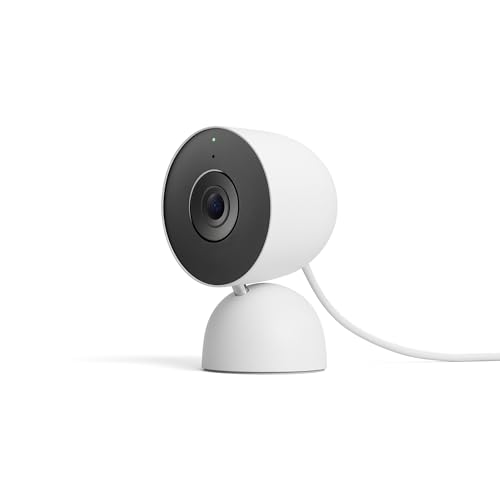
Google Nest Cam Indoor (Wired, 3rd Gen)
The Google Nest Cam Indoor (Wired, 3rd Gen) is the 2025 model in Google’s indoor line, and it brings 2K HDR video to a Google Home household. HDR keeps bright windows and dim corners visible in the same frame, which helps in a living room with a large window. Gemini features in the Google Home app can describe events and let you search video history by asking for something, such as a person at the door.
Key specs:
- 2K HDR video with night vision
- Two-way audio
- Google Home app and Google Account required; not compatible with the Nest app
- Green LED shows when the camera is processing or streaming video
- Encrypted video with two-step verification through a Google Account
- Corded power; 2.24 x 2.52 x 4 inches; Snow color
- Some Gemini features need a Google Home Premium plan
Strengths: Its strengths are its picture quality and its place in a Google Home household. If your parent’s home already uses Google Home, the camera joins the same app as the lights and the speaker, so one family member can manage everything in one place. The green LED is a clear, honest signal that the camera is on.
Limits: Its limits are its ties to Google. It needs a Google Account and the Google Home app, it does not work with the Nest app, and its most advanced Gemini features need a Google Home Premium plan. If your family uses Alexa instead, the Ring cameras fit better.
Best for: a Google Home household that wants the sharpest picture and smart event descriptions.
Comparison Table
| Camera | Video | View | Night vision | Two-way audio | Storage |
|---|---|---|---|---|---|
| Ring Indoor Cam (2nd Gen) | 1080p HD | 143 degrees diagonal, fixed | Color night vision | Yes, with noise cancellation | Ring Home plan |
| Ring Pan-Tilt Indoor Cam | HD | 360-degree pan, tilt | Color night vision | Yes, Two-Way Talk | Ring Home plan |
| TP-Link Tapo C210 | 2K (1296p) | 360-degree pan, 114-degree tilt | Up to 30 feet | Yes, with siren | microSD up to 512 GB, Tapo Care cloud option |
| Google Nest Cam Indoor (Wired, 3rd Gen) | 2K HDR | Fixed | Yes | Yes | Google Home plan for video history |
Frequently Asked Questions
Is it right to place a camera in an elderly parent’s home?
It can be, when your parent agrees to it. Talk first, agree together on which rooms the camera watches, and keep cameras out of bedrooms and bathrooms unless your parent asks for one there. A privacy cover and a visible LED help your parent feel in control. If your parent says no to a room, respect that and find another way to check in, such as a daily phone call or a visit from a neighbor.
Do these indoor cameras need Wi-Fi?
Yes. All four cameras in this guide need home Wi-Fi to show live video and send alerts to your phone. The Ring cameras and the Tapo C210 use 2.4GHz Wi-Fi, so keep that band switched on in the router. Place the camera within a good signal range of the router, and move the router closer or add an extender if the video freezes in a far room.
Can I speak to my parent through the camera?
Yes. All four cameras have two-way audio. Open the app on your phone, hold the talk button, and speak in short, calm sentences. Your parent answers by speaking toward the camera, without touching anything. This helps at night or when your parent has left the phone in another room.
What happens to video if the Wi-Fi drops?
It depends on the model. The Tapo C210 stores video on a microSD card, so clips stay on the card even when Wi-Fi drops. Ring and Nest cameras upload clips to the cloud, so new clips pause until Wi-Fi returns. Live viewing always needs Wi-Fi, so keep the router switched on and the camera near a strong signal.
Conclusion
The best indoor cameras for elderly loved ones share the same core: clear night vision, two-way audio, a view that covers the room, and controls a parent can understand. The Ring Indoor Cam (2nd Gen) is the simple pick for a living room or hallway, with a privacy cover your parent can slide closed. The Ring Pan-Tilt Indoor Cam suits an open room where one fixed view leaves blind spots. The TP-Link Tapo C210 suits families who want sharp 2K video and clips stored on a microSD card in the home. The Google Nest Cam Indoor (Wired, 3rd Gen) suits a Google Home household that wants 2K HDR video and smart event descriptions. Whichever you choose, talk with your parent first, agree on the rooms, and remember that a camera is a helper, not a replacement for visits, calls and a neighbor who can knock on the door.
Disclosure: As an Amazon Associate, we may earn a commission from qualifying purchases made through links in this article, at no extra cost to you.
Related guides
More from Amazon
Programs that pair well with the guide above. Offers and eligibility are set by Amazon and may change.
Free shipping on eligible items, Prime Video and more. Eligible new members can start with a free trial.
Start a Prime free trialAudiobooks and podcasts to listen to on the go. Eligible new members can start with a free trial.
Try Audible freeAd-free music streaming. Eligible new subscribers can start with a free trial.
Try Music Unlimited freeA free business account with business pricing and bulk-buying tools for work, shop or home office.
Create a business accountAs an Amazon Associate we earn from qualifying purchases.




Write Your Review
No reviews yet. Be the first to share your experience!