
Key takeaways
- Compare the best document cameras for classrooms and offices, with sharp capture, flexible arms, and USB or HDMI connections for live demos and lessons.
As an Amazon Associate I earn from qualifying purchases. This post may contain affiliate links at no extra cost to you.
The best document cameras, also called visual presenters or visualizers, turn a desk into a live stage. Place a worksheet, a textbook page, a science sample, or a piece of artwork under the lens, and the whole room can see it on a projector, a large display, or a video call. Teachers use them to model handwriting, demonstrate a maths problem, or show a delicate specimen up close. In offices they serve the same purpose for live demos, design markups, and hybrid meetings where a remote colleague needs to see physical material clearly.
A good document camera is more than a camera on a stick. It needs a sensor sharp enough to keep small print readable, an autofocus system that locks on quickly, and an arm flexible enough to cover a full page or tilt toward a three-dimensional object. Connection options matter too: a USB model plugs into a laptop for video calls and recording, while an HDMI model can feed a projector or television directly with no computer in the room at all.
The three document cameras below are all dedicated visual presenters built for classroom and office use. They differ in sensor resolution, connection style, and extra features such as built-in lighting and microphones, so the comparison table further down this page will help you match a model to your room and your workflow.
What to Look For
1. Sensor resolution and readable text
Resolution decides whether fine print stays legible when projected. An 8 megapixel sensor captures a full letter-size page with clear, readable text, while a 13 megapixel sensor adds extra headroom for zooming into small details such as a diagram label or a handwritten annotation. Look for the still capture resolution, not just the video resolution, since stills are what your audience reads.
2. Fast, reliable autofocus
A document camera that hunts for focus wastes lesson time and distracts the room. Look for a model with a dedicated autofocus button and a focus lock, so you can lock the image once it is sharp and keep it steady while you write or point. A camera that refocuses quickly after you swap a page keeps the flow of a lesson intact.
3. Capture area that covers a full page
Check that the camera can frame a whole letter or A4 page from a normal working height, with room to spare. A flexible multi-jointed arm and a rotating camera head let you widen the view for a large book or narrow it for a close-up of a coin, a leaf, or a circuit board. A head that rotates also helps when you need to show the front of a whiteboard or a wall chart.
4. USB, HDMI, or both
USB connection is the standard choice for video calls, recording, and use with a laptop. HDMI connection sends the live image straight to a projector, television, or interactive display with no computer involved, which suits rooms where the display has no spare computer attached. A dual-mode camera that supports both gives you the most flexibility as rooms and routines change.
5. Frame rate for smooth live video
A frame rate of 30 frames per second at Full HD keeps handwriting and page turns looking smooth on screen. Lower frame rates can make a moving hand look choppy, which is tiring to watch during a long lesson. If you plan to record demonstrations or stream them live, smooth motion is worth prioritizing.
6. Built-in lighting
Classroom lighting is rarely even, and a shadow from the camera arm can fall exactly where you are writing. A built-in LED light on the camera head fills in that shadow and keeps the page bright and even. Models with a light you can switch on and off give you control for glossy pages, where extra light can cause glare.
7. Built-in microphone for calls and recording
If the document camera will join video calls or record lessons, a built-in microphone saves you from adding a separate audio device. It captures your voice while you demonstrate, so remote participants hear the explanation along with the image. For a dedicated classroom projector setup, a microphone matters less, since the room hears you directly.
8. Portability and setup time
Many teachers move between rooms, and many offices share equipment between teams. A document camera that folds flat, weighs little, and works as soon as it is plugged in will actually get used, while a heavy or fiddly unit tends to stay in a cupboard. Look for a foldable arm, a stable base that does not tip when the arm is extended, and software that installs without a long setup process.
Top Picks
1. IPEVO V4K Ultra High Definition 8MP USB Document Camera

The IPEVO V4K is a classroom staple for good reason. Its 8 megapixel Sony CMOS sensor captures stills at up to 3264 by 2448 pixels and streams live video at 30 frames per second in Full HD, which keeps handwriting, textbook print, and small diagrams crisp on a projector or a shared screen. The multi-jointed arm folds flat for storage and unfolds to cover a full page, and the camera head rotates so you can aim it at a wall chart, a whiteboard, or a three-dimensional object without moving the base.
Setup is deliberately simple. The V4K connects to a computer over a single USB cable and works with Windows, Mac, and Chromebook, so it fits almost any school or office laptop. The free IPEVO Visualizer software adds useful tools such as snapshot capture, video recording, image rotation, and annotation, and the camera also works with common video conferencing and classroom apps as a standard USB video source. A built-in autofocus button and a focus lock on the base keep the image sharp while you write.
There are two limits to keep in mind. The V4K is a USB-only model, so it needs a computer between the camera and the display; if your room has a projector with no computer attached, the dual-mode pick below is the better fit. It also has no built-in light or microphone, so in a dim room you may want to position a desk lamp to even out the page, and for recorded lessons you will rely on the computer microphone. For straightforward laptop-based teaching, live demos, and remote lessons, the V4K remains a dependable and widely used choice.
2. IPEVO VZ-R HDMI/USB Dual Mode 8MP Document Camera
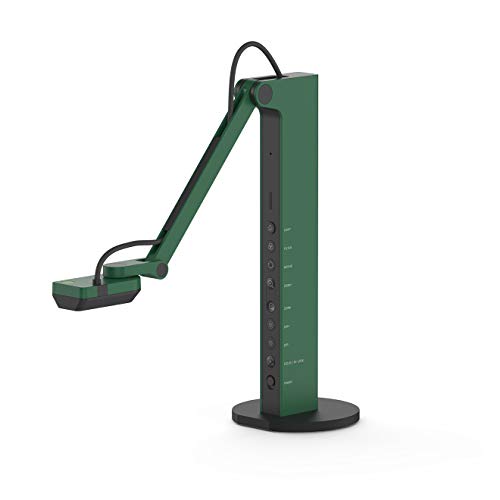
The IPEVO VZ-R solves the one problem that stops many document cameras from being used: the missing computer. Alongside its USB connection, the VZ-R adds an HDMI output, so it can feed a projector, television, or interactive flat panel directly, with no laptop in the room at all. In USB mode it captures up to 3264 by 2448 pixels for calls and recording, and in HDMI mode it sends a Full HD image at 30 frames per second straight to the display. That dual-mode design makes it the most flexible camera in this guide for rooms that change use from one period to the next.
The VZ-R shares the same 8 megapixel sensor class as the V4K, and its controls sit on the base within easy reach: autofocus, zoom, exposure adjustment, image rotation, and a built-in LED light that brightens the page under the lens. The multi-jointed arm folds for transport between rooms, and the camera head rotates for showing objects from different angles. It works with Windows, Mac, and Chromebook over USB, and the free IPEVO Visualizer software is available for capture and annotation when a computer is connected.
The main point to note is that this listing is for the original 8 megapixel VZ-R, and IPEVO also sells a newer VZ-R Ultra with a higher resolution sensor, so it is worth confirming the model name and sensor on the listing before ordering. The VZ-R also has no built-in microphone, so video calls will use your computer audio. For a teacher whose room has a display but no dedicated computer, or for anyone who wants one camera that works both ways, the VZ-R is the most versatile pick here.
3. OKIOLABS OKIOCAM S2 Pro 13MP USB Document Camera
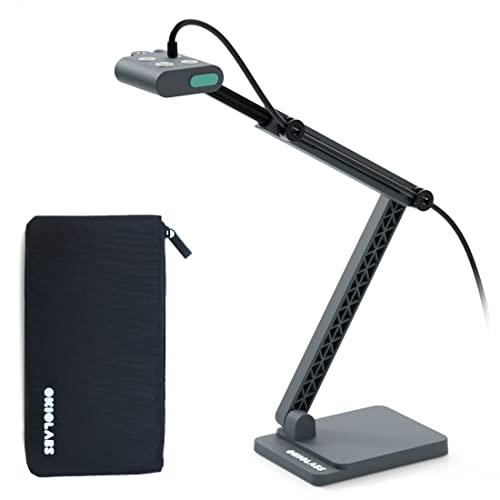
The OKIOLABS OKIOCAM S2 Pro is the highest-resolution camera in this guide, built for teachers and presenters who need to zoom deep into fine detail. Its 13 megapixel sensor captures up to 4K stills, which means small print, fine diagram labels, and delicate handwriting stay readable even when the image is enlarged on a large display. Live video runs smoothly at Full HD, and the foldable arm adjusts to cover a full page or to focus tightly on a small object such as a mineral sample, a coin, or a piece of circuitry.
The S2 Pro also packs in the most extras. A built-in LED light brightens the working area, a built-in microphone captures your voice for calls and recordings, and the OKIOPoint smart pointer lets you highlight parts of the live image on screen, which is a genuinely useful teaching aid during a demonstration. A USB-C adapter is included for newer laptops, a carry bag is in the box for moving between rooms, and the camera works with PC, Mac, and Chromebook as a standard USB video source.
As with any feature-rich model, the extra capability comes with a slightly longer learning curve, so it is worth spending a few minutes with the included software before the first lesson. The camera is also USB-only, so a computer is needed between the camera and the display. For teachers who record lessons, run hybrid classes, or regularly show fine detail that a lower-resolution camera would blur, the S2 Pro is the most capable document camera in this guide.
Comparison at a Glance
| Camera | Sensor and Capture | Connection | Extras |
|---|---|---|---|
| IPEVO V4K | 8MP, up to 3264 by 2448 stills, Full HD at 30 frames per second | USB | Folding arm, rotating head, Visualizer software |
| IPEVO VZ-R | 8MP, up to 3264 by 2448 stills, Full HD at 30 frames per second | USB and HDMI dual mode | Built-in LED light, folding arm, works without a computer |
| OKIOLABS OKIOCAM S2 Pro | 13MP, 4K stills, Full HD live video | USB with USB-C adapter | Built-in light and microphone, OKIOPoint pointer, carry bag |
FAQ
What is a document camera used for?
A document camera displays physical material live on a screen. Teachers place worksheets, books, and objects under the lens so the whole class can follow along. Offices use them for live product demos, design markups, and showing documents to remote colleagues during video calls. They also record lessons and demonstrations for later viewing.
Do I need a USB or an HDMI document camera?
Choose USB if the camera will connect to a laptop for video calls, recording, or classroom software, since USB models appear as a standard video source. Choose a dual-mode USB and HDMI model, such as the IPEVO VZ-R, if the camera will also feed a projector or television directly with no computer in the room. HDMI-only use is simpler for projection, while USB adds recording and conferencing.
Can a document camera work as a webcam?
Yes, in most cases. USB document cameras appear to a computer as a standard video source, so video conferencing apps can select them just like a webcam. The camera head can be aimed at the presenter or at the desk, which makes a document camera a flexible second camera for hybrid lessons and meetings.
How large an area can a document camera capture?
Most document cameras in this guide cover a full letter or A4 page from a normal working height, and some can frame an even larger area when the arm is raised. For three-dimensional objects, the camera head can be tilted or rotated to show the object from the side. Always check the capture area on the listing if you regularly show large books or oversized sheets.
Which software works with these document cameras?
All three cameras work as standard USB video sources, so they can be selected inside video conferencing apps and most classroom software. IPEVO supplies its free Visualizer software for capture, recording, and annotation with the V4K and VZ-R, while OKIOLABS supplies its own software for the S2 Pro. No subscription is required for the basic capture and display features.
Conclusion
The best document cameras are the ones that fit your room and your routine. The IPEVO V4K is the straightforward USB choice for laptop-based teaching and remote lessons, with a proven design and simple setup. The IPEVO VZ-R adds HDMI output, so it works with a projector or display even when no computer is available, which makes it the most flexible option for shared rooms. The OKIOLABS OKIOCAM S2 Pro brings the sharpest sensor, a built-in light and microphone, and a smart pointer for teachers who need the most detail and the most features. Pick the connection style your room needs first, then let resolution and extras decide the rest.
Disclosure: As an Amazon Associate, stanthonyscalgary.com earns from qualifying purchases.
Related guides
More from Amazon
Programs that pair well with the guide above. Offers and eligibility are set by Amazon and may change.
Free shipping on eligible items, Prime Video and more. Eligible new members can start with a free trial.
Start a Prime free trialAudiobooks and podcasts to listen to on the go. Eligible new members can start with a free trial.
Try Audible freeAd-free music streaming. Eligible new subscribers can start with a free trial.
Try Music Unlimited freeA free business account with business pricing and bulk-buying tools for work, shop or home office.
Create a business accountAs an Amazon Associate we earn from qualifying purchases.
Write Your Review
No reviews yet. Be the first to share your experience!