
Our Short List of 3

- Best for: New owners who want controllers stored neatly and charged after every session.
- Brand: PlayStation
- Product: DualSense Charging Station
- Capacity: Charges two DualSense wireless controllers
- Platform: PlayStation 5

- Best for: New owners who play at night, join party chat, or share a room with others.
- Brand: PlayStation
- Model name: PULSE 3D
- Model number: 3005688
- Product: Wireless headset

- Best for: New owners who intend to stream or record themselves playing from the console.
- Brand: PlayStation
- Product: HD Camera
- Platform: PlayStation 5
All 4 Picks at a Glance
| Product | Specs | Action |
|---|---|---|
| PlayStation DualSense Charging Station |
| Check price on Amazon |
| PlayStation Pulse 3D Wireless Headset |
| Check price on Amazon |
| PlayStation 5 HD Camera |
| Check price on Amazon |
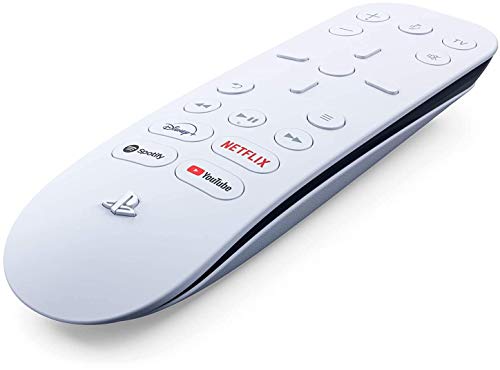 PlayStation Media Remote |
| Check price on Amazon |
Key takeaways
- First-setup PS5 essentials for new owners: a charging station, Pulse 3D headset, external game drive, HD camera and media remote for day one use.
What's inside
As an Amazon Associate I earn from qualifying purchases. This post may contain affiliate links at no extra cost to you.
Unboxing a PS5 leaves a short, practical checklist rather than a shopping spree: controllers need somewhere to charge, games need somewhere to live, and the console quickly becomes the household’s film and streaming box as well as its game machine. The must-have decision is separating those day-one needs from upgrades that can happily wait a season. Pro controllers, racing wheels, and virtual reality all have their moment, but none of them matters if the single pad is flat when friends arrive.
New owners setting up a first PS5 are the readers here, and the list deliberately stops at essentials. Products were picked from the names and specifications on their Amazon listings, favouring official PlayStation hardware and licensed storage that covers charging, audio, game space, streaming, and media control without overlap. Each item answers a question a new owner will ask within the first month, which is the working definition of essential used throughout this checklist.
Quick Picks
As an Amazon Associate we earn from qualifying purchases
| Product | Best for | Key spec from title |
|---|---|---|
| PlayStation DualSense Charging Station | A tidy home base for controllers | Charges two DualSense controllers |
| PlayStation Pulse 3D Wireless Headset | Private audio and chat from day one | Wireless headset for PlayStation 5 |
| Seagate Game Drive for PlayStation Consoles 2TB | Room for a growing game library | 2TB external hard drive, USB 3.2 Gen 1, officially licensed |
| PlayStation 5 HD Camera | Streaming your face alongside gameplay | HD Camera for PlayStation 5 |
| PlayStation Media Remote | Controlling films and apps from the sofa | Media playback controls, powers on the PS5 |
How to Choose
Cover Charging Before Anything Else
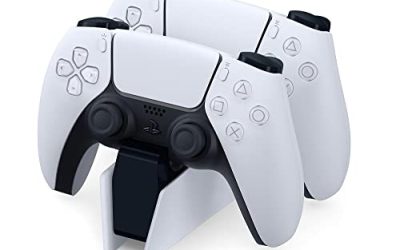
A new setup usually includes one controller and a cable, which works until the pad dies mid-game or the cable migrates to a phone. A dedicated charging station gives the controller a fixed home and keeps it full between sessions, and Sony’s version holds two pads so a future second controller slots straight in. Place charging at the top of a first-setup list because it protects every other purchase: headsets, games, and subscriptions all assume a controller that turns on. It is also the accessory guests understand instantly when they visit.
Give a Growing Library Somewhere to Go
Game installs are large, and a new owner’s library grows fastest in the first months as bundles and back-catalogue titles pile up. External storage like the Seagate Game Drive suits that phase well, because it archives PS5 games and stores and plays PS4 games directly, freeing internal space for the PS5 titles currently in rotation. Understand the boundary before buying: PS5 games must sit on internal storage to launch. For a first setup, an external drive delays the day you open the console to fit an internal SSD, which many new owners prefer to postpone.
Plan Audio for the People Around You
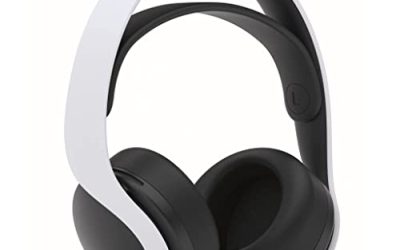
A console in a lounge or bedroom rarely has the room to itself. A wireless headset keeps game sound and party chat private, lets you play after others are asleep, and adds a microphone the television cannot provide. The Pulse 3D was built as the PS5’s companion headset, which keeps pairing and on-screen controls simple for a first-time owner. If the console lives in a dedicated gaming room with speakers and no neighbours, audio can slide down the checklist, but for most shared homes it belongs in the first box of extras.
Think About the Console’s Second Job
Within a week, most PS5s are also streaming players and Blu-ray machines, and a game controller is a clumsy remote for a film. The Media Remote exists for that second job, with playback buttons and the ability to power the console on and adjust a compatible television. The HD Camera serves the other common second job, streaming, for owners who plan to broadcast. Neither is essential for pure offline gaming, yet both are cheap in effort compared with months of fumbling through menus with a D-pad every single night.
The 5 Best Options
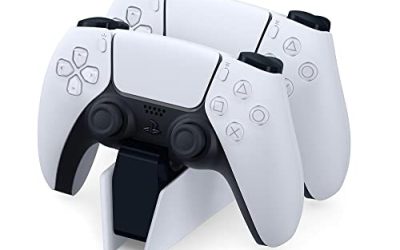
PlayStation DualSense Charging Station
- Best for: New owners who want controllers stored neatly and charged after every session.
- Brand: PlayStation
- Product: DualSense Charging Station
- Capacity: Charges two DualSense wireless controllers
- Platform: PlayStation 5
New owners who want controllers stored neatly and charged after every session.
The dock is made for DualSense controllers, so older DualShock pads from a PS4 setup will not use it.
Every first setup needs an answer to the flat controller problem, and Sony’s station is the simplest one available. It holds two DualSense controllers in a dock that matches the console, so the pads live in one visible place and charge between sessions instead of competing for a USB cable. Starting with the official station also future-proofs the inevitable second controller purchase, since the spare slot is already waiting. Among all five items here, this is the one whose absence gets noticed fastest, usually during the second week of ownership.
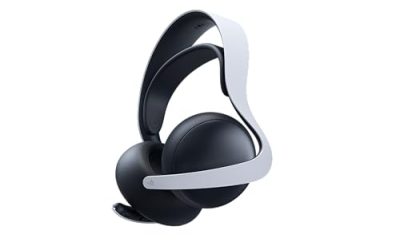
PlayStation Pulse 3D Wireless Headset
- Best for: New owners who play at night, join party chat, or share a room with others.
- Brand: PlayStation
- Model name: PULSE 3D
- Model number: 3005688
- Product: Wireless headset
New owners who play at night, join party chat, or share a room with others.
Wireless headsets need charging like controllers do, so build a routine for it alongside the pads rather than discovering a flat battery mid-session.
Pulse 3D earns its essential label by solving noise, chat, and immersion in a single first purchase. It is the headset Sony positioned for the PS5 from the start, tuned around the console’s 3D Audio, and it connects wirelessly so a cable never crosses the room. New owners who join friends online need its microphone immediately, while solo players gain late-night volume without disturbing anyone. Later upgrades in audio exist, of course, but as the first headset in a new setup this one covers every basic requirement without research fatigue.
Seagate Game Drive for PlayStation Consoles 2TB
This licensed Seagate drive is the low-effort answer to the first storage squeeze a new owner meets. The listing describes a 2TB external hard drive on USB 3.2 Gen 1, officially licensed for PlayStation consoles, and Seagate’s description explains that it works with PS5 and PS4, archives PS5 games, and stores and plays PS4 games directly from the drive. That split suits a starter library perfectly: current PS5 favourites stay internal, while the back catalogue and overflow live here until called up.
Specs
- Brand: Seagate
- Capacity listed: 2TB
- Product named in the title: Game Drive for PlayStation Consoles, external hard drive
- Interface named in the title: USB 3.2 Gen 1
- Licensing named in the title: Officially licensed
- Model reference in the title: STLV2000101
Best for: New owners building a library quickly who want simple extra space without opening the console.
Watch out for: PS5 games can be archived on this drive but must be moved back to internal storage to play, so keep your current rotation on the console itself.
ASIN: B0CH87VY5B
PlayStation 5 HD Camera
- Best for: New owners who intend to stream or record themselves playing from the console.
- Brand: PlayStation
- Product: HD Camera
- Platform: PlayStation 5
New owners who intend to stream or record themselves playing from the console.
Check the camera’s stated purpose against your plans, since it serves console broadcasting and is not a general webcam for a computer setup.
For a new owner who plans to stream, the HD Camera belongs in the first setup rather than on a later wishlist, because the console’s broadcast features expect a camera from the start. Sony’s camera is the model made for the PS5, and it lets the console place your picture within your gameplay broadcast without capture cards or a computer in between. Owners with no streaming plans can skip it entirely and lose nothing, which is the honest test for any essential list: this one is essential specifically to the growing group who buy a console partly to create.
PlayStation Media Remote
- Best for: Households where the PS5 doubles as the main streaming and film player.
- Brand: PlayStation
- Product: Media Remote
- Controls named in the listing: Play/pause, fast forward, and fast reverse buttons
- Console control named in the listing: Powers on the PS5 and navigates its menus
Households where the PS5 doubles as the main streaming and film player.
Television control depends on a compatible TV and may need a PS5 system software update, as the listing itself notes.
The Media Remote is the smallest purchase here and the one other people in the house will thank you for. Its listing describes built-in play, pause, fast forward, and fast reverse controls, the ability to power on the PS5 and navigate its menus, and an IR transmitter that adjusts volume and power on compatible televisions. Film nights stop requiring a hunt for the controller, and parents or partners gain a familiar way to run the entertainment apps. In a games-only room it matters less, but in a lounge it is used daily.
Which One Fits Your Situation
Your Console Arrived This Week
Work down the list in order: charging station, headset, then the Seagate drive once the first big installs land. That sequence covers power, sound, and space, the three limits every new owner meets in the first month. The camera and remote can follow once you know whether streaming or film nights feature in your routine, rather than buying for habits you have not formed yet.
The PS5 Lives in the Family Lounge
Prioritise the Media Remote and the Pulse 3D. The remote hands everyone a simple way to run films and apps, while the headset keeps your gaming out of the room’s shared soundscape after hours. Add the charging station next so controllers stop colonising the sofa, and the setup will feel considered instead of improvised within a fortnight.
You Bought the Console to Start Streaming
The HD Camera jumps to the front of your queue, paired with the Pulse 3D for clear game audio and your voice on broadcast. Keep the charging station in the plan as well, since a controller dying on stream is the kind of small failure audiences remember. Storage can wait until your recording habit, not your game library, starts demanding it.
Games Are Already Queuing to Install
Go to the Seagate Game Drive first and treat the rest as a second wave. Two terabytes of licensed external space absorbs the back catalogue and archived titles immediately, with no tools and no opening the console. When the internal drive still fills with current PS5 games later, that is the moment to research an internal SSD as a separate, deliberate upgrade.
Common Mistakes
- Filling the first order with decorative extras while controllers still charge from a loose cable.
- Expecting an external drive to launch PS5 games without moving them back to internal storage.
- Skipping a headset in a shared home, then keeping game volume low enough to miss dialogue and cues.
- Buying a camera for a computer streaming desk when the listed model is made for console broadcasting.
- Assuming the Media Remote controls every television, without checking the compatible TV wording on its listing.
Frequently Asked Questions
What should a new PS5 owner buy first?
Start with the DualSense Charging Station, because it keeps the controller ready every day and holds the second pad most owners add soon after. Follow with a Pulse 3D headset if you share the room or play online, then external storage once installs begin competing for the internal drive.
Is an external drive enough, or do I need an internal SSD later?
For a first setup, an external drive like the Seagate Game Drive covers archiving and PS4 games well. An internal SSD becomes relevant when several large PS5 games need to stay installed and playable at once, since those titles run only from internal or M.2 storage. Many owners add the SSD months later, not on day one.
Do I really need the HD Camera to stream from PS5?
If you want your own image inside a broadcast made directly from the console, a camera is part of that setup, and the PlayStation 5 HD Camera is the model listed for the console. Players who stream gameplay without a face view, or who never stream at all, can leave it off the checklist entirely.
Can the Media Remote replace my TV remote?
Partly. The listing says its IR transmitter adjusts volume and power settings on compatible TVs, and it powers the PS5 on and navigates its menus, which covers the everyday film-night routine. Full television settings and other devices still belong to the TV’s own remote, so think of it as the console’s remote rather than a universal one.
Related guides
More from Amazon
Programs that pair well with the guide above. Offers and eligibility are set by Amazon and may change.
Free shipping on eligible items, Prime Video and more. Eligible new members can start with a free trial.
Start a Prime free trialAudiobooks and podcasts to listen to on the go. Eligible new members can start with a free trial.
Try Audible freeAd-free music streaming. Eligible new subscribers can start with a free trial.
Try Music Unlimited freeA free business account with business pricing and bulk-buying tools for work, shop or home office.
Create a business accountAs an Amazon Associate we earn from qualifying purchases.
Write Your Review
No reviews yet. Be the first to share your experience!