
Key takeaways
- See the newest gaming controllers compared by stick tech, triggers, polling and platform support, with five current-generation picks explained.
What's inside
As an Amazon Associate I earn from qualifying purchases. This post may contain affiliate links at no extra cost to you.
Shopping the newest controller generation means deciding which recent hardware ideas genuinely change play: anti-drift stick sensors, faster wireless response, switchable trigger behavior, and pads built for the latest consoles. The trap is paying for a fresh model name while the underlying connection or platform support does not match the devices sitting under your television today.
This selection is for upgraders and new-console owners who want current models rather than old stock. Every pick comes from a recent Amazon listing, including a controller explicitly sold as a current-year Xbox model, the Pro Controller built for Nintendo’s newest system, and 8BitDo’s Ultimate 2 line with its updated joystick technology named in the title. Where a listing names a launch window or a console generation, that wording is quoted in the specs rather than assumed, so you can separate a genuine update from a relabelled older pad.
Quick Picks
As an Amazon Associate we earn from qualifying purchases
| Product | Best for | Key spec from title |
|---|---|---|
| Xbox Wireless Gaming Controller (2025) Shock Blue | Current Xbox and PC setup refresh | Play on Xbox, Windows, Android, iOS and more, per title |
| Nintendo Switch 2 Pro Controller | Owners of Nintendo’s newest console | Pro Controller for Nintendo Switch 2 |
| 8BitDo Ultimate 2 Bluetooth Controller | Switch 2 and Windows with modern sticks | TMR joysticks with switchable triggers |
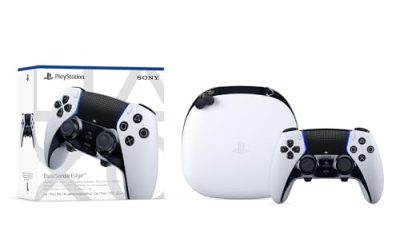
| PlayStation DualSense Edge Wireless Controller Midnight Black | PlayStation players wanting replaceable sticks | DualSense Edge in Midnight Black finish |
| 8BitDo Pro 2 Bluetooth Controller Hall Effect Update | Retro layout with updated internals | Hall Effect joystick update |
How to Choose
Stick Sensor Technology Is the Big Generational Story
Recent models advertise how their sticks sense movement, and the wording matters. The 8BitDo Ultimate 2 Bluetooth listing names TMR joysticks, its Pro 2 refresh names a Hall Effect joystick update, and both phrases describe specific modern sensor approaches rather than cosmetic changes. When a listing still says nothing about stick technology, treat that silence as information too. If you have worn out sticks before, prioritize models whose product pages name their sensor system clearly and early.
Trigger Design Has Split Into Camps
Look at what the newest listings promise about triggers. The Ultimate 2 Bluetooth title highlights switchable Hall effect and tactile triggers, meaning one pad tries to serve both long-travel racing inputs and short, quick presses. PlayStation’s Edge follows the customization route with trigger stops in its design language. Decide by genre: drivers usually want travel and smoothness, shooter players often want a shorter stop, and a switchable design is the hedge when your library contains both styles in equal measure.
Polling, Latency, and Connection Claims
Current-generation marketing loves speed language, so slow down and read it precisely. Some listings for the Ultimate 2 family discuss fast wireless performance and high polling behavior in their surrounding materials, while standard console pads focus on platform integration instead. A high polling figure only helps on the platform and connection mode where it applies. Check whether the quoted performance belongs to wired use, a dongle, or Bluetooth, because those three routes rarely perform identically on the same controller.
Buy for the Console You Own Now
New hardware generations create confusing shelves, where a pad for the newest Nintendo system sits beside one for the previous machine with a nearly identical name. The Switch 2 Pro Controller listing is explicit about its system, and that clarity is what you want. Likewise, the Xbox controller below is labeled as a dated current model in its title. Match the generation named in the listing to your console box at home, not to the console you hope to buy later.
The 5 Best Options
Xbox Wireless Gaming Controller (2025) Shock Blue
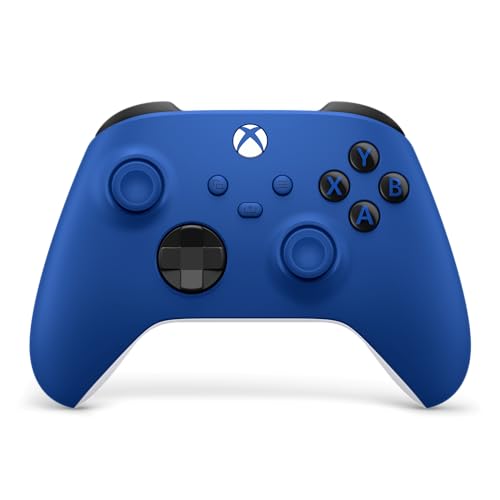
Anyone refreshing an Xbox and Windows setup around the current model should start here, because the listing dates the controller and lists an unusually wide playground: Xbox, Windows, Android, iOS, Fire TV devices, smart TVs, and VR headsets. Textured grip and the familiar modern Xbox layout mean the upgrade feels instant rather than experimental. Shock Blue also solves a small household problem, since a distinctive color makes your pad easy to spot among older black controllers in the same drawer.
Specs
- Dated current model year named in the listing title
- Shock Blue finish
- Play on Xbox, Windows, Android, and iOS, per the title
- Also lists Fire TV Sticks, smart TVs, and VR headsets
- Textured grip in related current listings
- Wireless, Bluetooth, and USB-C connectivity in related current listings
Best for: Replacing an aging Xbox pad with the current model for console, PC, and streaming devices.
Watch out for: Older Xbox controllers look nearly identical, so confirm the dated model wording on the listing you order.
ASIN: B0F1J12R6N
Nintendo Switch 2 Pro Controller

Owners of Nintendo’s newest console who play docked for hours are the clear audience. The listing names it directly as the Nintendo Switch 2 Pro Controller, separating it from the long-running earlier Pro Controller, and that generational match is the whole reason to choose it. Expect the full-size comfort that made the Pro line popular, now bought specifically for the new system rather than carried over by assumption. For a new console setup, removing controller guesswork on day one is worth more than novelty features.
Specs
- Pro Controller for Nintendo Switch 2, per the title
- Full-size pro-style gamepad
- Official Nintendo controller for the newest system
- Wireless console connection
- Black finish in product imagery descriptions
Best for: New-console owners who want the matching official pro pad for docked play.
Watch out for: Do not confuse it with the earlier Switch Pro Controller listing; the system name in the title must match your console.
ASIN: B0F3VTFD6J
8BitDo Ultimate 2 Bluetooth Controller

This is the enthusiast’s current-generation pick, because its title packs in TMR joysticks, switchable Hall effect and tactile triggers, vibration, and motion control for Switch, Switch 2, and Windows PC. That combination speaks to players who move between Nintendo and PC libraries and want one modern pad whose sticks and triggers adapt to the game. The Ultimate 2 name also signals 8BitDo’s flagship tier, above its simpler models. If you read spec sheets for fun, this listing was written for you.
Specs
- Bluetooth controller for Switch, Switch 2, and Windows PC, per the title
- TMR joysticks named in the title
- Switchable Hall effect and tactile triggers named in the title
- Vibration and motion control named in the title
- Black finish
- Ultimate 2 flagship model
Best for: Switch 2 and Windows players who want modern stick sensors and adaptable triggers in one pad.
Watch out for: Confirm Bluetooth is the connection you want, since 8BitDo also sells Ultimate models built around other connection types.
ASIN: B0F194QFT2
PlayStation DualSense Edge Wireless Controller Midnight Black

PlayStation players who burn through sticks or crave control over every input should examine the Edge in its Midnight Black edition, identified in listings by its own model code and recent release timing. The Edge design centers on changeable stick caps, mappable back buttons, remappable inputs, saved profiles, and replaceable stick modules described in its product materials. This Midnight Black version gives that pro formula a stealthier finish than the launch white. It remains a PlayStation-first tool, and it makes no apology for that focus.
Specs
- DualSense Edge wireless controller in Midnight Black
- Changeable stick caps described in product materials
- Mappable back buttons described in product materials
- Quick-swap control profiles described in product materials
- Remappable buttons described in product materials
- Carrying case as part of the Edge package design
Best for: Dedicated PlayStation players who customize profiles and want replaceable stick modules.
Watch out for: Check the exact color edition and model code, because several Edge listings exist for different finishes.
ASIN: B0DSQQ1P8D
8BitDo Pro 2 Bluetooth Controller Hall Effect Update

Some players love a classic symmetrical layout but refuse to buy yesterday’s internals, and this refreshed Pro 2 answers them. The listing names the Hall Effect joystick update directly in its title, in a Transparent Purple finish, for Switch and Switch 2, PC, Windows, Android, and Mac-style ecosystems in related Pro 2 listings. Two back buttons and the familiar Pro 2 shape carry over the model’s identity while the stick update modernizes the part that wears first. It is a nostalgia purchase with a practical core.
Specs
- Bluetooth controller with Hall Effect joystick update, per the title
- Transparent Purple finish
- For Switch and Switch 2 in the updated listing title
- PC and Windows support named in the listing title
- Pro 2 model with back buttons in the Pro 2 design
- Symmetrical stick layout
Best for: Players who prefer a classic layout but want updated stick hardware for modern systems.
Watch out for: Pro 2 listings span older and updated versions, so the Hall Effect wording must appear on the exact listing you choose.
ASIN: B0BFGSNLTM
Which One Fits Your Situation
You Just Bought a New Console
Pair the pad to the box: the Switch 2 Pro Controller for Nintendo’s newest system, and the dated Xbox Wireless Gaming Controller for a fresh Xbox or Windows setup. Buying the matching current pad avoids the quiet disappointments of older stock, from missing system buttons to tired batteries. Start native, then consider a cross-platform second pad later if your library grows beyond one machine.
Stick Wear Ended Your Last Controller
Look first at the models whose listings name their stick technology: TMR in the Ultimate 2 Bluetooth, and the Hall Effect update in the Pro 2. PlayStation loyalists have a different answer in the Edge, whose replaceable stick module approach tackles the same fear from a serviceability angle. Choose the philosophy you trust, sensor design or replaceable parts, and buy that model deliberately.
Your Library Mixes Racers and Shooters
The Ultimate 2 Bluetooth was built for your indecision, with switchable trigger behavior named right in its title, so one pad can present long travel for driving and a tactile short press for shooting. The Edge is the alternative if you live on PlayStation and prefer physical customization plus profiles. Either route beats owning two mid-tier pads that each suit only half your shelf.
You Prefer a Classic Shape With Modern Parts
Take the refreshed Pro 2 and enjoy the symmetrical layout your hands learned years ago, now paired with the Hall Effect update in its listing. It will not shout about being current, and that restraint is charming. It suits retro collections, platformers, and PC indie libraries where D-pad placement and a familiar silhouette matter more than aggressive pro features.
Common Mistakes
- Assuming a familiar controller name means the newest version, when updated and older listings sit side by side.
- Mixing up the Pro Controller generations and ordering a pad named for the wrong Nintendo system.
- Believing a headline polling or latency claim applies to every connection mode the pad offers.
- Choosing a color edition of a pro controller without checking that the model code matches the full version.
- Ignoring trigger style, even though racers and shooters ask for opposite behavior from the same two triggers.
Frequently Asked Questions
What actually makes a controller current-generation?
A mix of platform match and hardware updates: a pad named for the newest console, stick sensors such as TMR or Hall Effect designs in the listing, adaptable triggers, and current connection options. No single feature defines the generation. The listings here each show at least one of those markers in their own wording, which is how you should judge any model you are considering elsewhere.
Are TMR and Hall Effect joysticks the same thing?
No, they are different sensing approaches, and makers name them separately for a reason, as the two 8BitDo listings in this article demonstrate. For a buyer, the practical point is simpler: both represent current stick technology that listings highlight prominently. Compare them alongside layout, triggers, and platform support rather than treating either term as an automatic winner.
Should I replace a working older controller with a new model?
Only when the new model solves a problem you actually have: a console generation change, worn sticks, a trigger style that fights your games, or a connection your new devices need. A working pad that fits your hands and platforms is not obsolete just because a fresher listing exists. Upgrade for a reason you can name in one sentence.
Why do pro controllers emphasize replaceable parts now?
Because sticks and caps are wear items, and current pro designs such as the DualSense Edge build their pitch around swapping those parts and saving profiles instead of replacing the whole pad. Listings describe changeable caps, mappable back buttons, and replaceable stick modules in plain language. If you play daily, that serviceability can matter more than any cosmetic edition.
Related guides
More from Amazon
Programs that pair well with the guide above. Offers and eligibility are set by Amazon and may change.
Free shipping on eligible items, Prime Video and more. Eligible new members can start with a free trial.
Start a Prime free trialAudiobooks and podcasts to listen to on the go. Eligible new members can start with a free trial.
Try Audible freeAd-free music streaming. Eligible new subscribers can start with a free trial.
Try Music Unlimited freeA free business account with business pricing and bulk-buying tools for work, shop or home office.
Create a business accountAs an Amazon Associate we earn from qualifying purchases.

Write Your Review
No reviews yet. Be the first to share your experience!