
Our Short List of 3
- Best for: Players who game at night in shared living spaces
- Platform: PlayStation 5
- Features: Fine-tuned for 3D Audio on PS5 consoles
- Microphones: Dual noise-cancelling microphones
- Battery: Built-in rechargeable battery, with easy-access controls

- Best for: Families whose controllers end up scattered around the room
- Model: DualSense Charging Station, model number 3005837
- Capacity: Charges up to two DualSense wireless controllers
- Design: Click-in design listed on the product page
- Benefit listed: Frees up console USB ports

- Best for: Players who rotate through many large installed games
- Capacity listed: 8TB
- Interface: NVMe, M.2 SSD with heatsink
- Speed listed in the title: Up to 7,200MB/s read
- Feature listed: Officially licensed product for PS5 consoles
All 4 Picks at a Glance
| Product | Specs | Action |
|---|---|---|
| PlayStation PULSE 3D Wireless Headset |
| Check price on Amazon |
| PlayStation DualSense Charging Station |
| Check price on Amazon |
| WD_BLACK SN850P NVMe SSD for PS5, 8TB |
| Check price on Amazon |
 PlayStation Portal Remote Player |
| Check price on Amazon |
Key takeaways
- Plan PS5 accessory buying for the sales season with timing, compatibility and stock checks, plus five verified picks for charging, audio and storage.
What's inside
As an Amazon Associate I earn from qualifying purchases. This post may contain affiliate links at no extra cost to you.
The hard part of shopping this season is not finding accessories, it is deciding which gaps in your setup deserve attention first and which purchases can safely wait until later. A second controller, dependable charging, clearer audio and more storage solve different problems, so ranking your own bottleneck before the sales period begins keeps the basket focused and avoids duplicate gear. That ranking also tells you what to ignore, however tempting a crowded seasonal display may look in the moment.
Households sharing one console and solo players with growing libraries will both find a route through this guide. Each option was selected from the name and specifications shown on its Amazon page, covering official PlayStation hardware alongside a licensed storage drive, so the comparisons rest on stated compatibility and features rather than guesswork about your room.
Quick Picks
As an Amazon Associate we earn from qualifying purchases
| Product | Best for | Key spec from title |
|---|---|---|
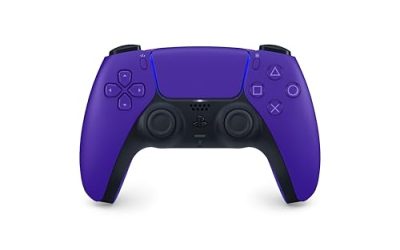
| PlayStation DualSense Wireless Controller | A second player joining without swapping pads | Haptic feedback and adaptive triggers |
| PlayStation PULSE 3D Wireless Headset | Hearing game audio clearly after others are asleep | Tuned for 3D Audio on PS5 consoles |
| PlayStation DualSense Charging Station | Ending the tangle of loose charging cables | Charges two DualSense controllers at once |
| WD_BLACK SN850P NVMe SSD for PS5, 8TB | A library that no longer fits on the console | Officially licensed storage expansion for PS5 |
| PlayStation Portal Remote Player | Playing away from the main television | Play PS5 games over home Wi-Fi |
How to Choose
Decide the bottleneck before the sales window opens
Write down what actually interrupts play at home. Controllers running flat points toward charging, repeated deletions point toward storage, and a television shared with family points toward remote play. Naming one main problem first stops a seasonal basket filling with near duplicates, such as two headsets and no dock. Keep the list short, rank it, and let that order guide every later decision you make during the busy shopping period ahead. Keep that ranked list visible on your phone when you browse, so impulse additions have to justify themselves against it first.
Use timing as a planning tool, not a promise
Treat the weeks around the sales season as a schedule rather than a single day. Check listings early to learn normal availability, save the exact model names you want, and revisit them closer to the period when you plan to buy. Stock for popular colours and capacities can thin out, so having a second acceptable colour noted in advance helps. Nothing in this guide assumes any particular listing will change, so patience and preparation matter more than urgency. A calm buyer who knows the exact model wanted will almost always make a better choice than a hurried buyer reacting to a crowded page late at night.
Check compatibility while the listing is in front of you
Confirm the console model, the connection type and any required adaptor on the product page before ordering anything seasonal. A headset listing may name several platforms, an internal drive must suit the PS5 expansion slot, and a dock must match DualSense rather than an older controller shape. Screenshots of the specification block help if you compare later, because memory blurs model numbers quickly once several similar tabs are open on your phone or laptop. Write the chosen model number beside each item on your ranked list, and cross-check that number again at checkout before you confirm any seasonal order.
Plan for returns, gifting and delayed setup
Seasonal orders often sit unopened while travel, guests and school holidays get in the way, so keep packaging intact until the accessory has been paired, charged or installed. Check the return terms shown on the listing when you order, note the date the parcel arrives, and store the receipt email in one folder. That simple habit protects you if a colour is wrong, a headset fits poorly, or a drive turns out to be the wrong capacity. That same folder is also the quickest place to find order numbers if a parcel is delayed, damaged in transit, or delivered to a neighbour by mistake.
The 5 Best Options
PlayStation DualSense Wireless Controller
A spare DualSense changes how a shared console feels on busy evenings, because nobody waits for the single pad to recharge between turns. It suits local multiplayer, siblings taking rotations, and anyone whose main controller shows heavy daily use. The haptic feedback and adaptive triggers keep supported games feeling as the makers intended, while the built-in microphone covers quick chat when a headset is in another room. Keep a short USB-C cable nearby for pairing and for the first charge out of the box, and confirm the colour on the listing matches the one you pictured.
Specs
- Platform: PlayStation 5
- Connectivity: Wireless and USB-C
- Features: Haptic feedback, adaptive triggers, built-in microphone
- Compatibility listed for PS5, PC, Mac and mobile
Best for: Homes where two people regularly play together
Watch out for: Check that the listing names the standard DualSense rather than the Edge model, since the names look alike at a glance
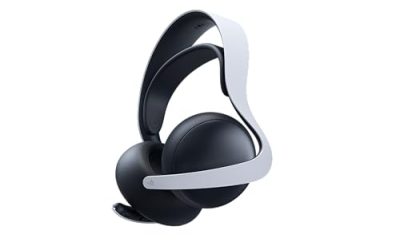
PlayStation PULSE 3D Wireless Headset
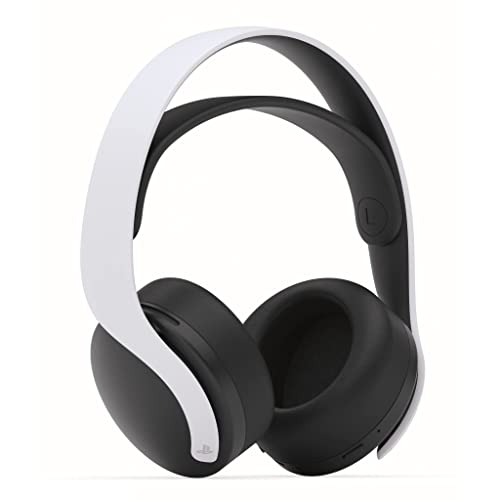
- Best for: Players who game at night in shared living spaces
- Platform: PlayStation 5
- Features: Fine-tuned for 3D Audio on PS5 consoles
- Microphones: Dual noise-cancelling microphones
- Battery: Built-in rechargeable battery, with easy-access controls
Players who game at night in shared living spaces
Confirm the wireless adaptor is included in the box contents shown, because the headset connects through it
Late sessions are where this headset earns its place, letting one player keep full game sound while the room stays quiet for everyone else. It was built around 3D Audio on PS5 consoles, so footsteps, weather and dialogue sit in a more spacious mix than television speakers usually manage. Dual noise-cancelling microphones handle party chat, and the controls sit on the headset itself for quick adjustments mid game. Households with different bedtimes will appreciate how little setup it asks for each night.
Watch out for: Confirm the wireless adaptor is included in the box contents shown, because the headset connects through it
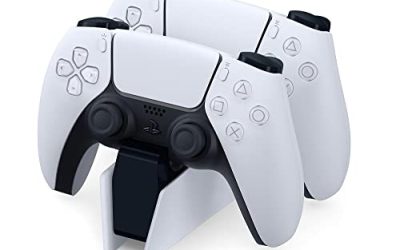
PlayStation DualSense Charging Station
- Best for: Families whose controllers end up scattered around the room
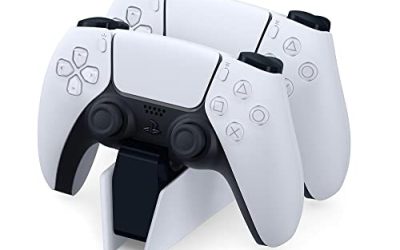
- Model: DualSense Charging Station, model number 3005837
- Capacity: Charges up to two DualSense wireless controllers
- Design: Click-in design listed on the product page
- Benefit listed: Frees up console USB ports
Families whose controllers end up scattered around the room
Measure the shelf space first, since the dock needs a flat spot near a power outlet
Anyone tired of a cable trailing from the console to the sofa should look at a dedicated dock as the tidiest seasonal upgrade. This station takes two DualSense controllers at once, so a main pad and a spare can both sit ready instead of competing for one lead. The click-in design gives each controller a fixed home, which also makes a quick tidy before guests arrive much easier. Because it works away from the console ports, those ports stay free for other uses.
Watch out for: Measure the shelf space first, since the dock needs a flat spot near a power outlet
WD_BLACK SN850P NVMe SSD for PS5, 8TB
- Best for: Players who rotate through many large installed games
- Capacity listed: 8TB
- Interface: NVMe, M.2 SSD with heatsink
- Speed listed in the title: Up to 7,200MB/s read
- Feature listed: Officially licensed product for PS5 consoles
Players who rotate through many large installed games
Verify your console model and follow the listed installation requirements, including any system software notes
Deleting and reinstalling large games is the clearest sign that storage, rather than another controller, should top a seasonal list. This drive is listed as officially licensed storage expansion for PS5 consoles, with a heatsink already fitted and a very large capacity in this version. Installed inside the console, it lets a household keep far more titles ready at once. Read the installation steps on the listing carefully before ordering, and set aside unhurried time for fitting it rather than rushing between other jobs.
Watch out for: Verify your console model and follow the listed installation requirements, including any system software notes
PlayStation Portal Remote Player
- Best for: Homes where the main screen is often in use by others
- Platform: PlayStation 5
- Connectivity: Wi-Fi
- Resolution listed: 1080p
- Features: Haptic feedback and adaptive triggers in supported games
Homes where the main screen is often in use by others
Check your home Wi-Fi coverage in the room where you plan to play, because remote play depends on it
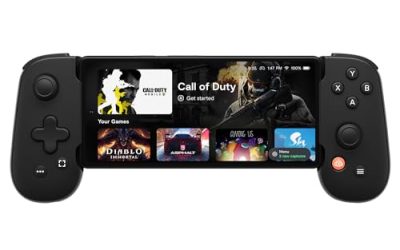
When the television is booked for films or sport, this remote player keeps a PS5 session going elsewhere in the home over Wi-Fi. It carries the familiar DualSense style controls around its screen, including haptic feedback and adaptive triggers in supported games, so play still feels connected to the console in the other room. It works from compatible games already installed on your PS5, which makes it a comfort purchase rather than a second console. A steady home network matters more here than anything else.
Watch out for: Check your home Wi-Fi coverage in the room where you plan to play, because remote play depends on it
Which One Fits Your Situation
The television is free only in the evenings
Evening-only players gain most from combining the PULSE 3D headset with the Portal, depending on whether sound or screen access causes more friction. Choose the headset when you can see the television but cannot use its speakers, and choose the Portal when the screen itself is taken. Either route keeps a session possible without asking the whole household to reorganise around one game.
Two players share one console every weekend
Start with the spare DualSense, then add the charging station once the second pad becomes part of the routine. That pairing removes both friction points in order: first the waiting for a turn, then the flat battery at the start of a session. Weekend households rarely need more than this pairing plus the controllers they already own, so storage and audio can wait for a later round.
Your library keeps outgrowing the internal drive
Put the WD_BLACK SN850P at the top of the list and let everything else wait. Extra controllers do nothing for a player who spends Friday night deleting one game to install another. Fitting the drive once, then moving titles across in one organised session, restores the simple habit of choosing a game and playing it straight away without planning deletions first.
You are buying ahead for a December gift
Order the item the recipient has actually mentioned, keep the packaging sealed, and file the order email where you can find it quickly. A DualSense suits almost any PS5 owner, while a headset is more personal because fit varies. If you are unsure between two options, the charging station is the safest household gift, since every DualSense owner needs somewhere reliable to keep a controller ready.
Common Mistakes
- Buying several accessories that solve the same problem while the real bottleneck stays unfixed
- Ordering a headset for a console variant or platform that the listing does not name
- Assuming a seasonal listing will still show the same model, colour or capacity when you return later
- Throwing away boxes and order emails before the accessory has been paired, charged or installed
- Choosing an internal drive without reading the installation and system software notes on its page
Frequently Asked Questions
When should I start checking PS5 accessory listings for the sales season?
Begin a few weeks ahead by saving exact model names, colours and capacities, then revisit those same listings as your buying window approaches. Early checking teaches you what normal availability looks like, which makes later decisions calmer. Keep a short ranked list, so a missing colour does not push you into a rushed substitute that suits your setup less well overall.
How do I avoid buying the wrong version of an accessory?
Read the full product name on the listing rather than relying on the photograph, because DualSense and DualSense Edge, or two capacities of one drive, can look identical in a thumbnail. Match the model number in the specification block to the item you intended, and check platform compatibility there too. That thirty second pause prevents most seasonal mix ups and returns.
Is storage or a second controller the smarter seasonal purchase?
Follow the friction you feel most often. If sessions stall because one pad is flat or shared, a second DualSense and its dock change daily life immediately. If you delete games every month to make room, the internal drive solves the deeper problem. Counting how often each annoyance happened in the last month gives a clearer answer than any general ranking can provide.
What should I keep in case a seasonal purchase needs returning?
Keep the outer packaging, inserts and any adaptors together until the accessory has been charged, paired or installed and used in a real session. Save the order confirmation email in a single folder and note the arrival date on your calendar. Listings state their own return terms, so check those terms at ordering rather than assuming a window after the holidays have passed.
Related guides
More from Amazon
Programs that pair well with the guide above. Offers and eligibility are set by Amazon and may change.
Send a Prime gift membership to someone who would use free shipping and Prime Video.
Gift Amazon PrimeGive audiobooks to someone who loves to listen. Plans and prices are set by Amazon.
Gift AudibleFree shipping on eligible items, Prime Video and more. Eligible new members can start with a free trial.
Start a Prime free trialAudiobooks and podcasts to listen to on the go. Eligible new members can start with a free trial.
Try Audible freeAs an Amazon Associate we earn from qualifying purchases.
Write Your Review
No reviews yet. Be the first to share your experience!