
Our Short List of 3

- Best for: Commuters and travellers who want firm protection in the slimmest workable shape.
- For Nintendo Switch and OLED Model
- Protective case with space for 10 game cartridges
- Hard portable travel case
- Original patent design
- Best for: Pro Controller owners who also keep Joy-Con in regular rotation.
- Controller charging dock compatible with Nintendo Switch
- Charges Joy-Con and Pro Controller as listed
- LED indicators for charging status
- 5 in 1 controller charging dock station

- Best for: Players wanting one licensed case that works across whichever Switch model they own.
- Hard shell protective pouch with carry handle
- Storage for 9 game cards
- Officially licensed Mario Pop design
- For Nintendo Switch, Switch Lite and OLED Model
All 4 Picks at a Glance
| Product | Specs | Action |
|---|---|---|
| tomtoc Slim Carrying Case for Nintendo Switch and OLED Model |
| Check price on Amazon |
| OIVO Controller Charging Dock Compatible with Nintendo Switch |
| Check price on Amazon |
| PowerA Protection Case for Nintendo Switch Mario Pop |
| Check price on Amazon |
 Orzly Accessories Bundle Compatible with Nintendo Switch Geek Pack |
| Check price on Amazon |
Key takeaways
- Start with protection, charging and storage, then stop. These five essentials cover the basics every Nintendo Switch owner needs before extra add-ons.
What's inside
As an Amazon Associate I earn from qualifying purchases. This post may contain affiliate links at no extra cost to you.
Owning a Switch without a case, screen glass or a way to charge spare controllers leaves the essentials unfinished, yet accessory shelves push novelty items first. The genuine decision is which handful of purchases removes daily friction: a scratched display, dead Joy-Con before a session, cartridges with no home, and a console rattling loose inside whatever bag happens to be nearby.
Anyone setting up a standard Switch or OLED model and wanting to stop after the fundamentals will find this shortlist useful. Selections came from listing names and stated functions on Amazon, covering a slim hard case, two charging docks with different layouts, a licensed carry case and a multi-piece Orzly kit for anyone missing several basics at once, without forcing anyone to research a dozen separate categories before the console is properly protected and ready for daily use.
Quick Picks
As an Amazon Associate we earn from qualifying purchases
| Product | Best for | Key spec from title |
|---|---|---|
| tomtoc Slim Carrying Case for Nintendo Switch and OLED Model | Slim everyday protection that still carries ten games | Protective case with 10 game cartridges and military grade protection |
| FASTSNAIL Switch Controller Charger for Nintendo Switch and OLED | Charging four Joy-Con, or a Pro Controller mix, in one place | Charger for 4 Joy-Con or 1 Pro Controller and 2 Joy-Con |
| OIVO Controller Charging Dock Compatible with Nintendo Switch | Combined Joy-Con and Pro Controller charging with LED indicators | 5 in 1 controller charging dock station with Type C cable |
| PowerA Protection Case for Nintendo Switch Mario Pop | Licensed hard shell case with room for nine game cards | Hard shell protective pouch with carry handle and 9 game cards storage |
| Orzly Accessories Bundle Compatible with Nintendo Switch Geek Pack | Filling several essential gaps with a single purchase | Case, screen protector, grips, racing wheels and charge dock in one pack |
How to Choose
Protect the Screen and Shell Before Anything Else
Nothing else on this list matters if the display gets scratched in week one, so glass and a hard case rank first among essentials. A slim case that still carries game cartridges protects the console on ordinary trips without turning it into luggage. Look for wording such as hard shell, protective and military grade protection in the listing, plus a soft interior against the screen. Then confirm the case matches your model, because standard Switch and OLED bodies differ slightly in size.
Solve Charging for Every Controller You Own
One pair of Joy-Con charges on the console itself, but a second pair or a Pro Controller quickly creates a rota nobody enjoys. A dock that handles several controllers at once, with indicator lights showing charge state, removes the guesswork entirely. Compare the layouts: some docks mix Joy-Con and Pro Controller spaces, others focus purely on Joy-Con. Match the dock to the controllers actually in your drawer, and check whether its cable is included or whether you must supply a USB connection yourself.
Give Cartridges and Cables a Fixed Address
An essential setup includes somewhere deliberate for game cards, because loose cartridges are small, smooth and easy to lose between sofa cushions. Cases holding ten cartridges cover most active libraries, while larger holders suit collectors. Storage inside the carry case keeps games with the machine, which is where they are needed. Apply the same logic to the charging cable: a pocket inside the case beats a cable borrowed from a phone each time, arriving tangled and occasionally forgotten at home.
Buy Bundles Only When You Lack Several Basics
A multi-piece kit is essential-value only when you genuinely need most of its contents, such as a case, glass, grips and a dock arriving together for a brand-new console. If you already own a case, the same kit duplicates your strongest item and wastes the rest. Read the contents line by line and count how many pieces fill a real gap. Three or more genuine gaps usually justify a bundle; one gap means a single targeted purchase serves you better and leaves less clutter behind.
The 5 Best Options
tomtoc Slim Carrying Case for Nintendo Switch and OLED Model
- Best for: Commuters and travellers who want firm protection in the slimmest workable shape.
- For Nintendo Switch and OLED Model
- Protective case with space for 10 game cartridges
- Hard portable travel case
- Original patent design
Commuters and travellers who want firm protection in the slimmest workable shape.
Confirm your charger fits elsewhere, because a slim case prioritises the console and games over bulky extras.
Minimalists who carry the console daily will appreciate how this slim tomtoc case protects without swallowing an entire bag. The listing highlights a hard portable design, space for ten game cartridges and military grade protection under an original patent, which covers the two essentials of impact cover and game storage in one slim profile. It fits the standard Switch and the OLED model as listed, making it the carry answer for owners who travel light and dislike the bulk of larger accessory cases.
FASTSNAIL Switch Controller Charger for Nintendo Switch and OLED
Households running two pairs of Joy-Con need a charging routine that does not involve swapping controllers on the console overnight. This FASTSNAIL dock charges four Joy-Con at once, or one Pro Controller alongside two Joy-Con, and uses lamp-post style indicators so the state of each controller is visible at a glance. Slide-in operation keeps it simple enough for guests and children. For OLED owners the listing explicitly includes OLED Joy-Con, removing the compatibility doubt that surrounds older charging accessories.
Specs
- Can charge 4 Joy-Con controllers at the same time
- Alternative layout: 1 Pro Controller and 2 Joy-Con
- Charging indicator made of 4 lampposts
- Easy slide-in design, plug and play via USB port
- Compatible with Nintendo Switch and OLED Joy-Con as listed
Best for: Players with spare Joy-Con or a Pro Controller who want one visible charging point.
Watch out for: Note that no controllers are included, and plan a USB power source near where the dock will live.
ASIN: B0786BNC1L
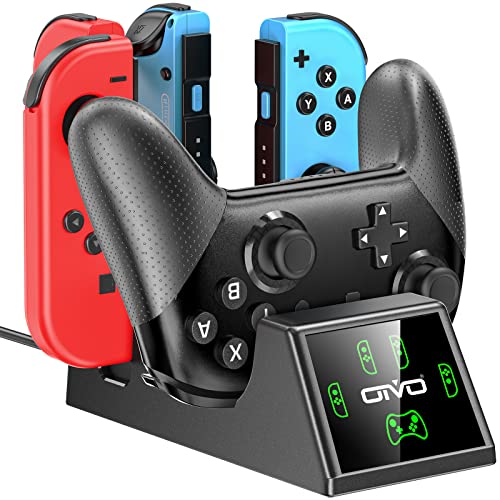
OIVO Controller Charging Dock Compatible with Nintendo Switch
- Best for: Pro Controller owners who also keep Joy-Con in regular rotation.
- Controller charging dock compatible with Nintendo Switch
- Charges Joy-Con and Pro Controller as listed
- LED indicators for charging status
- 5 in 1 controller charging dock station
Pro Controller owners who also keep Joy-Con in regular rotation.
Check the wattage and power source wording on the listing, since the dock expects a suitable USB supply.
Anyone mixing Joy-Con and a Pro Controller in the same sessions should look at this OIVO station, which the listing describes as a five in one dock for both controller types with LED indicators and a Type C cable in the box. Having the cable included matters for an essentials list, because the dock can be set up immediately beside the television. It suits players who rotate between handheld Joy-Con play and longer docked sessions on a Pro Controller and want both ready without cable swapping.
PowerA Protection Case for Nintendo Switch Mario Pop
- Best for: Players wanting one licensed case that works across whichever Switch model they own.
- Hard shell protective pouch with carry handle
- Storage for 9 game cards
- Officially licensed Mario Pop design
- For Nintendo Switch, Switch Lite and OLED Model
Players wanting one licensed case that works across whichever Switch model they own.
Verify the exact design variant on the listing page, because PowerA sells several artwork versions under similar names.
Owners who want their one case to be officially licensed should consider this PowerA Mario Pop design, which pairs a hard shell and carry handle with storage for nine game cards. The listing covers the Switch, Switch Lite and OLED model, so it survives a change of console within the family better than single-model cases. A built-in play stand adds tabletop usefulness that plain storage cases lack. For an essentials buyer, that combination of protection, capacity and a stand justifies its place without any novelty extras.
Orzly Accessories Bundle Compatible with Nintendo Switch Geek Pack
- Best for: Brand-new Switch owners who own no accessories at all yet.
- Carry case and screen protector included
- Joy-Con grips and racing wheels included
- Controller charge dock included
- Comfort grip case included
Brand-new Switch owners who own no accessories at all yet.
Count the contents against what you already own before ordering, to avoid doubling up on a case or dock.
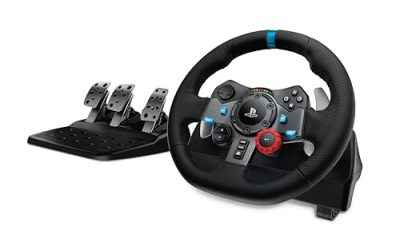
New owners starting from an empty drawer are the audience for this Orzly pack, since it combines a carry case, screen protector, comfort grip case, Joy-Con grips, racing wheels and a controller charge dock in one box. Rather than ordering protection now and charging later, everything essential arrives together and matches the same console. The wheels are the only playful extra; the rest maps directly onto the protection, storage and charging jobs this article treats as non-negotiable for a standard Nintendo Switch setup.
Which One Fits Your Situation
You Just Unboxed the Console and Own Nothing Else
Start with the Orzly Geek Pack, because it delivers case, glass, grips and charging in a single delivery and leaves no essential gap behind. Players who dislike bundles can replicate the same coverage by pairing the tomtoc slim case with the FASTSNAIL charger instead. Either route finishes the basics in one step, which is the entire point of an essentials-only approach to accessories.
Your Bag Goes Everywhere and Space Is Tight
The tomtoc slim case is the pick here, since its hard shell and ten cartridge slots protect the console without the depth of a full accessory case. Slim cases reward owners who carry a cable in the bag itself rather than inside the case. If your daily route involves crowded trains or a small work bag, that thinner profile is the difference between carrying the Switch and leaving it home.
Two Controller Types Share One Television Setup
Pick between the FASTSNAIL and OIVO docks by layout rather than looks. FASTSNAIL lists four Joy-Con, or a Pro Controller plus two Joy-Con, with lamp-post indicators, while OIVO describes a five in one station with its Type C cable included. Count the controllers you charge on a typical evening and let that number decide, because an undersized dock simply recreates the rota problem you were trying to escape.
You Want One Licensed Case for Any Model at Home
The PowerA Mario Pop case covers Switch, Lite and OLED in a single hard shell, which suits households where the case gets borrowed between machines. Its nine card slots and carry handle handle school runs and holidays alike. Owners of a single console who never share may prefer the slimmer tomtoc instead, but for mixed-model homes the PowerA flexibility removes a whole category of packing mistakes.
Common Mistakes
- Treating novelty attachments as essentials while the screen still has no glass on it.
- Buying a charging dock sized for fewer controllers than the household actually uses each week.
- Choosing a case for the standard Switch when the console at home is the slightly larger OLED model.
- Paying for a large bundle when only one item in the box fills a genuine gap.
- Storing cartridges loose in a bag pocket instead of in case slots made for them.
Frequently Asked Questions
What is the single most essential Switch accessory?
A hard carry case paired with screen glass does more than any other purchase, because it guards the two parts that are hardest to repair and easiest to damage. Everything else improves convenience, but protection preserves the console itself. Buy those first, fit the glass carefully on a clean screen, and only then consider charging docks, grips or extra storage for a growing game library.
Do I need a Joy-Con charging dock if the console charges them?
Owners of a single Joy-Con pair can manage without one, since attached controllers charge with the console. The dock becomes essential once a second pair, visiting players or a Pro Controller enter the picture, because the console can only charge what is attached. A dock also creates one visible home for controllers, which reduces the time spent hunting for a charged pair before playing.
How many game card slots should a case have?
Ten slots cover the active rotation for most players, and both slim cases here follow that pattern. Heavy collectors who carry a whole library should look for larger holders instead of forcing cartridges into pockets. Think about how many titles genuinely travel with you each month rather than how many you own, because the unused majority can stay safely stored at home in their original boxes.
Can one case fit both the Switch and the OLED model?
Some can, but only when the listing says so explicitly, as the tomtoc and PowerA listings here do for their respective models. The OLED body is slightly larger, so a case moulded tightly for the original console may squeeze it or refuse to close. Never assume cross-compatibility from a similar product name; check the compatibility line on the exact listing before ordering any case.
Related guides
More from Amazon
Programs that pair well with the guide above. Offers and eligibility are set by Amazon and may change.
Free shipping on eligible items, Prime Video and more. Eligible new members can start with a free trial.
Start a Prime free trialAudiobooks and podcasts to listen to on the go. Eligible new members can start with a free trial.
Try Audible freeAd-free music streaming. Eligible new subscribers can start with a free trial.
Try Music Unlimited freeA free business account with business pricing and bulk-buying tools for work, shop or home office.
Create a business accountAs an Amazon Associate we earn from qualifying purchases.
Write Your Review
No reviews yet. Be the first to share your experience!