
Key takeaways
- Compare Android tablets for kids by screen, storage, family controls and case, with five verified picks for different ages and home routines.
What's inside
As an Amazon Associate I earn from qualifying purchases. This post may contain affiliate links at no extra cost to you.
Choosing an Android tablet for a child is really a choice about control: which family account will manage apps, how downloads get approved, and how much storage games and school tools will need by the end of term.
This guide is for parents who prefer Android over a closed system and want Google family features as the listings describe them. The five picks below were chosen from their Amazon listing names and stated specs, covering big screens, compact travel sizes and bundle style learning models for different ages. Each model below is compared on the same listed points. The sections that follow keep the comparison practical. Each model below is compared on the same listed points. The sections that follow keep the comparison practical. Each model below is compared on the same listed points.
Quick Picks
As an Amazon Associate we earn from qualifying purchases
| Product | Best for | Key spec from title |
|---|---|---|
| Samsung Galaxy Tab A9+ Kids Edition Tablet, Red | Big screen Android viewing with a protective puffy cover | 11 inch screen, 64 GB storage |
| Samsung Galaxy Tab A9+ Tablet, Silver | Older kids needing the most storage in this guide | 11 inch screen, 128 GB storage |
| Lenovo Tab M9 Tablet, 32 GB, Gray | Compact Android use with a folio case for reading | 9 inch HD screen, 32 GB, Android 12 |
| Contixo K103 Kids Tablet Bundle, Green | Bundle buyers who want headphones included as listed | 10 inch screen, 3 GB RAM, 32 GB |
| Contixo K102 Kids Tablet, Pink | Tabletop drawing and viewing with a kickstand case | 10 inch screen, 32 GB, Android |
How to Choose
Screen Size and Readability
screen size shapes reading, video and game comfort. A seven inch display suits small hands and short sessions, while a ten or eleven inch display gives picture books and two player games more room. Look at the size wording on the listing, compare it with a book your child already holds, and think about where the tablet will live: sofa, car seat or homework table. Bigger is not always better for a young child who must grip the sides securely during everyday use at home and on trips.
Storage, Memory and Room to Grow
storage fills faster than most parents expect once videos, games and school apps accumulate. Check the internal storage written on the listing, note whether expandable storage is mentioned, and consider how many offline downloads a holiday or a school term needs. Memory figures on the listing give a rough guide to how smoothly apps switch. Families sharing one tablet between siblings should lean toward the larger storage options in this guide, while a single child with a small app set can manage with less. Think about your own routine before choosing.
Parental Controls and Family Accounts
controls decide how safe the tablet feels day to day. Look for parental controls named on the listing, plus age filters, app approval and time limit tools inside the family system it uses. Set up the parent account first, test a download request, and try pausing the device if that feature is listed. A tablet with strong controls lets a child explore approved content freely, while weak controls push more checking work onto parents every evening after school and at weekends. Think about your own routine before choosing.
Case, Battery and Daily Durability
a kids tablet earns its keep by surviving normal drops and lasting through a school day or a long drive. Check whether a kid proof or puffy case is included, whether a kickstand or handle is listed, and what battery life the listing states in hours. Handles help younger children carry the device between rooms. For older children, a slimmer case feels less babyish and fits a school bag more easily, which often decides whether the tablet actually gets used each week. Think about your own routine before choosing.
The 5 Best Options
Samsung Galaxy Tab A9+ Kids Edition Tablet, Red

Families comparing this model will notice it is a big screen Android model with a puffy protective cover made for family use. Key points from the listing include 11 inch screen, 64 gb storage, which helps a parent judge fit without guessing beyond what the seller states. Because it runs Android as the listing states, it fits families who want Google family features and familiar app store routines, provided a parent checks account setup, age filters and download approvals before handing it over.
Specs
- Display: 11 inch screen as listed
- Storage: 64 GB as listed
- Connectivity: WiFi Android tablet as listed
- Expansion: expandable storage as listed
- Cover: durable Puffy Cover as listed
- Build: slim and lightweight as listed
Best for: Big screen Android viewing with a protective puffy cover
Watch out for: Confirm cover colour and WiFi only status on the listing before you order.
ASIN: B0D4NNZ6JM
Samsung Galaxy Tab A9+ Tablet, Silver

Parents shortlisting options often start with it is a large Android tablet with generous storage and a design the listing describes as kid friendly. Key points from the listing include 11 inch screen, 128 gb storage, which helps a parent judge fit without guessing beyond what the seller states. Because it runs Android as the listing states, it fits families who want Google family features and familiar app store routines, provided a parent checks account setup, age filters and download approvals before handing it over.
Specs
- Display: 11 inch screen as listed
- Storage: 128 GB as listed
- System: Android tablet as listed
- Audio: quad speakers as listed
- Design: Kids Friendly Design as listed
- Version: US Version, 2024, as listed
Best for: Older kids needing the most storage in this guide
Watch out for: Note this is a standard tablet, so allow time to add a child suitable case and setup.
ASIN: B0CLF4NVSL
Lenovo Tab M9 Tablet, 32 GB, Gray
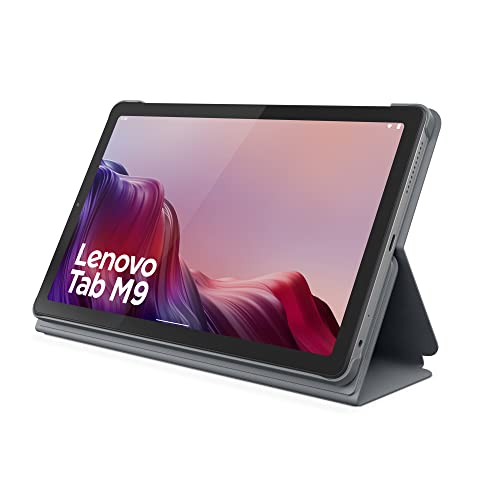
What stands out first about this choice is it is a compact Android tablet with a folio case and a screen size between phone and full family tablet. Key points from the listing include 9 inch hd screen, 32 gb, android 12, which helps a parent judge fit without guessing beyond what the seller states. Because it runs Android as the listing states, it fits families who want Google family features and familiar app store routines, provided a parent checks account setup, age filters and download approvals before handing it over.
Specs
- Display: 9 inch HD screen as listed
- Memory: 3 GB memory as listed
- Storage: 32 GB storage as listed
- System: Android 12 or later as listed
- Cameras: front 2MP and rear 8MP camera as listed
- Included: Folio Case included as listed
Best for: Compact Android use with a folio case for reading
Watch out for: Check Android version wording on the listing, since it states Android 12 or later.
ASIN: B0BYPHZWZK
Contixo K103 Kids Tablet Bundle, Green

On paper, this pick earns attention because it is a ten inch Android learning tablet sold as a bundle with headphones in the listing title. Key points from the listing include 10 inch screen, 3 gb ram, 32 gb, which helps a parent judge fit without guessing beyond what the seller states. Because it runs Android as the listing states, it fits families who want Google family features and familiar app store routines, provided a parent checks account setup, age filters and download approvals before handing it over.
Specs
- Display: 10 inch screen as listed
- System: Android as listed
- Memory: 3 GB RAM as listed
- Storage: 32 GB storage as listed
- Connectivity: WiFi and Bluetooth as listed
- Controls: parental controls as listed
- Case: Kid-Proof Case as listed
Best for: Bundle buyers who want headphones included as listed
Watch out for: Verify every bundle item named in the title is shown in the box contents section.
ASIN: B0CZNDKY1F
Contixo K102 Kids Tablet, Pink

For many households, the appeal here is it is a ten inch Android model with a kickstand case suited to tabletop viewing and drawing. Key points from the listing include 10 inch screen, 32 gb, android, which helps a parent judge fit without guessing beyond what the seller states. Because it runs Android as the listing states, it fits families who want Google family features and familiar app store routines, provided a parent checks account setup, age filters and download approvals before handing it over.
Specs
- Display: 10 inch screen as listed
- System: Android as listed
- Storage: 32 GB storage as listed
- Controls: parental controls as listed
- Case: Kid-Proof Case with kickstand as listed
- Learning: Google Kids Space mentioned in the listing
Best for: Tabletop drawing and viewing with a kickstand case
Watch out for: Confirm case colour and kickstand style on the listing before ordering.
ASIN: B098TZWRD2
Which One Fits Your Situation
For a Child Who Drops Everything
Rugged case models lead this situation. Samsung Galaxy Tab A9+ Kids Edition Tablet, Red fits because the listed case style is built for knocks, and the screen size still suits stories and simple games. Choose the chunkier case over a slim one, set the child profile before first use, and keep a charging spot away from floor traffic at home.
For Long Car Rides and Family Trips
Battery wording and portability decide this one. Samsung Galaxy Tab A9+ Tablet, Silver works well here because its listed battery life and size balance viewing time with bag space. Download shows and books on home WiFi before leaving, pack a short cable, and turn brightness down during the journey to stretch each charge further. Start with the child profile and age filter.
For Reading and Early Homework
A clearer, larger page helps young readers focus. Lenovo Tab M9 Tablet, 32 GB, Gray suits this routine thanks to its listed screen size and storage for reading apps and school downloads. Create a homework folder on the home screen, keep game apps in a separate space, and review new downloads together each Sunday evening. Start with the child profile and age filter.
For Siblings Sharing One Device
Shared use needs storage headroom and separate profiles. Contixo K103 Kids Tablet Bundle, Green is the sensible shared pick in this set because its listed storage gives each child room for apps and downloads. Name each profile clearly, agree a rota for busy afternoons, and let the parent account approve every new app request. Start with the child profile and age filter.
Common Mistakes
- Buying the biggest screen without checking whether small hands can hold it safely for a full reading session.
- Ignoring storage figures on the listing, then finding game updates and school apps compete for space within weeks.
- Skipping the parent account setup and handing over the tablet while default settings still allow open browsing.
- Choosing a slim fashion case for a young child who really needs a chunky bumper style cover for drops.
- Forgetting to check what is actually included in the box, such as a stylus, headphones or a kickstand case.
Frequently Asked Questions
How long should a kids tablet last each day?
Battery wording on listings gives the headline figure, but real use varies with brightness, games and video. Plan around shorter mixed use than the stated hours, charge overnight, and treat the listed figure as a best case for reading and light apps rather than a promise for heavy game sessions at full brightness.
Do these tablets need WiFi all the time?
Most learning apps, books and videos work offline once downloaded, while app stores, video calls and game updates need a connection. Download a core set of content on home WiFi during setup, then test airplane mode before a trip so a child is not surprised when streaming stops away from home.
Can siblings use separate profiles?
Family systems on these models are built around child profiles, although the exact steps differ by brand. Create one profile per child from the parent account, set separate age filters and time limits, and check the storage figure on the listing if both children will keep large games installed at once.
What should I check before ordering?
Match the exact model name, storage and case style on the product page with the version you intend to buy, confirm what accessories are listed in the box, and read the returns wording. Variants of the same tablet can differ in memory, colour and included items, so a slow final check prevents most mix ups.
Related guides
More from Amazon
Programs that pair well with the guide above. Offers and eligibility are set by Amazon and may change.
Free shipping on eligible items, Prime Video and more. Eligible new members can start with a free trial.
Start a Prime free trialAudiobooks and podcasts to listen to on the go. Eligible new members can start with a free trial.
Try Audible freeAd-free music streaming. Eligible new subscribers can start with a free trial.
Try Music Unlimited freeA free business account with business pricing and bulk-buying tools for work, shop or home office.
Create a business accountAs an Amazon Associate we earn from qualifying purchases.



Write Your Review
No reviews yet. Be the first to share your experience!