
Key takeaways
- Four cameras that hold a sharp facecam through long Twitch sessions, from a true 4K60 webcam to full-frame mirrorless bodies with clean HDMI output.
What's inside
As an Amazon Associate I earn from qualifying purchases. This post may contain affiliate links at no extra cost to you.
A Twitch facecam lives in a small corner of the screen, yet it carries the whole channel: viewers read your reactions more than the gameplay. The real decision is how the camera feeds your broadcast software and how it behaves three hours into a session. A body that overheats, hunts for focus every time you lean back, or crushes your face under dim RGB lighting will undermine an otherwise strong broadcast, no matter how impressive its headline resolution looks on a spec sheet.
The four picks below cover the main ways streamers build a facecam. The Elgato Facecam Pro serves desk-bound streamers who want true 4K60 over a single USB cable. The Canon EOS R10 and Panasonic Lumix G100 suit growing channels that want interchangeable lenses on a mid-range budget. The Sony ZV-E1 is the premium step, a full-frame body with the strongest low-light face capture here.
Quick Picks
As an Amazon Associate we earn from qualifying purchases.
| Product | Best for | Key spec from title |
|---|---|---|
| Sony Alpha ZV-E1 | Dim rooms where background blur sells the shot | Full-frame 12.1MP sensor, 4K 120p recording |
| Canon EOS R10 with RF-S 18-150mm Lens | Growing channels that also shoot photos | 24.2MP APS-C sensor, 4K 60p video |
| Elgato Facecam Pro | Pure facecam duty with zero capture gear | True 4K60 Ultra HD over USB-C |
| Panasonic Lumix G100 with 12-32mm Lens | Compact desks and first mirrorless setups | 20.3MP Micro Four Thirds sensor, 4K video |
How to Choose
Clean HDMI or USB Output
Your camera reaches OBS or Streamlabs in one of two ways: a capture card fed by HDMI, or a direct USB connection the computer reads as a webcam. HDMI through a capture card gives the cleanest, most reliable feed for mirrorless bodies, provided the camera offers a clean output with no overlays and no automatic shutoff. USB is simpler and suits dedicated streaming cameras like the Facecam Pro, which sends uncompressed 4K60 over USB-C. Check the exact mode your pick supports, because some bodies limit USB webcam output to 1080p while their HDMI feed runs at full quality.
Sensor Size and Low-Light Face Capture
Most gaming rooms are lit by a key light, monitor glow, and coloured lamps, which is harder on a sensor than a bright studio. Larger sensors gather more light, so a full-frame body like the ZV-E1 keeps skin tones clean at sensitivities where smaller sensors turn grainy. A one-inch or APS-C sensor still performs well with a decent key light, and a fast lens aperture helps every format. If your room lighting is fixed and modest, sensor size matters more than resolution; a clean 1080p face beats a noisy 4K one in the corner of a broadcast.
Autofocus That Tracks a Moving Streamer
Streamers lean toward the screen during tense rounds, rock back laughing, hold products up to the lens, and glance between two monitors. Eye-detection autofocus that locks onto a face and holds it through those movements is worth more than raw sharpness. Sony and Canon both offer mature face and eye tracking in the bodies below, while the Facecam Pro uses a fast fixed-range lens design tuned for desk distances. Think about your habits: if you move around the room on camera, tracking autofocus becomes essential; if you sit in one spot, a simpler focus system does the job.
Heat and Power for Long Sessions
A camera that records beautifully for twenty minutes can still fail a five-hour raid night. Long sessions demand dummy-battery or USB-C power delivery so the camera runs off the wall instead of a battery, plus a body that manages heat at your chosen frame rate. Higher frame rates and 4K modes generate the most heat, so many streamers broadcast at 1080p60 even on 4K bodies. Before committing, confirm your pick supports continuous power, check its behaviour at the resolution you will actually broadcast, and plan airflow around the camera rather than sealing it in a corner.
The 4 Best Options
Sony Alpha ZV-E1
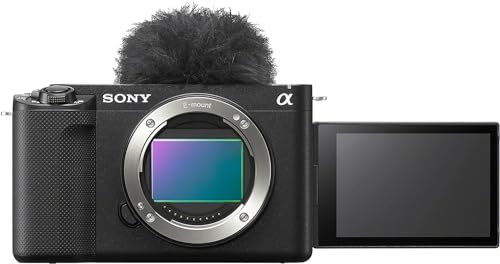
The ZV-E1 is the pick for streamers who treat the facecam as part of the show. Its full-frame sensor delivers the shallow depth of field that separates you from the shelves and posters behind you, and it holds clean skin tones in the mixed, dim lighting most gaming rooms run. Real-time Eye AF keeps focus locked while you lean and gesture, and the AI processing unit powers framing features that suit solo broadcasters. Feed it into a capture card over HDMI for the full-quality signal, and it anchors a premium desk setup that also handles serious video work away from the stream.
Specs
- 12.1MP full-frame Exmor R CMOS sensor
- 4K 60p 10-bit 4:2:2 recording, 4K 120p available
- 5-axis in-body image stabilisation
- Real-time Eye AF with AI processing unit
- Vari-angle 3.0-inch touchscreen LCD
- Clean HDMI output and USB streaming support
- Sony E mount
Best for: Established streamers in dim rooms who want full-frame background separation.
Watch out for: The body-only box needs a lens, and long 4K sessions call for attention to heat settings and airflow.
ASIN: B0BZWNWCZ9
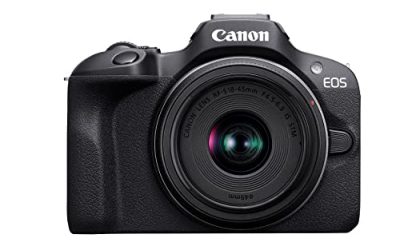
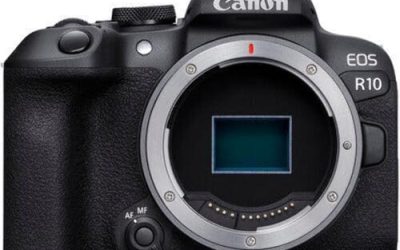
Canon EOS R10 with RF-S 18-150mm Lens

The R10 fits the streamer whose channel is growing and whose camera also needs to earn its keep on photos and clips. Dual Pixel CMOS AF II tracks faces and eyes with the confidence Canon shooters expect, and the included 18-150mm zoom covers everything from a tight desk framing to a wider room shot without a lens swap. Oversampled 4K 30p looks crisp when downscaled into a 1080p broadcast window, and the vari-angle screen makes self-framing simple. Run it through a capture card for long sessions and it behaves like a far pricier broadcast body.
Specs
- 24.2MP APS-C CMOS sensor with DIGIC X processor
- 4K 60p video, 4K 30p oversampled from 6K
- Dual Pixel CMOS AF II with face and eye detection
- RF-S 18-150mm f/3.5-6.3 IS STM kit lens included
- Vari-angle 3.0-inch touchscreen LCD
- Clean HDMI output via micro HDMI port
- Canon RF mount
Best for: Growing channels that want one camera for streaming, photos, and clips.
Watch out for: The 4K 60p mode applies a crop, and onboard recording limits make a capture card the better route for marathon sessions.
ASIN: B0B2KV6D97
Elgato Facecam Pro

The Facecam Pro skips the capture card, the dummy battery, and the lens collection entirely. It is a dedicated streaming camera that sends true 4K60 uncompressed video over a single USB-C cable, with a large Sony sensor and a fast f/2.0 lens that keep a face sharp under ordinary room lighting. Elgato’s Camera Hub software gives manual control over exposure, white balance, and field of view in a way that feels closer to a mirrorless menu than a typical webcam panel. For a streamer who only needs a facecam and nothing else, this is the shortest path to a polished broadcast image.
Specs
- Sony CMOS sensor, 8.3MP still resolution
- True 4K60 uncompressed video over USB-C
- Supported modes include 2160p60, 1080p60, and 720p60
- f/2.0 lens, 21mm full-frame equivalent, 90-degree field of view
- Autofocus with a close minimum focus distance
- UVC connection, works with OBS, Teams, and Zoom
- Weight 240g without mount
Best for: Desk-bound streamers who want 4K60 with no capture card or lens kit.
Watch out for: It needs a USB 3.0 connection for full 4K60 bandwidth, and it is a fixed-purpose camera that will not double as a photo body.
ASIN: B0BJL7Q3SR
Panasonic Lumix G100 with 12-32mm Lens

The G100 is the compact route into interchangeable-lens streaming. Its Micro Four Thirds sensor and small 12-32mm kit lens keep the whole rig light enough for a monitor arm or a small desk tripod, and the free-angle touchscreen makes framing yourself easy. Face detection autofocus handles a seated streamer well, and the three-microphone OZO Audio array is a genuine bonus for anyone whose headset mic is not ready for broadcast duty. Sent through a capture card over its HDMI output, the G100 delivers a clean, colourful facecam image that sits comfortably above any built-in laptop camera.
Specs
- 20.3MP Micro Four Thirds MOS sensor
- 4K 30p and Full HD 60p video recording
- 12-32mm f/3.5-5.6 kit lens, 24-64mm equivalent
- 5-axis hybrid image stabilisation
- Three-microphone OZO Audio with tracking
- Free-angle 3.0-inch touchscreen and 3.68M-dot viewfinder
- HDMI output for capture card use
Best for: First mirrorless streamers with small desks and limited mounting space.
Watch out for: Autofocus relies on contrast detection, so confirm your framing distance, and plan on a capture card rather than onboard clips for live work.
ASIN: B08B7W6L82
Which One Fits Your Situation
You Stream From a Dim Room With Mood Lighting
Choose the Sony ZV-E1. The full-frame sensor gathers far more light than the smaller formats here, so your face stays clean and detailed while the background falls into a soft blur. That combination hides a cluttered room better than any backdrop, and the eye tracking keeps the image locked while you move under low light.
You Want One Camera for Streaming and Everything Else
Choose the Canon EOS R10 kit. The zoom lens, strong stills performance, and dependable face tracking make it the most versatile body in this group. It covers channel art photos, short clips, and event shots between broadcasts, then settles onto the desk as a capable facecam through a capture card.
You Only Need a Facecam and Hate Extra Gear
Choose the Elgato Facecam Pro. One USB-C cable replaces the capture card, dummy battery, and lens decisions that mirrorless setups demand. It delivers the highest frame rate here, mounts in seconds, and its software controls stay set between sessions, which suits streamers who broadcast daily and value a routine that never needs rebuilding.
Your Desk Is Small and Your Setup Travels
Choose the Panasonic Lumix G100. The compact body and pancake-style kit zoom ride easily on a small tripod or monitor arm, and the whole kit packs down for streaming from a second location. The built-in microphone array also covers casual broadcasts when your usual audio chain stays at home.
Common Mistakes
- Buying a camera with no clean HDMI output, then finding menu overlays baked into the broadcast feed.
- Judging a facecam at full screen instead of at the small corner size viewers actually see during gameplay.
- Running a mirrorless body on its internal battery and having it die mid-session instead of using continuous power.
- Ignoring heat behaviour at 4K and discovering the camera shuts down during the longest, most important broadcasts.
- Placing the camera far off to the side, so the streamer appears to look away from the audience the entire session.
Frequently Asked Questions
Do I need a capture card for a Twitch facecam?
Only for mirrorless and DSLR bodies. A capture card converts the camera’s HDMI feed into a signal your broadcast software can use. Dedicated streaming cameras like the Facecam Pro connect over USB and appear as a webcam directly, which removes the extra hardware but limits you to that camera’s built-in lens and sensor.
Is 4K worth it for a facecam that sits in a corner?
Usually the broadcast itself runs at 1080p or below, so the facecam window shows only a fraction of a 4K frame. The real gains from a better camera are cleaner low-light capture, smoother autofocus, and pleasing background blur. A strong 1080p60 feed from a good sensor often looks better on stream than a noisy 4K feed.
How do streamers power a mirrorless camera for hours?
Most use a dummy battery, an adapter that fits the battery slot and plugs into the wall, or USB-C power delivery on bodies that support it. Continuous power removes the mid-session shutdown risk entirely. Pair it with sensible resolution settings and decent airflow, and the same body can run a full evening of broadcasting without interruption.
Where should the facecam sit relative to the monitor?
Place it as close to the centre of your main display as the mount allows, ideally just above the screen at eye level. That keeps your gaze near the lens when you read chat or watch gameplay, so viewers feel spoken to directly. A small tripod or monitor arm behind the display makes this positioning easy to hold.
Related guides
More from Amazon
Programs that pair well with the guide above. Offers and eligibility are set by Amazon and may change.
Free shipping on eligible items, Prime Video and more. Eligible new members can start with a free trial.
Start a Prime free trialAudiobooks and podcasts to listen to on the go. Eligible new members can start with a free trial.
Try Audible freeAd-free music streaming. Eligible new subscribers can start with a free trial.
Try Music Unlimited freeA free business account with business pricing and bulk-buying tools for work, shop or home office.
Create a business accountAs an Amazon Associate we earn from qualifying purchases.
Write Your Review
No reviews yet. Be the first to share your experience!