
Our Short List of 3

- Best for: Families tired of flat controllers at the start of play
- Model: DualSense Charging Station, model number 3005837
- Capacity: Charges up to two DualSense wireless controllers
- Design: Click-in design listed on the product page
- Benefit listed: Frees up console USB ports
- Best for: Older children who play while the room stays shared
- Platform: PlayStation 5
- Features: Fine-tuned for 3D Audio on PS5 consoles
- Microphones: Dual noise-cancelling microphones
- Battery: Built-in rechargeable battery, with easy-access controls
- Best for: Family film and streaming nights on the PS5
- Platform: PlayStation 5
- Controls: Play, pause, fast forward and fast reverse buttons
- Features: Built-in IR transmitter for compatible TV volume and power
- Function: Powers on the PS5 console and navigates menus
All 4 Picks at a Glance
| Product | Specs | Action |
|---|---|---|
| PlayStation DualSense Charging Station |
| Check price on Amazon |
| PlayStation PULSE 3D Wireless Headset |
| Check price on Amazon |
| PlayStation Media Remote |
| Check price on Amazon |
 PlayStation Portal Remote Player |
| Check price on Amazon |
Key takeaways
- Kid-friendly PS5 accessories for family rooms: simple charging, sturdy controllers, clear audio and a media remote parents can manage without fuss daily.
What's inside
As an Amazon Associate I earn from qualifying purchases. This post may contain affiliate links at no extra cost to you.
A family PS5 has a different problem from a solo setup: small hands, shared turns, controllers left on the floor, and a television everyone wants at once. Choosing accessories for children is really about reducing daily friction for parents, so gear needs to be simple to charge, hard to misplace, and easy to hand over without a long explanation before every session.
Parents, grandparents and older siblings setting up a shared console will find the shortlist below most useful. The picks were taken from the names and specifications on their Amazon pages, favouring official PlayStation items with clear jobs: a controller children already recognise, a dock that ends cable hunting, forgiving audio, a remote for film nights, and a way to play away from the main screen.
Quick Picks
As an Amazon Associate we earn from qualifying purchases
| Product | Best for | Key spec from title |
|---|---|---|
| PlayStation DualSense Wireless Controller | Turn taking without arguments over the one controller | Haptic feedback and adaptive triggers |
| PlayStation DualSense Charging Station | A fixed home that ends the lost cable problem | Charges two DualSense controllers at once |
| PlayStation PULSE 3D Wireless Headset | Quieter rooms when one child plays and others read | Tuned for 3D Audio on PS5 consoles |
| PlayStation Media Remote | Film nights an adult can run from the sofa | Media playback controls and IR transmitter |
| PlayStation Portal Remote Player | Freeing the television without ending the game | Play PS5 games over home Wi-Fi |
How to Choose
Simplicity a child can manage without help
Count the steps between picking an accessory up and actually playing. A click-in dock a child can use alone beats a cable that needs lining up, and a remote with clear play and pause buttons beats handing over a controller for a film. Fewer steps also means fewer calls for a parent from the other room. When a listing describes its controls in plain terms, that clarity usually carries into daily family use at home. Accessories passing this test are the ones still being used happily a month later, long after the novelty of a new purchase has faded away.
Durability and what happens after a drop
Family gear gets knocked off sofas, stepped around and carried between rooms, so think about shape and storage as much as features. Controllers and headsets with a fixed home survive better than items left in walkways. A charging station doubles as storage, which quietly protects everything else in this list. Check the listing photographs for size against a child hand, because an oversized headset that slips will be abandoned within a week, however good it sounds. Soft padding, simple adjustment and a shape without sharp edges all matter here, so read those listing details as carefully as any technical feature.
Parental practicality: charging, volume and tidying
Parents end up as the support desk for a family console, so choose accessories that reduce your own jobs. Two controllers charging in one place ends the morning hunt for a cable, and a headset with on-ear controls lets an older child adjust volume without opening menus. Decide where each item lives on day one, label the spot if needed, and make putting gear back part of the end of every session, like returning library books. When children own that routine themselves, the console area stays calmer, and parents stop being the only people who know where anything is kept.
Age fit, supervision and screen sharing
Match the accessory to the child in front of you rather than to an age printed in marketing. Younger children mainly need a second controller for turn taking and a remote an adult controls during films, while older children can handle a headset for party chat with friends you know. Remote play through a Portal can free the television, but it still counts as screen time, so keep the same household rules wherever in the home the playing happens. Talk about these choices together before buying, so the accessory arrives with its rules already understood rather than becoming the start of a negotiation.
The 5 Best Options
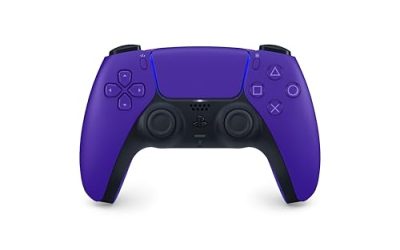
PlayStation DualSense Wireless Controller
A second DualSense is the single easiest upgrade for siblings, because turn taking stops depending on who held the pad last. Children already know the layout from the controller in the box, so there is nothing new to teach before a family game starts. The built-in microphone can cover brief in-game communication for older children, though parents may prefer a headset they can monitor. Keep this spare in the dock described below, and it becomes the controller children reach for without thinking.
Specs
- Platform: PlayStation 5
- Connectivity: Wireless and USB-C
- Features: Haptic feedback, adaptive triggers, built-in microphone
- Compatibility listed for PS5, PC, Mac and mobile
Best for: Siblings and cousins who play together at weekends
Watch out for: Check the colour on the listing together with your child, since colour choice matters a lot to younger players
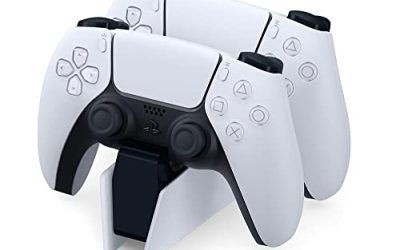
PlayStation DualSense Charging Station
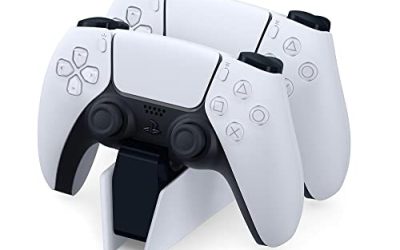
- Best for: Families tired of flat controllers at the start of play
- Model: DualSense Charging Station, model number 3005837
- Capacity: Charges up to two DualSense wireless controllers
- Design: Click-in design listed on the product page
- Benefit listed: Frees up console USB ports
Families tired of flat controllers at the start of play
Place it out of reach of toddlers, since the dock still connects to household power
This dock gives two controllers one obvious place to live, which is half the battle in a family room. Children can click a controller back into place at the end of a session without lining up a small cable, and parents can see at a glance whether both pads are charging. Freeing the console ports also keeps other cables out of small hands. Put the dock where controllers are used, not in a cupboard, or the tidy habit will quietly disappear within days.
Watch out for: Place it out of reach of toddlers, since the dock still connects to household power
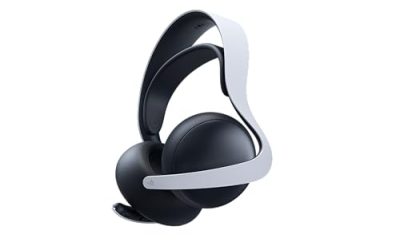
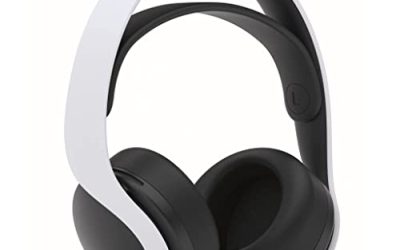
PlayStation PULSE 3D Wireless Headset
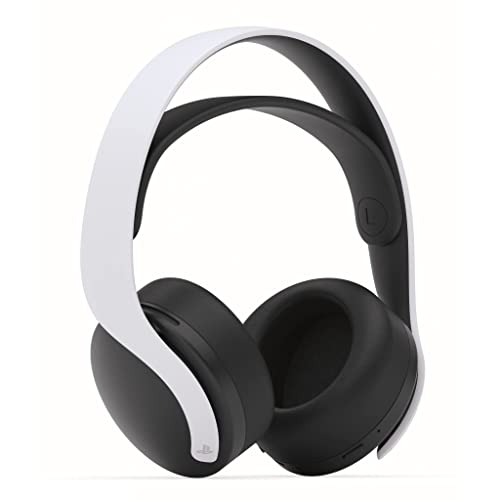
- Best for: Older children who play while the room stays shared
- Platform: PlayStation 5
- Features: Fine-tuned for 3D Audio on PS5 consoles
- Microphones: Dual noise-cancelling microphones
- Battery: Built-in rechargeable battery, with easy-access controls
Older children who play while the room stays shared
Confirm the fit guidance on the page, because an adult-sized headset can slip on smaller heads
A headset lets one child keep game sound while a sibling does homework at the same table, and this model was designed around PS5 3D Audio with controls on the headset itself. The dual microphones are there for older children chatting with known friends, which parents can supervise by keeping play in shared rooms. Its rechargeable battery means no hunting for disposable cells. Fit matters most, so check the sizing information on the listing against your child before assuming an adult headset will stay comfortable.
Watch out for: Confirm the fit guidance on the page, because an adult-sized headset can slip on smaller heads
PlayStation Media Remote
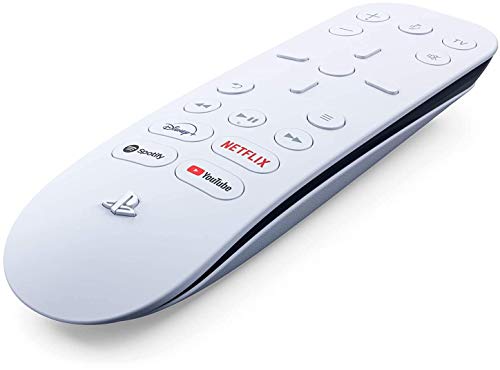
- Best for: Family film and streaming nights on the PS5
- Platform: PlayStation 5
- Controls: Play, pause, fast forward and fast reverse buttons
- Features: Built-in IR transmitter for compatible TV volume and power
- Function: Powers on the PS5 console and navigates menus
Family film and streaming nights on the PS5
Check the listing notes about television compatibility and any system software step before the first film night
Movie evenings run more smoothly when an adult holds a remote instead of passing a game controller around the sofa. This remote lists play, pause, fast forward and fast reverse buttons, plus an infrared transmitter for compatible television volume and power. That layout is far easier for grandparents and babysitters than a touchpad. Children can learn the main buttons quickly for cartoons, while the adult keeps control of what plays next and when the evening winds down.
Watch out for: Check the listing notes about television compatibility and any system software step before the first film night
PlayStation Portal Remote Player
- Best for: Older children playing while adults use the main screen
- Platform: PlayStation 5
- Connectivity: Wi-Fi
- Resolution listed: 1080p
- Features: Haptic feedback and adaptive triggers in supported games
Older children playing while adults use the main screen
Test Wi-Fi strength in the intended room first, and keep household screen-time rules the same as for the television
When adults want the television for news or a film, an older child can continue a compatible PS5 game elsewhere in the home on the Portal, over Wi-Fi. It keeps the familiar controller shape around its screen, including haptic feedback and adaptive triggers in supported games, so there is no new layout to learn. Parents should treat it like any other screen: agree the room, the duration and the finish time in advance. A strong signal in that room decides how smooth the experience feels.
Watch out for: Test Wi-Fi strength in the intended room first, and keep household screen-time rules the same as for the television
Which One Fits Your Situation
Siblings argue over turns every session
Add the second DualSense before anything else, and pair it with a simple turn timer on a phone or kitchen clock. Once two pads exist, most arguments shift from equipment to rules, which parents can settle fairly. The charging station becomes the next purchase, because two controllers double the chances that one is flat exactly when a cousin arrives to play after school.
One child plays while others need a quiet room
Choose the PULSE 3D headset and keep gaming in the shared space rather than sending a child off alone. The headset contains the sound, the on-ear controls let the player manage volume, and an adult nearby can still hear conversation and supervise chat. Agree which friends are approved for voice chat, and revisit that list together as your child gets older and friendships change.
Family films keep starting with controller confusion
Hand the Media Remote to whoever runs film night and retire the controller to its dock for the evening. Clear playback buttons mean a grandparent or babysitter can pause for drinks without a tutorial. Keep the remote in one named spot, such as the arm of the sofa or a small basket, because a remote that wanders causes exactly the frustration it was bought to remove.
Adults want the television back in the evening
For an older child, the Portal moves play to another room while the television returns to adult use, without buying a second console. Set the same finish time you would set for the main screen, and keep the device charging in a shared place overnight. Younger children are usually better served by ending the session and choosing a game together again tomorrow instead.
Common Mistakes
- Letting controllers live on the floor instead of giving them one charging home
- Buying an adult-sized headset without checking fit information for a smaller child
- Handing over voice chat without agreeing which friends are approved for it
- Treating remote play in another room as time that sits outside household screen rules
- Keeping small adaptors and cables loose where younger siblings can reach them
Frequently Asked Questions
What is the first PS5 accessory most families should buy?
For most households it is a second DualSense, because shared play and turn taking improve immediately, with no new controls for a child to learn. If arguments are rare but flat batteries are constant, start with the charging station instead. Think about which problem happened most recently in your home, and let that memory, rather than a general ranking, decide the order of your first two purchases.
Are wireless headsets suitable for children on PS5?
They can suit older children when fit, volume habits and chat rules are agreed first. Choose a headset with controls on the ear cup, keep sessions in shared rooms, and approve the friends list for voice chat together. Younger children usually manage better with television sound at a modest level and an adult nearby, so a headset can wait until they are older and more independent.
How can parents stop controllers always being flat?
Give charging a place and a routine rather than relying on reminders. A dock that holds both controllers makes the end of a session obvious: play finishes, pads click home, and the next session starts ready. Putting the dock beside the television, where play actually happens, matters more than any battery feature, because a tidy system only works when it is effortless for children to follow.
Does the Portal replace a second console for kids?
No, and it helps to be clear about that from the start. The Portal plays compatible games installed on your existing PS5 over home Wi-Fi, so the console must be available and the network steady. It solves a television sharing problem for older children, not a need for a fully separate system. Families wanting independent play in two rooms at once still need a different arrangement entirely.
Related guides
More from Amazon
Programs that pair well with the guide above. Offers and eligibility are set by Amazon and may change.
Free shipping on eligible items, Prime Video and more. Eligible new members can start with a free trial.
Start a Prime free trialAudiobooks and podcasts to listen to on the go. Eligible new members can start with a free trial.
Try Audible freeAd-free music streaming. Eligible new subscribers can start with a free trial.
Try Music Unlimited freeA free business account with business pricing and bulk-buying tools for work, shop or home office.
Create a business accountAs an Amazon Associate we earn from qualifying purchases.
Write Your Review
No reviews yet. Be the first to share your experience!